Growing your website with Pinterest isn’t about luck or going viral overnight, it’s about having a clear, repeatable strategy.
Whether you’re a blogger, creator, or ecommerce owner, learning how to increase Pinterest traffic can turn your pins into a steady stream of visitors, leads, and sales.
In this guide, you’ll learn exactly how Pinterest works, why its audience is so valuable, and the practical steps you can take to turn casual scrollers into consistent website traffic.
Why Pinterest Is Your Traffic Goldmine

It’s time to rethink Pinterest. Many marketers lump it in with other social platforms, seeing it as just a digital scrapbook for pretty pictures.
This view completely misses the mark. Pinterest isn’t just another social channel; it’s a powerful visual discovery engine.
For many businesses, it’s quietly becoming a bigger source of referral traffic than even Facebook.
To really understand how to increase Pinterest traffic, you first have to appreciate this fundamental difference in user intent.
Unlike typical social media where people scroll to see what their friends are doing, users come to Pinterest with a purpose: to plan, discover, and purchase.
They are actively searching for solutions and inspiration for their future goals, be it a home renovation, a new recipe, or the perfect outfit.
This forward-looking mindset makes the audience incredibly valuable.
The Psychology of the Pinner
Let’s break down the user journey. On most platforms, your content interrupts a user’s feed. On Pinterest, your content is the destination.
Pinners are in “discovery mode,” which makes them far more open to new brands and ideas.
This creates a rare opportunity where your content isn’t seen as an ad but as a welcome solution to their search.
This high-intent behavior is backed by some serious numbers. A staggering 96% of top searches on Pinterest are unbranded.
This means users are looking for generic terms like “minimalist home office” or “healthy weeknight meals,” not “IKEA desk” or “HelloFresh recipes.”
For your business, this is a massive advantage. It levels the playing field, letting you get discovered based on the quality of your ideas, not the size of your brand. It’s a space where relevance truly wins over reputation.
Before we dive deeper, let’s look at how Pinterest stacks up against other major platforms when it comes to driving traffic.
This table clearly shows why it’s a powerhouse for businesses.
| Platform | Referral Traffic | Purchase Intent | Session Duration | Mobile Usage |
|---|---|---|---|---|
| High – A top driver of referral traffic for many blogs and e-commerce sites. | Very High – Users actively plan future purchases, creating “shopping lists” on their boards. | Long – Average session duration is high as users browse and collect ideas. | 85% of Pinners use the mobile app. | |
| Moderate – Can be significant but depends heavily on ad spend and algorithm changes. | Low to Moderate – Users are primarily there to connect with friends, not to shop. | Short – Sessions are often quick check-ins. | 98.5% access via mobile devices. | |
| Low – Limited to “link in bio” or product tags, making direct traffic challenging. | Moderate – Influencer marketing drives purchases, but discovery is less direct. | Moderate – Users scroll through feeds and stories. | Primarily mobile-first platform. | |
| Low – Very short content lifespan means links get buried quickly. | Low – Primarily used for news, updates, and real-time conversation. | Very Short – Users consume content in quick bursts. | 80% of users are on mobile. |
As you can see, Pinterest excels in areas where other platforms fall short, particularly in driving high-quality, ready-to-buy traffic directly to your website.
Why Your Pins Keep on Giving

Perhaps the most compelling reason Pinterest is a traffic goldmine is the incredible longevity of your content.
A post on other social feeds has a lifespan measured in hours, but a Pin’s value actually grows over time.
A well-optimized Pin can continue driving traffic for months, or even years, as it gets re-pinned and discovered by new users.
The platform’s algorithm is built to continuously surface relevant, evergreen content.
The commercial intent here is undeniable. Recent data shows a 50% year-over-year increase in the number of shoppable Pins saved to boards.
With over half of users seeing the site as a place to shop, the journey from discovery to purchase is incredibly short. As of March 2024, Pinterest drove approximately 1.3 billion website visits in a single month, showcasing just how active and engaged its user base is.
You can learn more about the growing power of Pinterest for marketers and dive deeper into these findings.
This blend of high user intent, long content lifespan, and massive, engaged traffic is precisely why mastering Pinterest is no longer a “nice to have”—it’s essential for growth.
Setting Up Your Pinterest Profile for Success
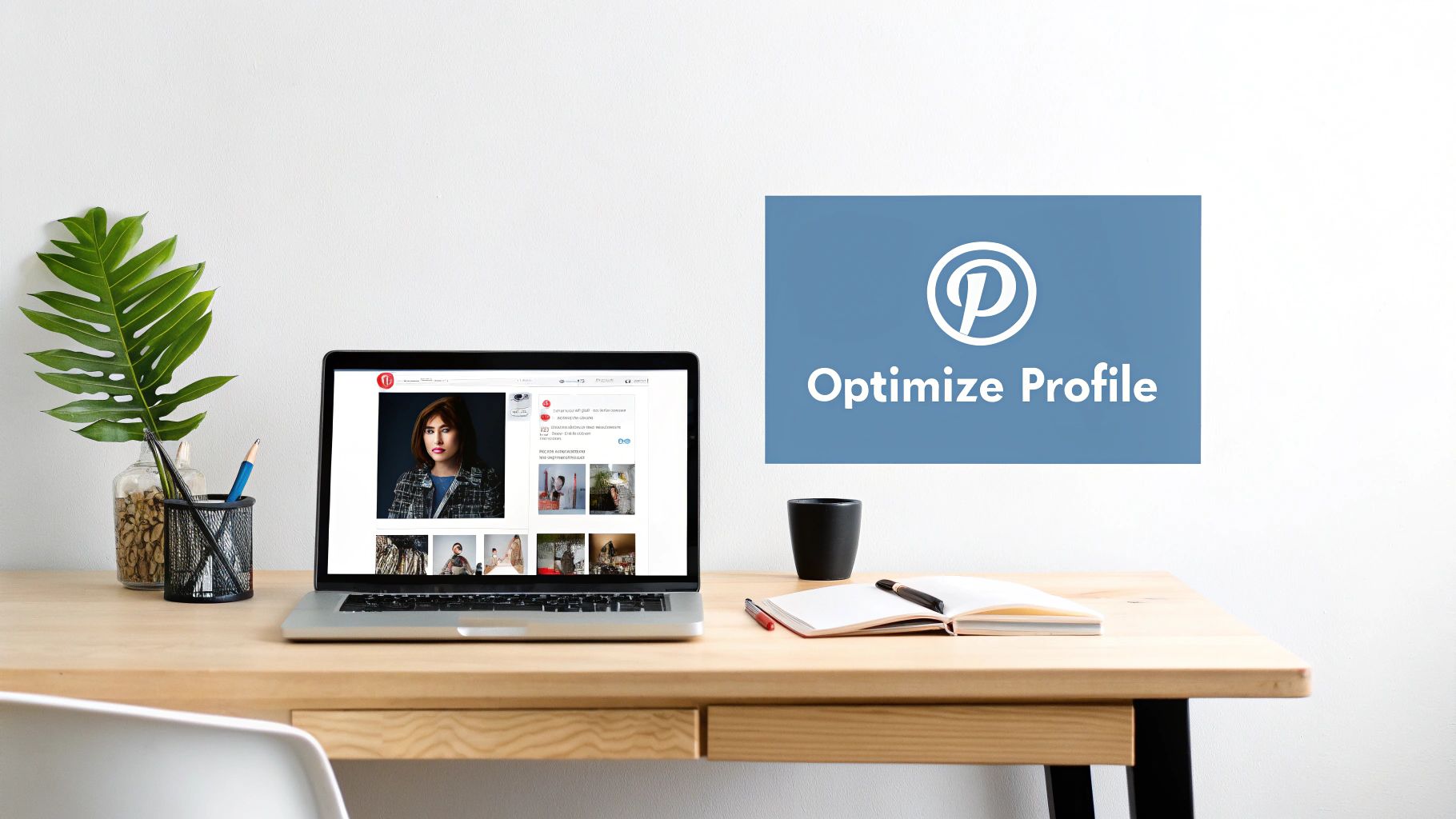
Think of your Pinterest profile as your digital storefront. Before you can even think about driving traffic, you need a “store” that people actually want to enter.
An incomplete or sloppy profile is like a shop with a dusty window and a broken sign—people will just scroll on by.
Nailing this foundational piece is your first real step toward turning casual browsers into loyal website visitors.
It all starts with creating a Pinterest Business account. As you can see in the screenshot from Pinterest’s own guide, this is the official starting point for any brand.
This is a non-negotiable step because it gives you access to the crucial analytics and advertising features you’ll need to grow.
Crafting a Magnetic Profile
Your profile has a few key parts that work together to pull in followers and encourage clicks. Let’s break down what you need to focus on.
- Profile Photo: Don’t overthink this. If you’re a personal brand, a clear and friendly headshot builds trust instantly. For a company, your logo is the perfect choice. The main goal here is recognition and professionalism.
- Your “About Me” Bio: This is more than just a simple description; it’s prime real estate for your Pinterest SEO. You have a small space to clearly explain what you do, who you help, and what kind of content people can expect. Most importantly, you need to weave in your main keywords. For example, if you’re a food blogger who focuses on vegan meals, your bio should include terms like “vegan recipes,” “plant-based meals,” and “healthy food ideas.” This helps the Pinterest algorithm understand your niche and show your profile to the right people.
The Technical Setup Everyone Skips
Once the visual parts are set, it’s time for the technical details that truly set you up for success.
I’ve seen so many people skip these steps, and it really holds back their traffic potential from day one.
First, claim your website. This is a simple verification process that connects your site to your Pinterest account. It’s important because it gives you credit for all Pins that come from your domain and unlocks more detailed analytics.
Next, you absolutely must enable Rich Pins. Think of these as super-powered Pins that automatically pull information from your website directly onto the Pin.
There are different kinds, but “Article Rich Pins” are game-changers for most businesses. They pull your blog post’s headline, meta description, and even the author.
This adds valuable context that encourages more clicks and keeps your branding consistent, even when others share your content.
Getting these technical pieces right from the start provides a solid foundation for all your future pinning efforts.
Creating Pins That Actually Get Clicked
Let’s be real—most pins on Pinterest are scrolled past without a second thought. S
o, what separates a pin that drives thousands of visitors from one that just floats around gathering digital dust? It comes down to a few critical elements.
If you want to actually increase Pinterest traffic and not just add to the platform’s noise, you have to master them.
Think of your pin as a book cover; if it doesn’t grab attention and promise something valuable, nobody will bother to open it.
The pins that consistently perform well have a few things in common.
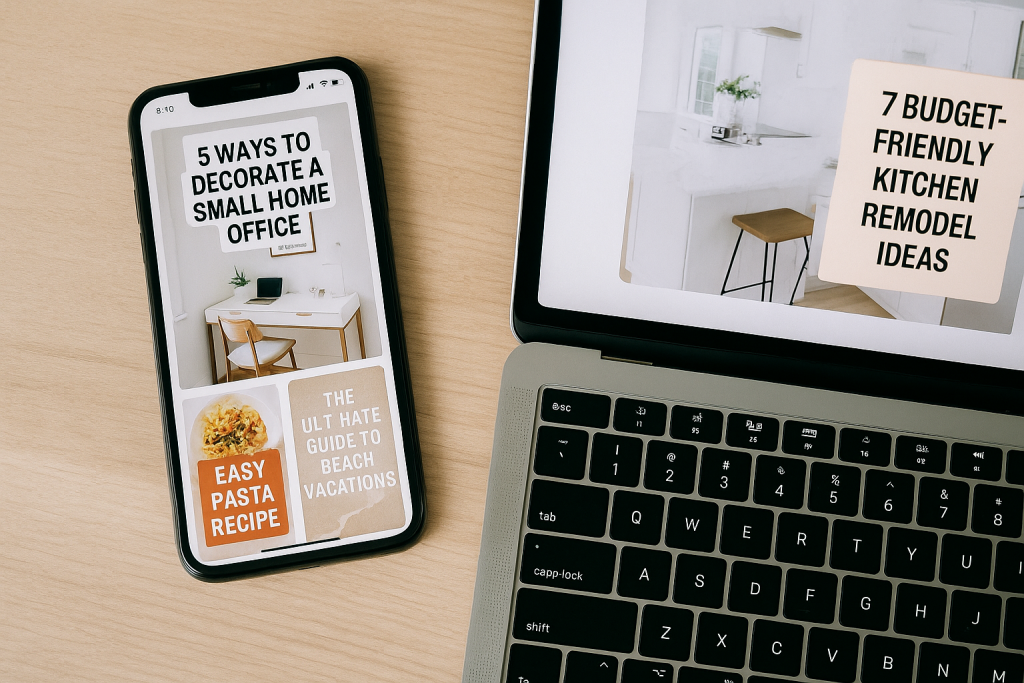
They’re almost always vertical (a 2:3 aspect ratio like 1000×1500 pixels is the sweet spot), they use high-quality images, and they feature a bold, easy-to-read text overlay.
This text isn’t just a label; it’s a hook designed to make someone stop scrolling.
Simple formulas like “5 Ways to…” or “The Ultimate Guide to…” are popular for a reason—they make a clear promise to the user.
Designing for the Click, Not Just the Save
A pretty pin might get a save, but a strategic pin gets the click. This is a crucial distinction.
Your design choices need to actively guide a person’s eye toward your call to action, compelling them to learn more.
Here’s how to do it:
- Color and Contrast: Use bright, warm colors to make your pins pop in a crowded feed. Data shows that pins with multiple dominant colors have a 3.25 times higher re-pin rate than pins with just one. Also, high contrast between your text and the background image is essential for readability on small screens.
- Clear Branding: I always make sure to subtly place my logo or website URL on every pin I create. It’s a simple step that builds brand recognition and ensures you get credit as your content gets shared.
- Actionable Headlines: Don’t just label your pin “Kitchen Remodel.” Instead, try something like “7 Budget-Friendly Kitchen Remodel Ideas You Can Start Today.” The second headline directly addresses a user’s problem and offers an immediate, tangible solution.
The Power of Video and Dynamic Content
Static images are the backbone of Pinterest, but if you want to see some serious engagement, you need to get into video.
With nearly 1 billion video views happening on the platform every single day, ignoring this format means leaving a huge opportunity on the table.
Videos that show a process, offer a quick tip, or feature a product in action perform incredibly well.
The stats back this up: users are 55% more likely to make a purchase after seeing a brand’s video. This shows how powerful video is for driving not just traffic, but actual sales.
If you’re looking for some creative ideas for dynamic content, our guide on how to make Story Pins on Pinterest is a great place to start.
This focus on an audience ready to buy is what makes Pinterest so unique. In fact, a staggering 85% of weekly Pinners have bought something based on pins from brands.
The platform drives 33% more referral traffic to e-commerce sites than Facebook does, making it a must-use channel for any online store. For brands, this high-intent audience is a goldmine.
You can discover more insights about Pinterest’s e-commerce power and learn how to tap into it effectively.
Mastering Pinterest Search and Keywords
Let’s get one thing straight right away: Pinterest isn’t a social network like Instagram; it’s a visual search engine, much closer to Google.
Understanding this is the single most important mindset shift you can make. To truly figure out how to increase Pinterest traffic, you have to treat it with a search-first strategy, and that foundation is built with keywords.
This means you need to think like your ideal customer. What are they actually typing into that search bar?
They aren’t just scrolling aimlessly; they are actively searching for inspiration, solutions, and products.
Your mission is to make sure your pins are the ones that pop up when they look.
Finding Your Golden Keywords
The easiest place to start your keyword hunt is right on Pinterest itself.
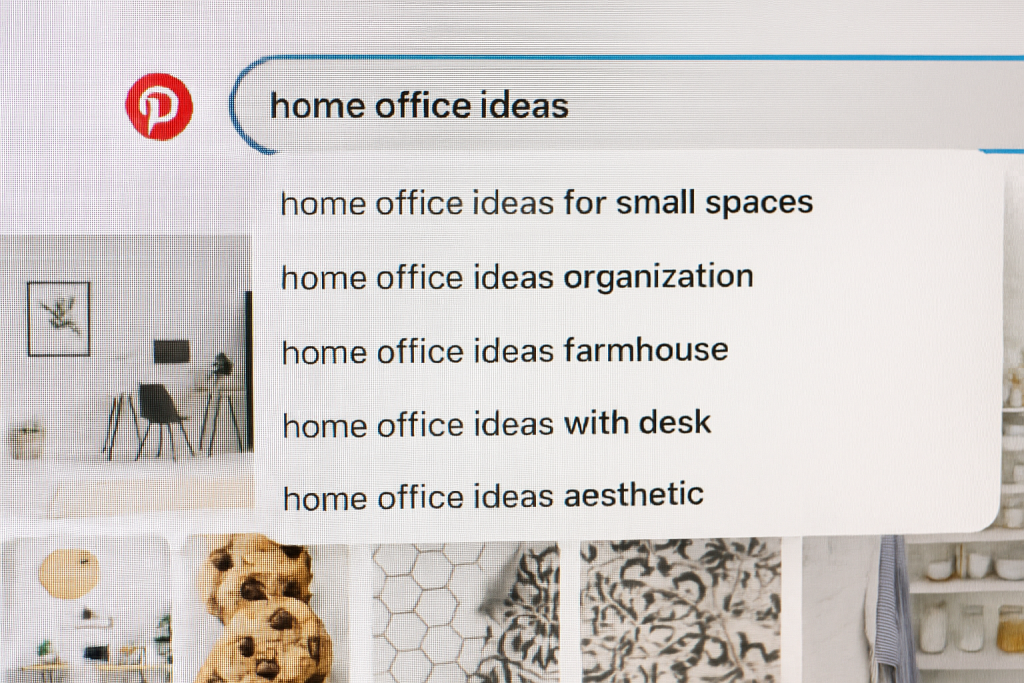
Begin by typing a broad term related to your niche into the search bar—for example, “home office ideas.” Pinterest will instantly serve up a list of related, more specific keywords that real people are searching for.
You’ll see things like “home office ideas for small spaces” or “home office ideas organization.” These suggestions are a goldmine because they come directly from user behavior.
Your goal is to uncover keywords that get a decent amount of traffic but aren’t completely oversaturated with competition.
Once you’ve got a solid list, you need to strategically place them everywhere you can:
- Your pin titles
- Your pin descriptions
- Your board titles and descriptions
- The text overlay on your actual pin images
This multi-pronged approach sends clear signals to the Pinterest algorithm about your content’s topic, ensuring it gets shown to the right people.
For a deeper dive, our complete guide on Pinterest keyword research can show you more advanced methods.
To give you a better starting point, I’ve put together a table of tools and techniques that can help you find those valuable keywords.
Pinterest Keyword Research Tools and Techniques
A comprehensive breakdown of free and paid tools for finding high-traffic Pinterest keywords, with effectiveness ratings and use cases.
| Tool | Cost | Key Features | Best For | Effectiveness Rating |
|---|---|---|---|---|
| Pinterest Search Bar | Free | Auto-suggests long-tail keywords based on real-time user searches. Displays related search bubbles. | Quick, foundational keyword discovery and understanding user intent. | ★★★★☆ |
| Pinterest Trends | Free | Shows the popularity of search terms over time, similar to Google Trends. Can compare multiple terms. | Identifying seasonal trends and high-growth topics before they peak. | ★★★★☆ |
| Tailwind | Paid (Freemium available) | Pin scheduling, analytics, and a keyword suggestion tool within its suite. | Bloggers and businesses looking for an all-in-one Pinterest management and optimization tool. | ★★★★★ |
| Ahrefs / SEMrush | Paid | While primarily for Google SEO, their keyword explorers can uncover related topics and questions that also perform well on Pinterest. | SEO professionals and marketers wanting to align their Pinterest and Google strategies. | ★★★☆☆ |
| AnswerThePublic | Freemium | Visualizes search questions around a keyword (who, what, why, etc.), great for content ideas. | Finding question-based keywords to create solution-oriented pins and blog posts. | ★★★★☆ |
As you can see, you don’t need expensive tools to start. The built-in Pinterest features offer a ton of value.
However, investing in a tool like Tailwind can seriously streamline your process once you’re ready to scale up.
The image below really drives home the final objective: creating pins that are not only beautiful but are also perfectly optimized for search.
This visual shows how design and SEO must be partners in creating pins that capture attention and perform well.
The key takeaway is that an amazing-looking pin is invisible without the right keywords, and the best keywords in the world can’t save a poorly designed pin. It’s the powerful combination of both that ultimately drives clicks and grows your traffic.
Smart Pinning Strategies That Build Momentum
Consistency always wins on Pinterest, but it’s about being strategically consistent, not just pinning at random.
A smart pinning rhythm keeps your content visible without overwhelming your followers or, even worse, getting flagged as spam by the algorithm.
Let’s bust an old myth right now: you don’t need to pin dozens of times a day.
The real secret to learning how to increase Pinterest traffic is finding a sustainable cadence that you can stick with.
A great starting point is to aim for 3 to 5 high-quality, fresh pins daily.
This is a totally manageable number that tells Pinterest you’re an active and valuable creator.
Pinning at the Right Time
Giving your pins an initial boost can be as simple as posting them at the right time.
Think about when your audience is most likely to be in “planning mode”—this is often in the evenings and on weekends.
For instance, a recipe pin might do exceptionally well around 4 PM when people are figuring out dinner, while a weekend DIY project could get more traction on a Saturday morning.
The best way to figure this out is to experiment and keep a close eye on your Pinterest Analytics.
Look for trends in when your audience is most active and engages with your content.
Then, you can use a scheduling tool to target those peak times.
Tools like our own Post Paddle can simplify this process by automatically posting at optimal intervals, removing all the guesswork.
The Content Mix: Fresh Pins vs. Re-Pins
Your main focus should always be on creating fresh pins—brand-new image or video designs that point to your content.
This is exactly what the Pinterest algorithm loves to see and will prioritize.
However, that doesn’t mean you should ignore your proven winners. A powerful strategy involves a healthy mix:
- 80% Fresh Pins: These are new designs for both your new and older blog posts.
- 20% Re-pins: Manually re-pin your most successful content to other relevant boards after a few months. This gives them a second life and new visibility.
This 80/20 balance keeps your profile looking dynamic while you continue to get mileage out of your best-performing assets.
It’s a fundamental part of any solid Pinterest marketing strategy, making sure you connect with a continuously growing audience.
Speaking of audience, the platform is bigger than ever. With projections showing around 570 million monthly active users worldwide in early 2025—a 3% increase from the previous year—there are more people to reach.
This growth is especially strong among Gen Z, which now makes up 42% of all users. This means fresh opportunities for discovery.
You can read more about these Pinterest user trends on Statista.com and see just how this growth can benefit your strategy.
Using Analytics and Ads to Amplify Your Results
Having a solid organic strategy is the foundation of your Pinterest success, but if you want to really hit the accelerator on your growth, you need to bring in data and paid promotion.
This is the moment you shift from simply pinning content to analyzing its performance.
It’s how you move from guessing what works to knowing what works, letting the numbers guide your strategy to increase Pinterest traffic.
Decoding Your Pinterest Analytics
Every Pinterest Business account comes with a pretty robust analytics dashboard. It’s easy to open it up and get distracted by big numbers like impressions.
While it’s cool to see how many people saw your pin, impressions don’t tell you if your content actually did its job.
Instead, you need to zero in on the metrics that matter: outbound clicks (how many people clicked through to your site) and saves (a sign that your content really hit home with your audience).
A great exercise is to look at your top 5-10 pins for outbound clicks over the last 90 days.
But don’t just glance at them—put on your detective hat and break them down.
- What keywords did you use in their titles and descriptions?
- Are there any common design elements, like specific color palettes, fonts, or image styles?
- What kind of headline or call to action did you write?
When you reverse-engineer what’s already winning, you create a data-backed blueprint for future content.
This takes the guesswork out of the equation and lets you build on proven successes.
Knowing When to Use Promoted Pins
Organic reach is wonderful, but there are times when a strategic, paid boost is exactly what you need.
This is where Promoted Pins, Pinterest’s ad format, come into play.
A common mistake is trying to use ads to save a pin that’s flopping.
The secret is to do the opposite: amplify a pin that is already a star performer organically.
If a pin is already racking up clicks and saves, putting a little money behind it is like pouring gasoline on an already roaring fire.
Imagine a small boutique owner sees a pin for a new floral dress getting double the organic clicks of any other product.
By promoting it with a small budget and targeting users interested in “summer fashion” and “wedding guest outfits,” they can drive a ton of qualified traffic and likely see a direct lift in sales.
A fantastic starting point for ads is retargeting. You can set up an audience of people who have already visited your website.
This is incredibly powerful because you’re showing your pins to a warm audience that already knows your brand.
For a more advanced approach, you can create a lookalike audience based on your most engaged followers.
This tells Pinterest to find new people with similar interests and behaviors, giving you a fresh, highly relevant audience to reach.
Your Pinterest Traffic Action Plan
Theory is great, but now it’s time to roll up our sleeves and get to work. Let’s turn everything we’ve talked about into a practical, repeatable plan that will build real momentum for your brand.
Forget those overwhelming to-do lists; this is about focusing your effort where it truly matters so you can start seeing results.
The goal isn’t just to pin more, but to pin smarter and create a sustainable system for growth.
Think of this as the roadmap that will help you methodically increase your Pinterest traffic.
Your First 30 Days: Building the Foundation
Your first month is all about setting a strong foundation and getting into a good rhythm. Don’t stress about seeing massive traffic numbers right away.
Instead, your main job is to be consistent and start learning what your audience loves.
- Week 1: This is setup week. Make sure your profile is completely filled out, your website is claimed, and you’ve enabled Rich Pins. Then, create your first 10-15 boards, making sure they are highly relevant and optimized with the keywords you’ve researched.
- Weeks 2-4: Now the real work begins. Your most important task is to create 3-5 new, high-quality pins every single day. Focus on creating multiple pins for your top 10 most popular blog posts or products. This is the time to experiment with different pin designs, catchy headlines, and clear calls-to-action.
A common mistake I see people make is getting bogged down in the ratio of their content versus other people’s. In the beginning, your focus should be 100% on pinning your own content.
You simply can’t drive traffic to your website by sharing links that point somewhere else.
The 60-Day Check-In: Analyze and Adapt
After a solid month of consistent pinning, you’ll finally have enough data to make some smart decisions. It’s time to dive into your Pinterest Analytics.
Look for your top-performing pins based on outbound clicks. What do they all have in common? Is it the design, the headline, the colors?
Identify these winning patterns and start creating more pins that follow that successful model.
This is also the perfect time to start thinking about seasonal content.
Use Pinterest Trends to see what topics in your niche are projected to be popular 60 days from now and begin creating content for them.
Pinners are planners, and getting ahead of trends is a game-changer.
Day 90 and Beyond: Scale and Sustain
By the 90-day mark, you should have a solid workflow and a good feel for what works.
Your next challenge is to scale your efforts without burning out. This is where automation becomes your secret weapon.
Instead of spending time manually pinning every day, you need a system to do the heavy lifting for you.
Turn Every Pin Into a Traffic Magnet
If you’re ready to turn all this Pinterest strategy into real results, the best place to start is with the pins you publish every day.
A simple, proven checklist helps you make sure every pin is designed to get clicks, saves, and traffic before it ever goes live.
Post Paddle’s free Pinterest Pin Checklist walks you through exactly what to include on each pin—from image size and text overlay to keywords and calls to action.
You’ll save time, stay consistent, and feel confident that every pin you create can actually bring people back to your website.
Stop guessing what works and start pinning with a clear plan.
FAQ Section
1. How long does it take to see traffic from Pinterest?
Most accounts start to see consistent traffic within 1–3 months of pinning regularly. Pinterest works more like a search engine than a social feed, so your pins often need time to be indexed, saved, and discovered.
The more high-quality, keyword-optimized pins you create, the faster your results usually grow over time.
2. How many pins should I post per day to increase my Pinterest traffic?
A good starting point is 3–5 fresh pins per day. Focus on quality over quantity: each pin should have a clear headline, strong design, and a keyword-rich description.
As you build a library of content and get more efficient with your workflow, you can test slightly higher volumes if it still feels sustainable.
3. Do I need a blog to drive traffic from Pinterest, or can I send people straight to product pages?
You don’t have to have a blog, but it definitely helps. Pinterest works extremely well for sending traffic to both blog posts and product pages.
Blog content lets you educate, build trust, and warm up your audience before they buy, while product pins can capture people who are ready to purchase now.
The strongest strategies usually mix educational content and direct product links.
4. What makes a pin most likely to get clicks instead of just saves?
Pins that get clicked usually have three things in common:
- A clear, benefit-driven headline that promises a specific result (for example, “7 Pinterest Pin Ideas to Double Your Traffic”).
- Clean, vertical design that’s easy to read on mobile, with strong contrast between text and background.
- A compelling call to action in the description that tells people what they’ll get when they click through.
If you design every pin with the question “Why would someone click this right now?” in mind, you’ll naturally create more traffic-focused pins.
5. Should I focus more on fresh pins or repinning existing ones?
Fresh pins should be your main focus, especially when you’re trying to grow. Aim for around 80% fresh pins (new designs linking to your content) and 20% strategic re-pins of your best performers.
Fresh designs give Pinterest more chances to understand, test, and surface your content, while occasional re-pins help you squeeze extra value out of what’s already working.