
At its core, a Pinterest scheduler is a tool that automatically publishes your Pins for you at specific, pre-set times.
Think of it as a smart assistant for your Pinterest marketing. It works 24/7 to get your content in front of your audience right when they’re most likely to see it—even if you’re sound asleep or on vacation.
What a Pinterest Scheduler Actually Does for You
Let’s drop the textbook definition for a moment and try an analogy. Imagine you’re a baker trying to sell fresh bread.
Pinning manually is like baking one loaf, then immediately running out to find a customer. You’re stuck in the kitchen all day, your timing is all over the place, and you can only serve one person at a time.
It’s tiring and a terribly inefficient way to run a business.
A Pinterest scheduler changes all of that. It’s like having a full-scale bakery operation.
You can spend one focused session baking all your bread for the week (this is called batching), then hand it off to an automated delivery service.
This service knows exactly when your customers are feeling hungry and delivers a fresh loaf at the perfect moment, day or night. Suddenly, you’re free to perfect new recipes instead of just making deliveries.
From Tedious Task to Strategic Advantage
The biggest headache a scheduler solves is the sheer amount of time it takes to manage Pinterest well.
Without one, you’re basically chained to your phone or computer, manually uploading every Pin, guessing the best times to post, and desperately trying to keep your boards from looking like a ghost town.
This is where the game changes. A scheduler shifts your role from a manual poster to a content strategist.
Instead of asking, “What should I Pin right now?”, you start thinking, “What’s my content strategy for the entire month?” That shift is the key to real, sustainable growth.
A Pinterest scheduler turns your marketing from a reactive chore into a proactive, automated system. It’s not just about saving a few hours; it’s about gaining a huge advantage by posting with flawless consistency.
How Automation Builds Momentum
The Pinterest algorithm absolutely loves consistency. When you share great content on a regular basis, the platform starts to see your account as a valuable and reliable resource.
A good scheduler makes this happen on autopilot, helping you build momentum that’s almost impossible to achieve by hand.
Here’s what that automation actually looks like in practice:
- Time-Saving Batching: Spend a couple of hours on a Monday morning and you can have your Pins scheduled for the entire week, or even the whole month.
- Optimal Timing: The best tools can analyze when your specific audience is online and active, then publish your Pins right in those high-engagement windows.
- Consistent Presence: Your account stays active with fresh content every single day, even when you’re busy with other parts of your business.
- Strategic Distribution: You can schedule one Pin to several relevant boards over time, spreading it out to maximize its reach without spamming your followers.
At the end of the day, a Pinterest scheduler isn’t just a nice-to-have tool. It’s a strategic necessity for anyone who’s serious about driving traffic, building an audience, and growing their brand on the platform.
It gives you the power to execute a deliberate content plan, freeing up your time to do what really matters: creating fantastic Pins that inspire, inform, and convert.
From Manual Guesswork to Smart Automation

Remember what managing Pinterest used to be like? It was a grind. You’d spend hours manually uploading every single Pin, one by one.
You’d take a wild guess at the best time to post, hoping to catch your audience online, and then scramble to keep dozens of different boards looking fresh. It was a daily chore filled with guesswork and repetition.
That’s a far cry from the intelligent automation we have now. The modern Pinterest scheduler has grown up, moving way beyond a simple calendar.
It’s now a powerful marketing engine that completely changes how you work on the platform.
The Evolution from Calendar to Command Center
The first scheduling tools weren’t much more than digital calendars. Sure, you could upload a Pin and set a time, but the strategy and all the heavy lifting were still on you.
Today’s advanced platforms are so much smarter.
They don’t just schedule Pins; they’ve become genuine automation partners. This leap in capability is what separates a basic tool from a platform that actually drives growth.
A modern scheduler automates your entire workflow, from finding content to getting it in front of the right people.
For instance, a sophisticated Pinterest scheduler can:
- Discover New Content: Automatically scan your blog or e-commerce store for new posts or products to turn into Pins.
- Generate Pin Designs: Create multiple, unique Pin designs from a single link, saving you hours tinkering in design software.
- Distribute Intelligently: Share your Pins across all your relevant boards at the best possible times, based on your account’s real performance data.
This kind of automation transforms what used to be a daily grind into a focused, strategic task that might only take you a couple of hours a week.
“The difference between manual pinning and using a smart scheduler is like the difference between hand-delivering flyers and running a targeted digital ad campaign.
One is based on effort and luck; the other is based on data and strategy.”
The Crucial Leap in Pinterest Automation
This shift from manual to automated has been a game-changer. At first, scheduling meant manually setting times for maybe hundreds of Pins a week—an exhausting routine that did very little to optimize your reach.
Now, advanced schedulers use automated content discovery to pull new items directly from your site. They can generate multiple Pin designs and distribute them at optimal times across all the right boards.
These systems even track performance, figure out what resonates with your audience, and can help you clean up underperforming content to keep your account healthy.
This full-circle automation cuts the manual workload down to under two hours a week, a massive improvement from the old way.
But here’s the catch: many tools on the market are still stuck in the past, operating more like simple calendars than true automation systems.
Using a modern scheduler that combines smart timing, content generation, and performance analytics can completely change your results on a platform with over 500 million monthly users actively looking for solutions.
This frees you up to focus on what actually grows your business: creating high-value content, analyzing your strategy, and connecting with your community.
Instead of getting bogged down by the how, you can concentrate on the what and the why of your Pinterest marketing.
5 Essential Features of a Powerful Pinterest Scheduler
Choosing a Pinterest scheduler can feel overwhelming. With so many tools on the market all promising the world, it’s hard to know which one is right for you.
To cut through the noise, you need to know which features actually move the needle.
This isn’t just about a checklist; it’s about understanding the core functions that turn a simple calendar into a true growth engine for your brand.
Think of it like buying a new car. Sure, you could get something with just an engine and wheels to get from A to B.
But the real magic comes from the extra features—the GPS for clear direction, the cruise control for long-haul efficiency, and the advanced safety systems for peace of mind.
A great Pinterest scheduler works the same way. The right features are what get you to your ultimate destination: more traffic, deeper engagement, and real sales.
This diagram breaks down how the most critical scheduler features work in tandem to build an efficient, powerful workflow.
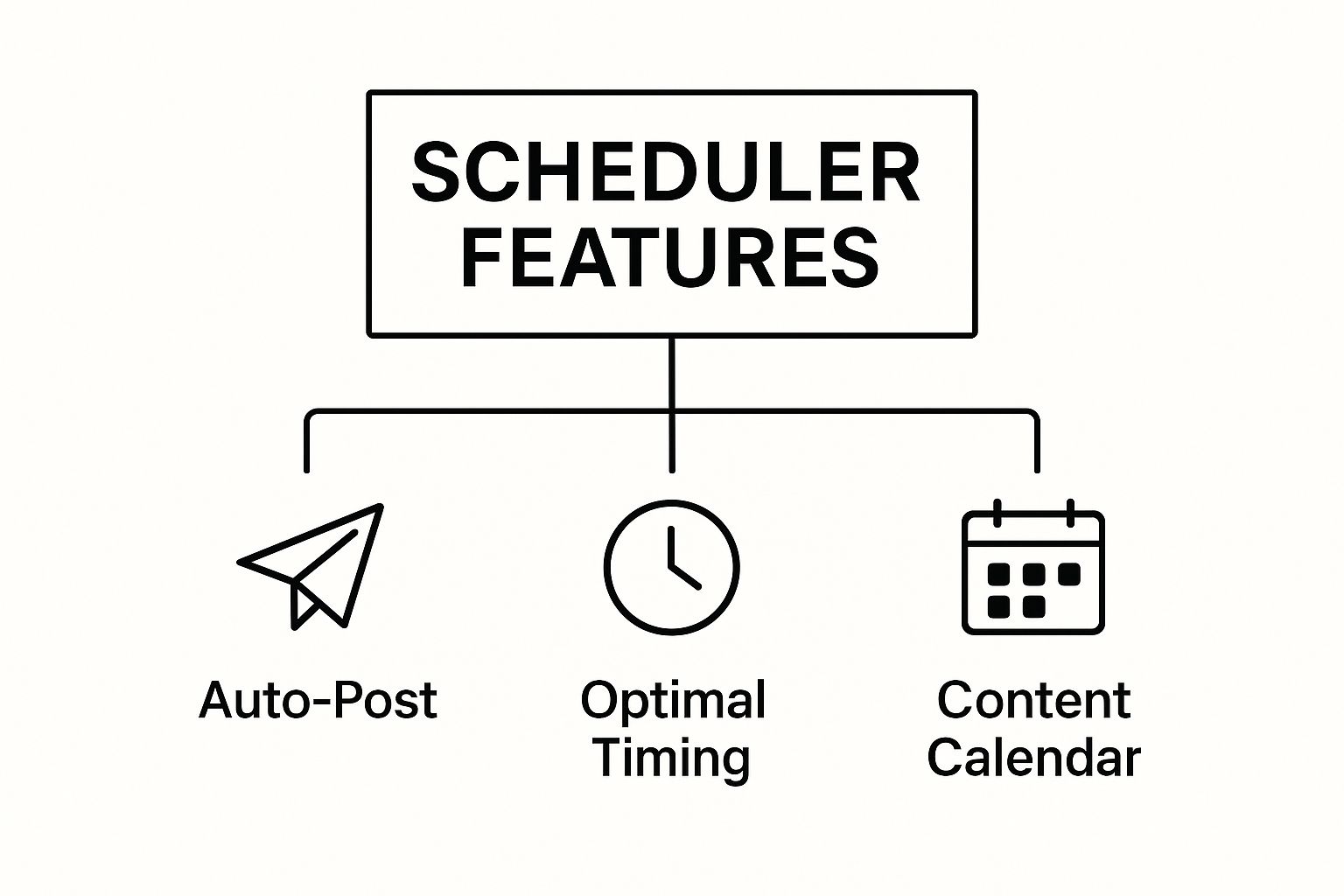
As you can see, core functions like auto-posting, smart timing, and a visual calendar are the absolute pillars of any effective scheduling system. Let’s dig into the features that you simply can’t do without.
1. Bulk Scheduling and Uploading
First on the list of non-negotiables is bulk scheduling. Manually scheduling one Pin at a time is the digital version of boiling water one drop at a time—it gets the job done eventually, but it’s an agonizing waste of time and energy.
A top-tier scheduler lets you upload and schedule dozens, or even hundreds, of Pins in a single go.
Imagine a blogger dedicating one afternoon to mapping out their entire month’s worth of Pinterest content.
They can upload all their Pin images, craft the descriptions, and assign them to various boards, all set to publish on a consistent schedule. This transforms a draining daily chore into a strategic, once-a-month task.
This feature is the absolute foundation of an efficient workflow. It frees you up to focus on what really matters—creating amazing content—instead of getting bogged down in the tedious logistics of posting it.
2. AI-Powered Smart Timing
Posting at the right time on Pinterest is everything. Publishing a Pin when your audience is offline is like shouting into an empty room—no one is there to hear you.
A great Pinterest scheduler solves this problem with smart timing, which is often powered by AI.
Instead of relying on generic “best times to post” advice, a smart scheduler analyzes your specific account’s performance data.
It pinpoints the exact hours and days when your followers are most active and engaged, then automatically publishes your Pins within those peak windows for maximum impact.
This means your content gets the highest possible chance of being seen, saved, and clicked the moment it goes live.
This data-driven approach takes all the guesswork out of the equation and gives your Pins the initial momentum they need to take off.
3. Visual Content Calendar
A visual planner or content calendar is another game-changer. It gives you a bird’s-eye view of your entire Pinterest strategy at a glance.
Instead of trying to make sense of a confusing list of scheduled posts, you see everything laid out in a clean, intuitive calendar format.
This allows you to:
- Spot Content Gaps: Easily see if you’re posting too much about one topic and not enough about another.
- Ensure Visual Variety: Check that your Pin designs are diverse and don’t look repetitive day after day.
- Drag-and-Drop Rescheduling: Quickly move Pins around to adjust your schedule on the fly without having to edit each one manually.
This visual organization is key to maintaining a balanced and aesthetically pleasing feed, which is absolutely vital on a visual-first platform like Pinterest.
While a great scheduler helps with consistency, perfecting the look of your Pins is crucial, and you can learn more about how to optimize Pinterest Pins in our detailed guide.
4. Core Features of an Effective Pinterest Scheduler
To make it even clearer, let’s break down the must-have features in a modern scheduler and why each one is so important for your strategy.
| Feature | What It Does | Why It Matters for Your Strategy |
|---|---|---|
| Bulk Scheduling | Allows you to upload and schedule many Pins at once. | Saves hours of manual work, turning a daily task into a monthly one. |
| Smart Timing | Analyzes your audience data to post at peak engagement times. | Maximizes initial Pin visibility and boosts your chances of going viral. |
| Visual Calendar | Displays your scheduled content in a drag-and-drop calendar view. | Helps you plan a balanced, visually appealing feed and spot content gaps. |
| In-Depth Analytics | Tracks key metrics like top Pins, clicks, and follower growth. | Provides actionable data to refine your strategy and prove your ROI. |
| Content Discovery | Suggests popular content from other creators to re-Pin. | Keeps your boards active and helps you engage with the community. |
Having a tool with these core functions isn’t just a convenience—it’s the difference between spinning your wheels and building real momentum on the platform.
5. In-Depth Analytics and Reporting
Finally, a scheduler is only as good as the results it helps you generate. That’s why deep-dive analytics are indispensable.
While Pinterest offers its own analytics, a great scheduler pulls more actionable insights right into its dashboard, saving you from having to jump between tabs.
Look for a tool that tracks key metrics like:
- Top-performing Pins and boards
- Engagement rates over time
- Follower growth
- Outbound clicks to your website
These analytics close the feedback loop. They show you exactly what’s working and what’s not, so you can stop guessing and start making data-backed decisions to improve your strategy.
Without this data, you’re just flying blind.
Building a Winning Pinterest Scheduling Strategy
Having a powerful Pinterest scheduler is like having a top-of-the-line kitchen. You have all the best appliances, but you still need a good recipe to make a fantastic meal.
The tool itself is only one part of the puzzle; the real magic happens when you pair it with a smart strategy.
This is where we go beyond simply using a scheduler and start thinking about how to make it work for long-term growth.
Pinterest isn’t like other social media platforms where content fades away after a day. It’s a visual discovery engine.
Your Pins can continue driving traffic for months, sometimes even years. Your strategy has to account for this incredible longevity.
Architecting Your Content Calendar
A winning strategy always starts with a well-planned content calendar. Think of it less as a to-do list and more as a strategic blueprint for your brand’s voice on Pinterest.
A good scheduler then becomes the tool that brings that blueprint to life without a hitch.
First, map out your key content pillars—these are the core topics your brand is known for. A food blogger, for example, might focus on “quick dinners,” “healthy baking,” and “meal prep ideas.”
A healthy mix keeps your audience interested and shows them the breadth of what you offer.
Next, use your scheduler to figure out how you’ll mix and match this content.
A great rule of thumb is the 80/20 principle: 80% of your Pins should be genuinely helpful content that serves your audience, while the remaining 20% can be more promotional, linking directly to your products or services.
This approach builds trust and keeps your profile from feeling like one big advertisement.
Your Pinterest scheduler is the engine, but your content calendar is the GPS. One is pretty useless without the other. A smart plan makes sure every single Pin has a purpose.
This strategic mindset is more critical than ever. We know that Pins have a much longer life than posts on other networks.
In fact, analysis shows Pins between one and two years old often get the most saves, and over 60% of all saves happen on Pins that are more than a year old.
This data proves that a scheduling strategy focused on evergreen content is your ticket to sustained visibility.
Finding Your Perfect Pinning Frequency
One of the first questions everyone asks is, “How often should I actually post?” While there’s no single magic number, most experts agree that pinning between 5 to 25 times per day is the sweet spot.
Any less, and you might struggle to gain traction; any more, and you risk overwhelming your followers or looking spammy.
Here’s a simple process for finding your ideal frequency:
- Start Conservatively: Begin by scheduling 5-10 Pins a day. A tool like Post Paddle can automatically spread them out at the best times for engagement.
- Monitor Your Analytics: Keep a close watch on your scheduler’s analytics. Are you seeing a lift in impressions, saves, and outbound clicks?
- Gradually Increase: If the results are positive, slowly start adding more Pins to your daily schedule. You’re looking for that point where more effort doesn’t necessarily lead to better results.
Remember, the real goal is consistency over sheer quantity. A scheduler makes it easy to maintain a steady stream of content, which signals to the Pinterest algorithm that you’re a reliable and active creator.
Our guide on how to schedule Pins on Pinterest dives deeper into establishing this kind of rhythm.
The Power of Repinning Evergreen Content
Finally, a truly winning strategy doesn’t just focus on new content—it recycles your greatest hits. A Pin that performed beautifully six months ago can easily find a brand-new audience today.
This is where repinning your own content to different, relevant boards over time becomes a game-changer.
Your Pinterest scheduler can put this on autopilot. Go through your analytics, identify your top-performing “evergreen” Pins (the ones that are always relevant), and set them up to be repinned to your other boards.
Just be sure to leave a healthy time gap between each one, like 7-14 days, so it feels fresh.
This tactic keeps your best content working for you long after you first created it, driving sustainable, compounding traffic.
Your scheduler isn’t just for publishing new Pins; it’s a powerful tool for squeezing every last drop of value out of your entire content library.
Why Consistent Scheduling Is the Key to Audience Growth

To really get why a Pinterest scheduler is so effective, you first have to understand Pinterest itself. It’s not like other social media platforms where content vanishes in a flash.
Think of it more like a giant, ever-growing visual library. People don’t just scroll endlessly; they come to plan their futures, find solutions, and get inspired.
Your job is to be the go-to librarian in your niche, consistently stocking the shelves with fresh, high-quality ideas.
Trying to do that one “book” at a time, whenever you remember, is a recipe for burnout and inconsistent results.
A scheduler changes the game by automating that process, making sure your content is always there when your audience comes looking. That steady presence is what truly drives audience growth.
Speaking the Algorithm’s Language
At its core, the Pinterest algorithm loves reliability. When you share great Pins on a regular basis, you’re telling the platform that you’re an active and valuable resource.
Each Pin you schedule is like casting a vote for your own authority.
As you build up that consistent track record, Pinterest starts to notice. It begins to push your content out to more people—in their home feeds, search results, and suggested Pins.
You just can’t build that kind of momentum by pinning sporadically whenever you have a free moment. A scheduler keeps you “talking” to the algorithm, even when you’re busy with a million other things.
A scheduler is more than a convenience; it’s a strategic necessity. It aligns your content delivery with the core mechanics of the Pinterest platform, turning consistency into a powerful growth lever.
This constant activity is your ticket to getting in front of a huge, engaged audience. The platform has over 522 million monthly active users who spend an average of 14.2 minutes on the app each time they open it.
And with 85% of weekly Pinners saying they’ve bought something based on Pins they saw, being inconsistent means you’re leaving money on the table.
You can dive deeper into these Pinterest statistics and what they mean for marketers to see the full picture.
Meeting Your Audience Where They Are
People on Pinterest are in a planning mindset. They’re actively looking for things like “quick weeknight meals” or “DIY patio furniture.”
They expect to find a deep well of ideas that’s always being refilled. An account that’s gone quiet just won’t cut it.
A Pinterest scheduler helps you meet that expectation by ensuring you’re always part of the conversation. By staying active, you accomplish a few critical things:
- Stay Top-of-Mind: Regular pinning keeps your brand in front of followers, solidifying you as their go-to expert.
- Capture Search Traffic: Pinterest is a visual search engine with 2 billion searches per month. Consistent pinning gives you more chances to show up for your target keywords.
- Build Trust: An active profile just feels more credible. It shows users you’re a serious, reliable source they can trust.
This steady flow of new content has a direct impact on how people interact with your brand.
When your audience knows you consistently deliver value, they’re far more likely to follow you, save your Pins, and—most importantly—click through to your website.
We’ve put together more tactics for how to increase Pinterest engagement that build on this very principle.
In the end, using a scheduler isn’t about posting more content; it’s about posting smarter. It’s how you build a reliable, always-on presence that both the Pinterest algorithm and its users will reward.
This consistency is what turns your profile from a simple photo album into a powerful engine for growing your audience and your business.
Plan your Pins first, then automate everything
Want your Pinterest scheduler to do more than “post consistently”?
Use the FREE Pinterest Keyword Research tool.
It helps you find the exact phrases your audience is searching—so the Pins you schedule are built around real demand, not random ideas.
Use it to map out a simple monthly plan: pick keyword themes, match them to boards and content pillars, write Pin titles/descriptions around those terms, then schedule in batches for steady growth.
When your calendar is keyword-led, your scheduling becomes a repeatable system that’s easier to track, optimize, and scale.
Frequently Asked Questions About Pinterest Schedulers
Even after seeing all the benefits, it’s totally normal to have a few questions swirling around about using a Pinterest scheduler.
Let’s walk through some of the most common ones I hear from creators and business owners.
Think of this as your practical, no-fluff Q&A. My goal is to clear up any lingering doubts so you can start scheduling with confidence.
How Many Times a Day Should I Post on Pinterest?
This is easily the question I get asked most, but there isn’t a single magic number that works for everyone. The truth is, quality and relevance will always win out over raw quantity.
A good rule of thumb for most people is to aim for somewhere between 5 to 25 Pins per day.
The real power of a Pinterest scheduler is its ability to spread those Pins out throughout the day. This prevents you from bombarding your followers’ feeds all at once. My advice?
Start on the lower end, maybe 5-10 Pins daily, and pay close attention to your scheduler’s analytics. See what frequency actually moves the needle on your engagement, and adjust from there. The aim is consistency, not just hitting a random daily target.
Key Takeaway: Using a legitimate, official Pinterest Marketing Partner tool isn’t just safe—it’s the smart way to manage a business account. Pinterest actually encourages their use because they help bring better content to the platform.
Can a Pinterest Scheduler Get My Account Banned?
No, you won’t get your account banned for using a legitimate Pinterest scheduler. This is a common myth, but it comes from a misunderstanding of how these tools operate.
Pinterest actually has an official partnership program. Tools that are approved Pinterest Marketing Partners get direct API access, which ensures they play by the rules.
As long as you pick an official partner tool and focus on sharing genuinely helpful, high-quality content, your account is completely safe.
The real danger lies in spammy behavior, like pinning the exact same link to ten different boards in a five-minute span. A scheduler is built to help you use Pinterest better, not to game the system.
How Do I Choose the Right Scheduler for Me?
The “best” Pinterest scheduler is the one that fits your unique needs, budget, and business goals. What works for a solo blogger might not be the right fit for a growing e-commerce brand or a marketing agency.
Here’s how to break it down to find your perfect match:
- For Beginners and Bloggers: You’ll want something with a clean, easy-to-use interface. A visual calendar to see your Pins at a glance is a huge plus, as is a free or affordable starting plan.
- For Growing Businesses and Agencies: You’ll need more horsepower. Look for robust analytics, features for team collaboration, and the ability to juggle multiple client accounts from one place.
Before you pull out your credit card, do two things.
First, double-check that the tool is an official Pinterest Marketing Partner.
Second, take full advantage of the free trial. There’s no better way to know if a tool’s workflow feels right than to actually use it for a few days.