
When you’re creating content for Pinterest, getting your post sizes right is more than just a technical detail, it’s crucial for grabbing attention.
The sweet spot for a standard Pinterest post size is 1000 x 1500 pixels, which hits that perfect 2:3 aspect ratio. This vertical format is, without a doubt, the gold standard for standing out in a user’s feed.
Your Quick Reference For Pinterest Post Sizes
If you’ve ever seen a Pin with the text cut off or the main image awkwardly cropped, you know why dimensions matter.
Getting the size right ensures your message is seen exactly as you intended, which is the first step toward boosting engagement.
While standard Pins are the bread and butter of the platform, other formats like Videos and Carousels come with their own set of rules. Nailing these specifications is fundamental to a solid Pinterest strategy.
This visual guide breaks down the core Pin formats at a glance.
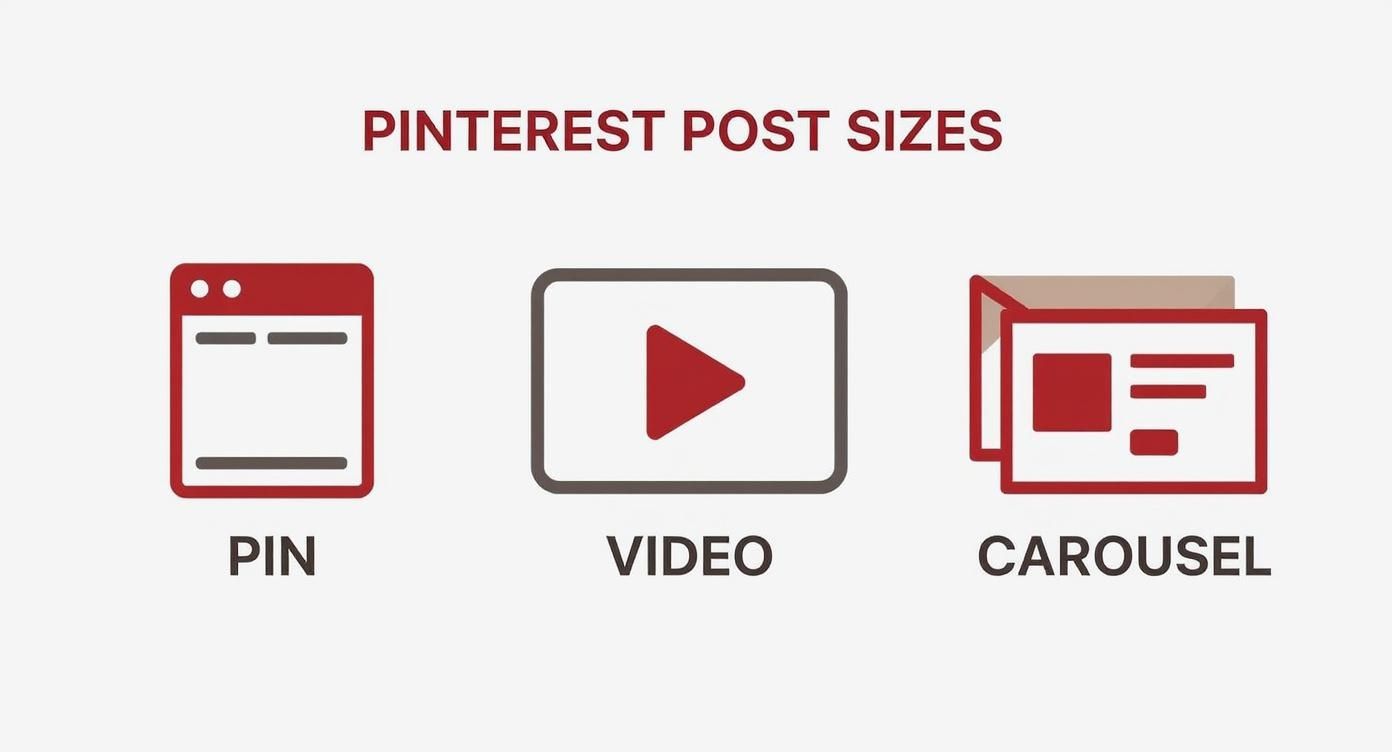
As you can see, vertical formats dominate. The 2:3 ratio is central to Pinterest’s design, and for good reason—it’s optimized for how people actually use the platform on their phones.
Pinterest Post Sizes Quick Reference Chart
For a more detailed breakdown, here’s a handy chart covering the most common Pin types. Keep this nearby to make sure every Pin you create is perfectly optimized.
| Pin Type | Recommended Pixels (Width x Height) | Aspect Ratio | Accepted File Types |
|---|---|---|---|
| Standard Pin | 1000 x 1500 pixels | 2:3 | PNG, JPG |
| Square Pin | 1000 x 1000 pixels | 1:1 | PNG, JPG |
| Video Pin (Standard) | 1000 x 1500 pixels | 2:3 | MP4, MOV, M4V |
| Video Pin (Square) | 1000 x 1000 pixels | 1:1 | MP4, MOV, M4V |
| Carousel Pin | 1000 x 1500 or 1000 x 1000 | 2:3 or 1:1 | PNG, JPG |
| Story Pin | 1080 x 1920 pixels | 9:16 | PNG, JPG, MP4, MOV, M4V |
This chart simplifies the core requirements, but always remember that the 2:3 aspect ratio for static images and standard videos generally delivers the best performance.
The Gold Standard Dimensions
So, why the big emphasis on the 2:3 aspect ratio? It’s all about the user experience. This size performs best on mobile devices, which is where over 80% of Pinterest’s 520 million users are browsing.
A 2:3 Pin takes up the most screen real estate without forcing users to scroll, making your content impossible to miss. It’s not just about looking good; it’s about maximizing visibility and performance.
Of course, your individual Pins are just one part of the puzzle. Your entire profile needs to look polished and professional.
To learn more about optimizing your page, take a look at our guide on the correct Pinterest cover photo size.
By paying attention to these details across your profile, you create a cohesive and appealing presence that turns casual browsers into loyal followers.
Why Pin Dimensions Impact Your Performance
Getting your Pinterest post sizes right is about more than just making things look pretty. It’s a strategic move that directly impacts how many people see and interact with your content.
The Pinterest algorithm is smart—it’s built to reward Pins that give users the best possible experience, and that starts with the right dimensions.
When you stick to the recommended vertical formats, especially the 2:3 aspect ratio, your content fits perfectly within the platform’s design.
Pinterest is a mobile-first world, and this vertical layout is specifically designed to take up as much screen space as possible on a phone.
A taller Pin is simply more commanding and eye-catching as someone scrolls, giving your work an instant advantage.
This isn’t just a hunch; the data backs it up. Pins that nail the 2:3 aspect ratio consistently see better engagement.
We’re talking up to 30% more clicks and saves compared to Pins with other, less ideal shapes.
You can dig into the numbers behind Pinterest engagement success on Socialchamp.com.
The Risks of Incorrect Dimensions
On the flip side, ignoring these guidelines can genuinely hurt your content’s reach. Using the wrong sizes creates a few problems that can undermine all your hard work.
- Awkward Cropping: If you upload a square or wide image, Pinterest will often crop it awkwardly in the feed. This can chop off important parts of your image or cut your text overlays in half.
- Reduced Visibility: Pins that aren’t tall and vertical just don’t have the same presence. They take up less room, making it all too easy for users to scroll right past them without a second glance.
- Lower Quality: Trying to stretch a small image to fit the recommended Pin dimensions is a recipe for a blurry, pixelated mess. It looks unprofessional and can really damage your brand’s credibility.
Ultimately, the algorithm sees poor formatting as a sign of low-quality content, which can cause it to show your Pin to fewer people.
By using the correct Pinterest post sizes, you’re sending a clear signal that your content is high-quality and made for the platform’s audience.
This principle of matching dimensions to the platform isn’t unique to Pinterest. Every social network has its own preferences.
For a wider view, understanding the nuances of optimizing video content across social networks shows just how important it is to adapt your format for each audience.
A Deeper Look at Standard Pin Sizes
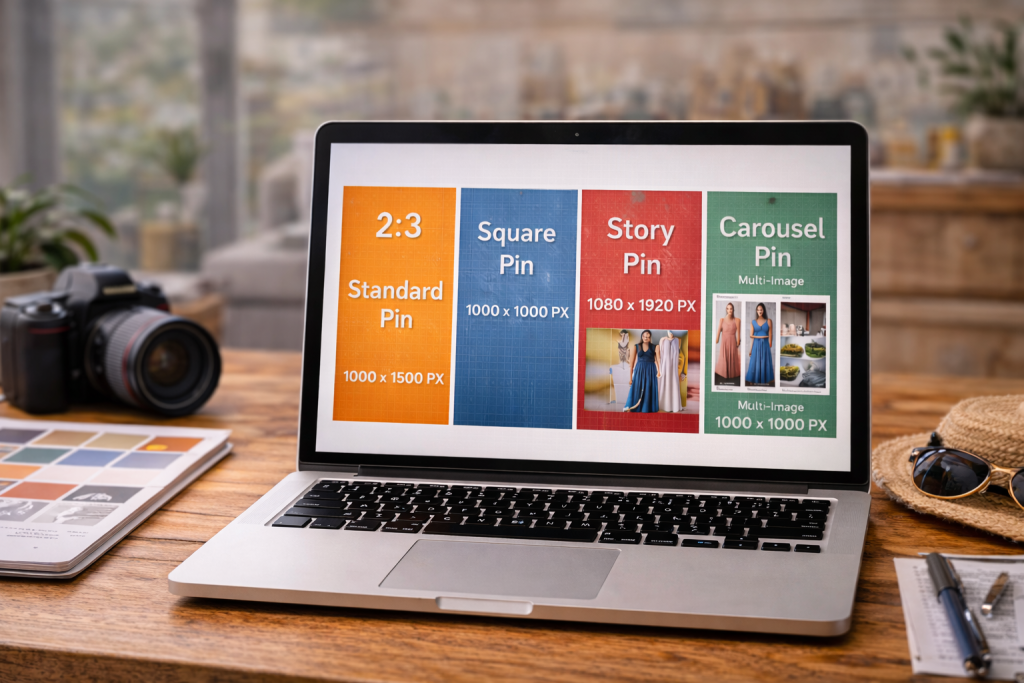
Standard Pins are the bread and butter of any solid Pinterest strategy. If you want to maximize your reach, getting their dimensions right is non-negotiable.
While Pinterest offers a few different formats these days, the classic vertical Pin still reigns supreme. Why? It’s perfectly designed to fill the screen on mobile, which is where most people are scrolling.
The sweet spot for a Standard Pin is 1000 x 1500 pixels. This hits the ideal 2:3 aspect ratio that Pinterest’s algorithm loves.
Sticking to this size means your image shows up in its entirety, no weird cropping or awkward cutoffs.
It simply presents your content exactly the way you intended, taking up a ton of screen real-estate and making it tough to just scroll past.
The Best Dimensions for Quality
Technically, Pinterest allows a minimum size of 600 x 900 pixels, but I always recommend aiming higher with the 1000 x 1500 pixel guideline.
Smaller images can look fuzzy or pixelated, especially on newer, high-resolution screens. That dip in quality can make your brand look unprofessional and is often enough to make someone keep scrolling.
For the best results, here are the technical specs to keep in mind:
- File Type: You can use either PNG or JPG files. I find that PNG is usually better for graphics that have text overlays because it keeps everything looking sharp and crisp.
- File Size: Make sure your file is under 20MB. Pinterest won’t even let you upload it if it’s any larger.
Getting your images compressed correctly is the key to hitting that size limit without sacrificing visual quality.
If you need a hand with that, we have a whole guide on how to optimize images for the web.
When to Use Other Standard Pin Sizes
While the 2:3 ratio is king, you can use other dimensions for Standard Pins in specific cases. The most common alternative is a square Pin, which uses a 1:1 aspect ratio (think 1000 x 1000 pixels).
This format is a lifesaver if you’re looking to repurpose content directly from your Instagram feed without a lot of extra work.
Just be careful with Pins that are too long. Super-tall Pins might seem like a good way to grab attention, but Pinterest actually cuts off any image that exceeds a 2:3 ratio in the main feed.
That means a user has to click on your Pin to see the full design, which could hide your most important visual elements or your call-to-action.
Key Takeaway: Sticking to the 1000 x 1500 pixel standard is the safest bet. It prevents your Pins from getting cut off and ensures they look great on any device, making sure your message always gets across.
As you think about what works best for your pins, it can also be helpful to get a feel for image sizing in general by understanding common picture sizes to see how dimensions work in a broader context.
Optimizing Dimensions for Video Pins
Video is an absolute powerhouse on Pinterest, but it plays by its own set of rules.
Just like with static images, if you want your videos to stop scrollers in their tracks, you have to get the dimensions right.
Nail these details, and you’ll see a real difference in how people engage with your content.
From my experience, the two formats that consistently deliver the best results are standard vertical and square videos.
Each has its own strengths, so the one you choose really depends on your specific video and what you’re trying to achieve.
Recommended Video Pin Dimensions
To get the most out of your video content, you should be creating it with mobile users in mind. That means picking dimensions that look great on a phone screen.
- Standard Vertical Video: The gold standard here is 1000 x 1500 pixels, which gives you that classic 2:3 aspect ratio. This size takes up a ton of screen real estate, making it perfect for immersive tutorials, vlogs, or storytelling.
- Square Video: A 1080 x 1080 pixel video (1:1 aspect ratio) is another fantastic option. I find this format works especially well if you’re repurposing content from other platforms like Instagram or for quick, eye-catching product showcases.
Sure, you can upload videos with different aspect ratios, but sticking to these two ensures your content won’t get awkwardly cropped or lose its visual punch when it shows up in someone’s feed.
Key Technical Specifications
Getting the dimensions right is only half the battle. There are a few technical specs you need to pay attention to if you want your video to upload and play without a hitch.
Trust me, ignoring these can lead to frustrating upload errors or a glitchy viewing experience for your audience.
Here are the must-know specs for your Video Pins:
- File Format: Use .MP4 or .MOV files. These are the most reliable formats for Pinterest.
- Maximum File Size: Keep your video file at 2GB or less.
- Video Length: You can upload videos up to 15 minutes long, but shorter is almost always better. For ads, Pinterest’s official advice is to aim for 6-15 seconds to grab and hold attention.
A crucial best practice I always share is to design your videos to be viewed with the sound off. The reality is, most people are scrolling silently.
Use clear text overlays or captions and powerful visuals to get your message across. This simple habit can dramatically boost your video’s performance and make it accessible to everyone.
Sizing Carousel and Idea Pins Correctly
Beyond a single image or video, Pinterest gives you more interactive formats like Carousels and Idea Pins to play with.
These are fantastic for telling a deeper story or showing off a collection, but they come with their own set of rules for sizing. Get them right, and you’ll create a seamless experience for your audience.
Carousel Pins let you bundle two to five images into one post that users can swipe through. The most important rule here is consistency.
To keep the swiping experience smooth and professional, every single image in the carousel must have the same aspect ratio.
Carousel Pin Dimensions
You’ve got two main choices for sizing your carousel cards, and they conveniently match the popular standard and square Pin formats.
This makes it easy to repurpose content you already have, as long as you stick to one size per carousel.
- Standard Vertical: 1000 x 1500 pixels gives you that classic 2:3 aspect ratio, perfect for immersive, vertical storytelling.
- Square: 1000 x 1000 pixels creates a clean 1:1 aspect ratio, which is great for product shots or content you’re also using on platforms like Instagram.
Just remember, if you start with a 2:3 card, every other card in that carousel needs to be 2:3 as well. Mixing aspect ratios simply doesn’t work and leads to awkward, unprofessional cropping.
Idea Pin Specifications
Idea Pins are Pinterest’s take on the full-screen, vertical story format. They’re built from the ground up for an immersive mobile experience, which means their sizing is much less flexible than other Pin types.
For Idea Pins, the only size that works is 1080 x 1920 pixels. This is a 9:16 aspect ratio, and it’s designed to fill a smartphone screen completely, grabbing all of a user’s attention.
You really can’t fudge the numbers on this one. Deviating from the 9:16 aspect ratio will cause Pinterest to crop, stretch, or add ugly bars to your content, instantly ruining that polished look you’re going for.
Here are a few more technical details to keep in mind for Idea Pins:
- Content: You can mix both images (PNG, JPG) and videos (MP4, MOV).
- Title: You get up to 100 characters to write a compelling title.
- Pages: An Idea Pin can contain up to 20 pages, giving you plenty of room to tell your story.
Designing Pins That Capture Attention

Knowing the right Pinterest post sizes is half the battle. But even a perfectly sized Pin needs a killer design to stop someone mid-scroll.
Your creative execution is what ultimately decides if a user clicks through or keeps on moving. It all starts with high-quality, vertical images.
Always, and I mean always, use clear, well-composed, and in-focus photos or graphics. A blurry image doesn’t just look bad; it can subtly damage your brand’s credibility.
On the flip side, a sharp, vibrant visual instantly signals professionalism and quality. This is your first impression—make it count.
Make Your Message Clear
Pinterest is a fast-paced environment. People scroll quickly, so your Pin has to communicate its value in a split second. This is where a good text overlay becomes your best friend.
Adding bold, easy-to-read text right on your image gives immediate context.
It tells the user exactly what they’re looking at—be it a recipe, a DIY tutorial, or a new product—before they even have a chance to read the description.
- Choose Legible Fonts: Stick to clean, simple fonts that are easy to read, especially on a small mobile screen.
- Create Contrast: Make sure your text color pops against the background image. High contrast is key for readability.
- Keep It Concise: A few powerful words are all you need. Think compelling headlines, not long sentences.
A great rule of thumb is to design a Pin that can stand on its own. If the image and its text overlay make sense without any other context, you’ve nailed it.
Build a Cohesive Brand Identity
Consistency is what builds brand recognition on a visual platform like Pinterest.
When you use the same set of colors, fonts, and a subtle logo on your Pins, you create a cohesive, professional look that people start to remember.
It’s a small detail, but adding your logo or website URL to each Pin is a simple, effective branding move.
Over time, users will start to recognize your signature style in their feeds, which builds trust and encourages more clicks.
For a deeper dive into this, our guide on how to create Pins that get noticed has a ton of great tips.
Make sure every Pin is sized right, readable on mobile, and ready to earn clicks.
You already know the winning dimensions (like 1000 × 1500 for standard Pins), but small details can still tank performance—cropped text, blurry exports, or elements placed too close to the edges.
Use our interactive Pin Optimization Checklist to quickly confirm your Pin size, safe margins, file type, and clarity before you hit upload.
It takes less than two minutes and saves you from the most common “why isn’t this Pin performing?” mistakes.
Your Pinterest Pin Size Questions, Answered
Even when you know the rules, figuring out the best Pinterest post sizes can still feel a little tricky.
Let’s clear up some of the most common questions that pop up so you can get your content strategy dialed in and sidestep any easy-to-make mistakes.
Getting these dimensions right is about more than just looking good—it’s about making sure your content performs its best.
Can I Just Use My Instagram Post Size for Pinterest?
Technically, yes, you can upload a square 1080 x 1080 pixel Instagram post to Pinterest. But should you? Definitely not.
The Pinterest feed is a vertical world, and a proper 2:3 aspect ratio (1000 x 1500 pixels) is prime real estate.
Think about it: a square image looks tiny and gets lost between all the taller Pins. To grab attention and stop the scroll, you need to maximize your screen space.
Always take the extra minute to create a separate, vertical graphic specifically for your Pinterest audience. It makes a huge difference in engagement.
What Happens If I Make My Pin Too Long?
If you create a Pin that’s much taller than the recommended 2:3 aspect ratio, Pinterest will crop it in the user’s feed.
People will only see the middle portion of your Pin, and any important text or imagery at the very top or bottom will get cut off completely.
This forces someone to click on your Pin just to see the whole thing, which is an extra step most people won’t take. You lose that instant impact.
Stick to the 1000 x 1500 pixel guideline to make sure your message is seen in full, right from the first glance.
What’s the Absolute Best Resolution for a Pinterest Pin?
For a crisp, professional look that pops on any screen, you should always aim for 1000 x 1500 pixels. This resolution is high enough to look sharp and clear on everything from a big desktop monitor to the latest smartphone.
Sure, Pinterest’s official minimum is 600 x 900 pixels, but uploading at that smaller size risks your Pins looking blurry or pixelated.
A low-quality image can damage your brand’s credibility. It’s always worth exporting high-quality PNG or JPG files at the recommended larger size.