
If you want to create a Pinterest Pin that actually gets results, you need more than just a pretty picture.
Think of each Pin as a tiny, strategic billboard designed to stop the scroll, spark curiosity, and drive traffic back to your website or blog.
The winning formula combines a vertical image (a 2:3 ratio like 1000×1500 pixels is perfect), a punchy text overlay, and a description packed with the right keywords.
The Blueprint for a Click-Worthy Pinterest Pin
Before you even open a design tool, it helps to know what makes a Pin work. A successful Pin is never an accident.
It’s a carefully crafted piece of marketing that’s built on a solid foundation of visual appeal, crystal-clear messaging, and smart optimization.
This isn’t just theory; it’s a necessity on a platform with a massive, highly engaged audience.
Pinterest was hovering around 570 million monthly active users globally in early 2025, and a staggering 85% of them are browsing on mobile.
That mobile-first reality is exactly why the vertical format is a non-negotiable part of the game.
Deconstructing the Perfect Pin
So, what are the must-haves for a Pin that begs to be clicked? I’ve found it really boils down to three core components.
Nail these, and you’re already ahead of the curve.
- Dominant Vertical Imagery: The 2:3 aspect ratio (1000×1500 pixels is my go-to) is the undisputed champion. It simply takes up more screen space on a mobile feed, giving your content a bigger presence and nudging your competitors out of sight. Always use high-quality, relevant, and visually interesting images.
- Compelling Text Overlay: Your text needs to be bold, easy to read, and create a “curiosity gap.” Promise a solution to a problem, ask a thought-provoking question, or highlight a must-have benefit. Steer clear of tiny fonts or fancy scripts that are impossible to decipher on a small screen.
- Embedded SEO: Don’t forget, Pinterest is a visual search engine. Your Pin’s title and description need to be filled with the keywords your audience is actively searching for. This is how you tell Pinterest what your content is about so it can show it to the right people.
Key Takeaway: A great Pin solves a problem visually before anyone even clicks. It instantly communicates its value through the image and text, making the decision to click feel both effortless and necessary.
To help you remember these key ingredients, here’s a quick summary of what every high-performing Pin needs.
Essential Elements of a Click-Worthy Pin
| Element | Best Practice | Why It Matters |
|---|---|---|
| Vertical Image | Use a 2:3 aspect ratio (e.g., 1000×1500 pixels). | Maximizes screen space on mobile devices, grabbing more attention. |
| High-Quality Visuals | Use clear, bright, and relevant photos or graphics. | Builds trust and stops the user from scrolling past your content. |
| Bold Text Overlay | Add a short, readable headline directly on the image. | Instantly communicates the Pin’s value and what the user will get by clicking. |
| Strong Branding | Subtly include your logo or website URL on the Pin. | Increases brand recognition and discourages content theft. |
| Keyword-Rich Title | Create a Pin title that includes your primary keyword. | Helps Pinterest’s algorithm understand and categorize your Pin for search. |
| Optimized Description | Write a detailed description with relevant keywords and a call to action. | Provides more context for both users and the search algorithm. |
Keeping these elements in mind will give you a solid framework for every single Pin you create.
Beyond just the Pinterest-specific tactics, taking a broader look at how to create engaging social media content that converts can give your strategy a serious boost.
When you understand what makes people tick across different platforms, you can craft messages that truly connect.
Ultimately, your goal is to merge stunning visuals with search-friendly text, creating an irresistible front door to your best content.
Bringing Your Pin to Life in Canva
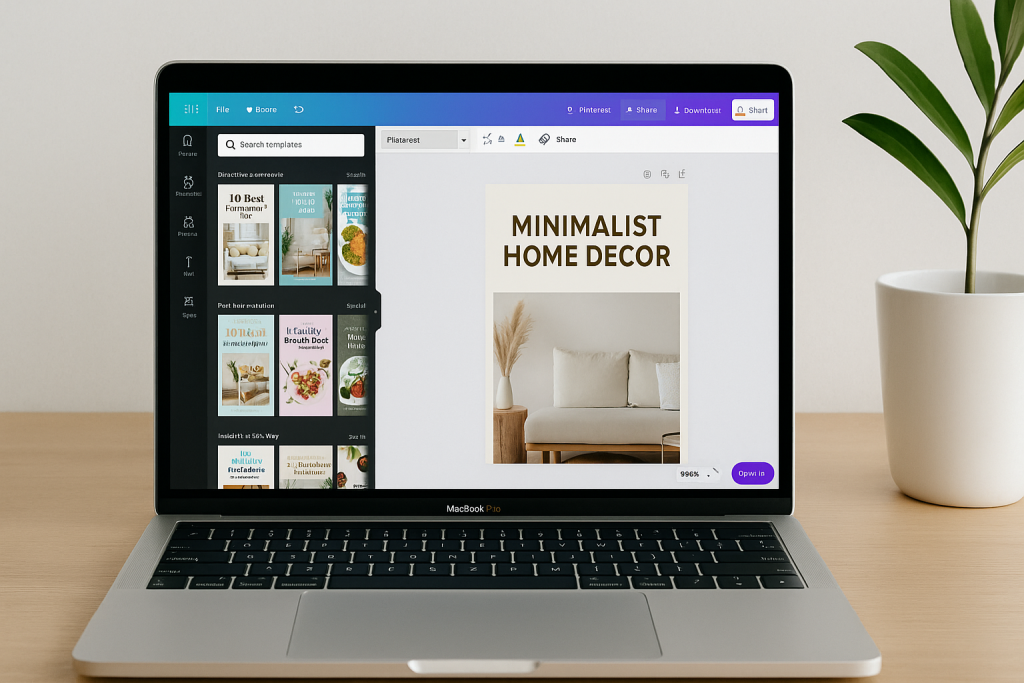
Alright, with your strategy locked in, let’s roll up our sleeves and actually make a Pin. My go-to tool for this is Canva.
It’s incredibly intuitive, so you can create something that looks professional without needing a degree in graphic design.
First things first: get your dimensions right. When you open Canva, you can search for a “Pinterest Pin” template, but I’ve found it’s better to set up a custom canvas.
I always use 1000 x 1500 pixels. This nails the 2:3 aspect ratio that Pinterest loves, making sure your Pin takes up as much valuable space as possible, especially on mobile phones.
Laying the Visual Groundwork
With your blank canvas ready, you need to decide on a background. This is what sets the mood for your entire Pin. You’ve really got two solid options here.
- A killer photo: Find an image that’s bright, crisp, and directly related to your topic. If you’re writing about “minimalist home decor,” you need a shot of a beautiful, uncluttered room. Making a Pin for a recipe? A drool-worthy photo of the final dish is non-negotiable.
- A simple backdrop: Sometimes, less is more. A solid color or a subtle texture can work wonders, particularly if your Pin has a lot of text. This approach lets your headline be the hero without any distractions.
Whatever you choose, remember that the background is there to support your message, not overshadow it. A busy, chaotic image will make your text impossible to read, and a user will just scroll right past it.
This is the exact workflow I follow to create Pins that actually get clicks and saves.
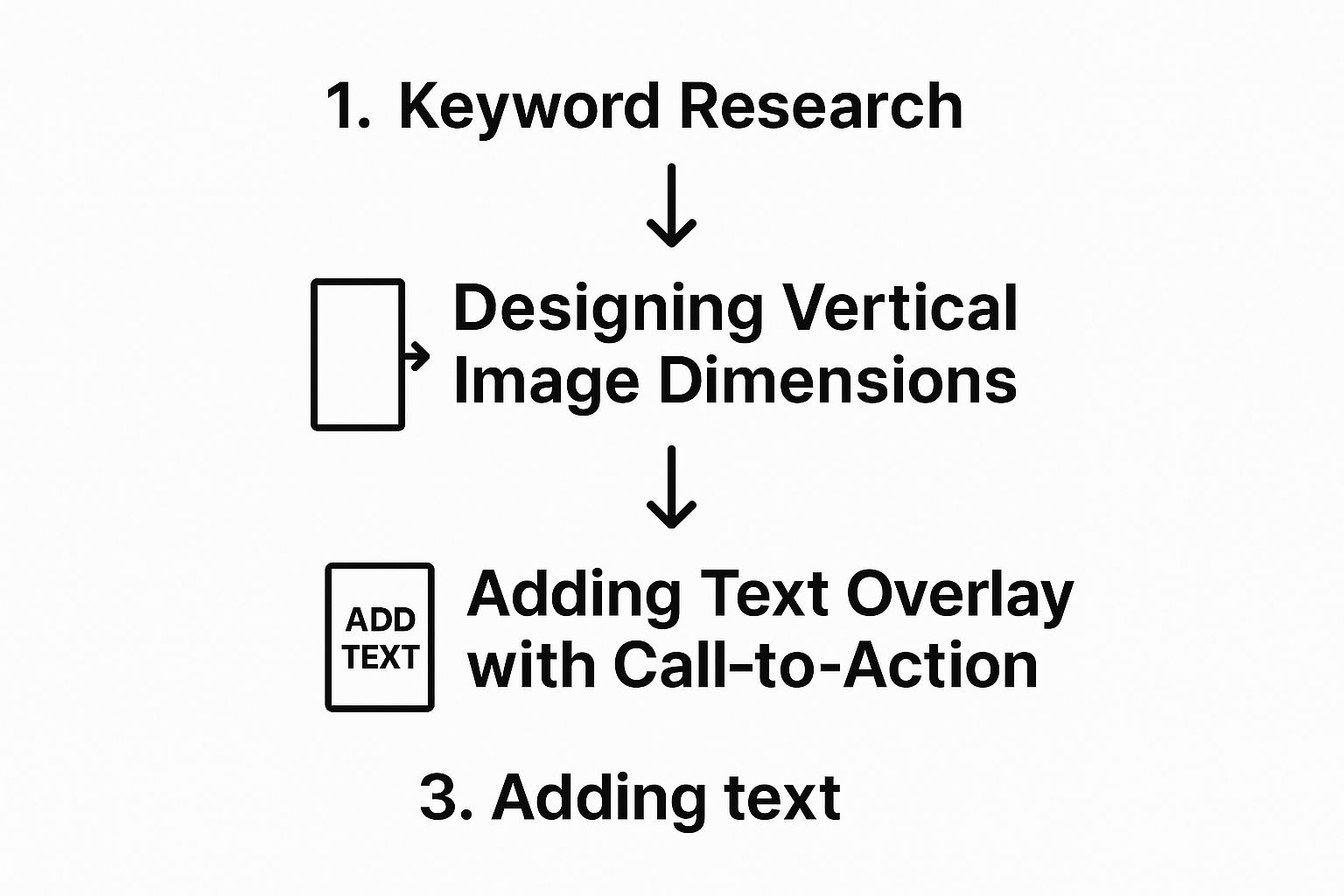
As you can see, the design and text elements come after the initial keyword research. This ensures every Pin you create is strategic from the ground up.
Adding Text and Branding That Pops
Your text overlay is probably the single most important part of your Pin. It’s the hook. It’s what stops the scroll and tells someone why they should care.
You need to use a bold font that’s a breeze to read. I stick with sans-serif fonts like Montserrat, Anton, or League Spartan because they’re clean and modern.
The key is creating high contrast between your words and the background. Dark photo? Use light text. Light photo? Use dark text.
It’s a simple rule, but it works. If you’re struggling to make it stand out, just add a semi-transparent colored block behind the text. Problem solved.
Pro Tip: Your headline needs to hit home immediately. Try posing a question that taps into a pain point (like, “Tired of a Messy Closet?”) or promising a clear benefit (like, “5 Steps to a Perfectly Organized Closet”). You want the user to see it and think, “That’s for me.”
Finally, don’t forget your branding. A small logo or your website URL tucked away at the bottom is all you need.
It builds brand recognition over time without getting in the way. If you want to go even deeper on design best practices, check out our full guide to https://www.postpaddle.com/blog/create-a-pin-for-pinterest.
Getting this right is crucial, especially when you consider that 80% of users have discovered a new brand or product on Pinterest.
And with women making up roughly 70% of the user base, tailoring your design style to that audience can pay huge dividends.
Beyond just Canva, making sure every image is perfectly sized is a small step that makes a big difference.
I often use a free Pinterest image resizer tool to get everything just right before I even start designing.
Finding Keywords That Fuel Your Reach
Let’s be real: you can create the most beautiful Pin in the world, but it’s useless if no one ever sees it.
This is where you have to stop thinking like a designer and start thinking about Pinterest SEO.
At its core, Pinterest is a visual search engine. It’s where people go to find inspiration, discover solutions, and plan their next project.
So, every time you make a Pinterest pin, you’re not just posting a picture; you’re creating an answer to a search query.
Your job is to embed the right keywords so Pinterest’s algorithm can connect your Pin with the right people.
Tapping Into Pinterest As a Search Engine
The best place to find your keywords is right there on Pinterest. It’s like getting a direct look into the minds of millions of users.
Head over to the search bar and type in a broad term related to your niche. Let’s say you’re in the home decor space and type “home office.”
Before you even hit enter, a dropdown list will appear with suggestions.
These aren’t random guesses—they are the most popular, real-time searches people are performing.
- “home office ideas”
- “home office decor”
- “home office organization”
- “home office for small space”
This is pure keyword gold. It shows you the exact language your audience is using, which is exactly the language you should be using.
For a deeper dive, our guide on https://www.postpaddle.com/blog/pinterest-keyword-research walks you through more advanced strategies.
What’s fascinating about Pinterest is that 96% of top queries are unbranded. This gives smaller creators and businesses a huge advantage.
You can reach people based on their genuine interests, not just brand loyalty. It’s a level playing field where good content wins.
Where to Place Your Keywords for Maximum Impact

Okay, you’ve got your list of powerful keywords.
Now, where do you put them? Sprinkling them in the right spots is crucial for telling the algorithm what your Pin is all about.
There are three critical places to focus on:
- Your Pin Title: This is prime real estate. Your main, most important keyword absolutely has to be here.
- Your Pin Description: Here’s where you can get a bit more descriptive. Weave in your primary keyword again, along with a few secondary ones. Just make sure it sounds natural and helpful—don’t just stuff it with terms.
- The Text Overlay on Your Image: Don’t overlook this one! Pinterest is smart enough to read the text on your actual Pin graphic. It uses this as another powerful clue to understand and categorize your content.
For example, if you’ve written a blog post on tidying up a compact workspace, your Pin title could be “Genius Home Office Organization Ideas for Small Spaces.”
Your description could then expand on that, naturally using phrases like “desk organization” and “small office storage hacks.” Taking this approach ensures all your bases are covered.
To really make sure your Pins get in front of the right eyeballs, it’s worth learning more about finding profitable and converting keywords that drive real traffic.
Getting Your Pin Out There the Smart Way
You’ve put in the work to design a great Pin and sprinkle in your keywords. Now for the exciting part: getting it in front of the right people.
Simply hitting “publish” isn’t enough. Where you post your Pin first, and how you follow up, can make all the difference in its journey from new Pin to viral sensation.
When you’re ready to upload your Pin on Pinterest, you’ll have one last chance to make sure your SEO is perfect.
The platform will ask for a title, a description, and that all-important destination link. Your title needs to be catchy but also lead with your main keyword.
For the description, think conversationally—how can you naturally include those related keywords in a way that genuinely helps the user?
Your First Board Is Everything
This is a step I see so many people get wrong. The very first board you save your Pin to is critical. Always pin it to the most relevant board on your profile.
For example, if you created a Pin for a “vegan lasagna recipe,” it absolutely must go to your “Vegan Dinner Recipes” board first.
Don’t drop it into a generic “Food” or “My Blog Posts” board. That initial placement sends a strong, clear signal to the Pinterest algorithm about your Pin’s topic.
This helps it get categorized correctly right from the start, which is exactly what you want for better visibility in search and feeds.
Pro Tip: Resist the urge to save your brand-new Pin to a dozen boards at once. It’s a common mistake that can actually hurt its initial performance.
Give it the best possible start by saving it to one, hyper-relevant board first. You can always circle back and re-pin it to other related boards later.
Once it’s live on that first board, you can start thinking about giving it a little extra push.
This is where a scheduling tool like Post Paddle comes in handy.
You can set up a schedule to re-pin it to your other relevant boards over the next few days or weeks, which keeps your content circulating without looking like spam.
Pinterest is built for this kind of product and content discovery, making it a powerful tool for businesses.
As you can see, the platform is designed to help brands seamlessly integrate their products, turning inspiration into a direct shopping opportunity for users.
Giving Your Pin an Early Boost
Beyond your own boards, a little strategic promotion can work wonders. Sharing your new Pin with relevant Tailwind Communities or group boards can kickstart its engagement.
This gets it in front of a fresh, highly engaged audience right away, which can lead to those precious early saves and clicks—the exact signals that tell Pinterest your content is a winner.
Another powerhouse strategy is to create multiple unique Pins for the same piece of content.
For a single blog post or product, I often recommend making 5-10 different Pin designs. Don’t dump them all at once! Space them out.
Maybe publish two this week and three the next. This keeps your content feeling fresh and avoids overwhelming the algorithm with too many Pins pointing to the same URL in a short period.
Advanced Tactics to Maximize Pin Performance
So, you’ve gotten the hang of creating a solid Pin. That’s fantastic.
But if you really want to move the needle and drive serious traffic, it’s time to go beyond the basics.
This is where you elevate a good Pinterest strategy into a great one by keeping your content fresh and compelling.
One of the most powerful things I’ve learned is to create multiple Pin variations for a single piece of content.
Don’t stop at just one Pin for your new blog post; make five.
Or even ten. This isn’t about spamming your followers’ feeds—it’s about smart, continuous A/B testing.
Think about it: by using different images, headlines, and descriptions, you’re giving yourself more chances to see what actually clicks with your audience.
You might be surprised to find that a bold, question-based headline gets double the engagement of a simple, descriptive one for the exact same article.
Creating Strategic Pin Variations
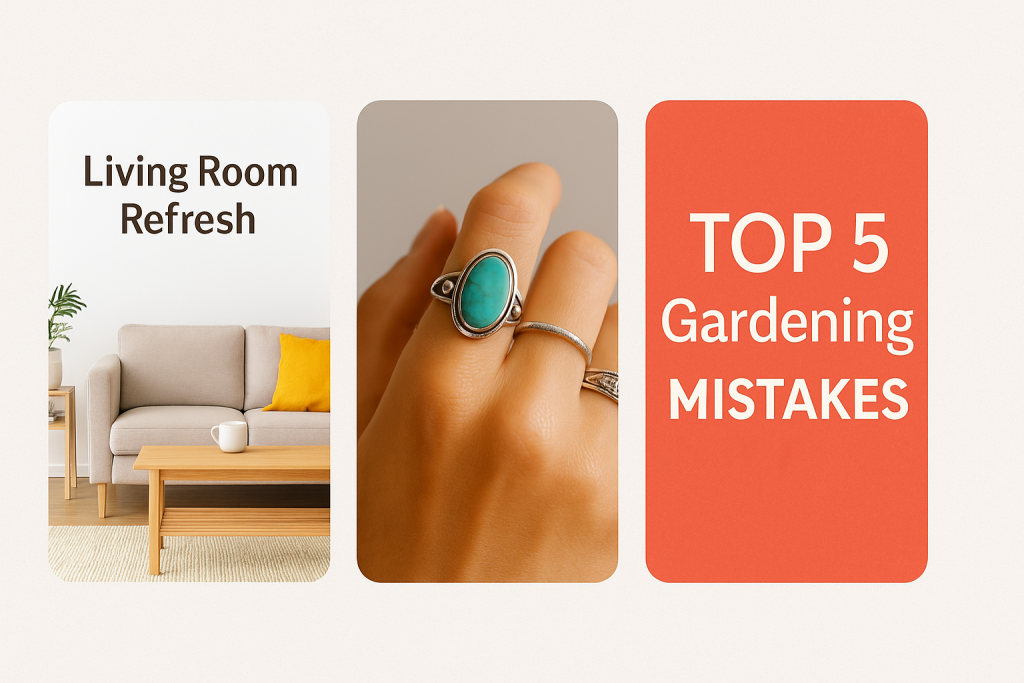
The secret to making multiple Pins work is genuine variety. Each Pin needs to feel distinct, even if they all lead back to the same URL.
Otherwise, you’re just creating noise.
Here’s how you can effectively mix things up:
- Vary the imagery: For one Pin, use a bright lifestyle photo. For another, a close-up product shot. For a third, try a custom graphic with bold text.
- Switch up the headline: Test out different angles. Frame one as a “How-To” guide, another as a “Top 5 Mistakes” list, and a third that highlights a surprising benefit.
- Change the call to action: Experiment with direct commands like “Read the Full Guide,” “Shop the Collection,” or “Download the Free Checklist.”
Key Insight: Your goal isn’t just to make more Pins; it’s to gather intelligence. When one variation takes off, you’ve just uncovered a valuable clue about what your audience craves. This insight should directly inform how you approach your future Pin designs.
This approach prevents your content from going stale and consistently feeds the Pinterest algorithm new assets to test and promote.
For a deeper dive, check out our guide on how to optimize Pinterest pins for maximum performance, where we break down even more strategies.
Embracing Engaging Formats
While static image Pins are the foundation of any Pinterest presence, integrating richer media can dramatically increase your engagement.
Movement and storytelling are what stop the scroll. Two formats you should absolutely be experimenting with are Video Pins and Idea Pins.
Video Pins are gold because they autoplay in the feed, immediately catching the eye with motion.
They are perfect for showing a process—think a quick recipe tutorial, a DIY craft coming to life, or a product being used in a real-world setting.
Idea Pins, on the other hand, are multi-page stories that let you walk users through an entire concept without them ever leaving Pinterest.
They’re fantastic for building brand authority and fostering a community, as they’re designed to encourage saves and follows rather than just clicks.
To help you decide which format to use and when, here’s a quick breakdown of their strategic uses.
Pin Type Comparison for Strategic Content
Choosing the right Pin format is crucial for hitting your specific goals. This table breaks down when to use Static, Video, and Idea Pins to get the best results.
| Pin Type | Best Used For | Key Feature |
|---|---|---|
| Static Pin | Driving direct traffic to a URL, evergreen content, A/B testing headlines and images. | The classic, direct link to your website or blog. |
| Video Pin | Demonstrating a process, showing a product in action, capturing immediate attention. | Autoplays in the feed, highly engaging with motion. |
| Idea Pin | Telling a story, building a community, sharing step-by-step guides, growing followers. | Multi-page format that keeps users on Pinterest. |
By strategically mixing these formats, you create a more dynamic and engaging profile that caters to different user behaviors on the platform.
Using Analytics to Double Down on What Works
Your Pinterest Analytics dashboard is your secret weapon. Seriously. This is where you stop guessing and start making data-driven decisions.
Make it a habit to regularly check which of your Pins are driving the most impressions, saves, and—most importantly—outbound clicks.
Start looking for patterns. Do Pins with a certain color palette always perform better? Do your listicle-style headlines consistently win? This data is pure gold.
It tells you exactly what to create more of and what to phase out.
By identifying your top performers, you can refine your strategy with precision, giving every new Pin you publish the best possible chance to succeed.
Make Every Pin Traffic-Ready Before You Hit Publish
You’ve just learned how to design a strong Pinterest pin—now the key is doing it consistently.
Every time you create a new pin, there are a lot of tiny decisions to make: image size, layout, headline, branding, and keywords. Miss a few of them, and even a great design can end up buried in the feed.
A simple checklist turns that guesswork into a repeatable process.
Instead of wondering if you forgot something, you can move through each step with confidence:
Is the text readable on mobile? Is the image sized correctly? Does the headline make someone want to click? Is your branding in place?
Post Paddle’s free Pinterest Pin Checklist walks you through these essentials one by one. It’s designed to help you quickly review every new pin before it goes live, so more of your designs actually turn into clicks, saves, and real traffic to your site.
Use it alongside the strategies in this guide and turn every pin you publish into a small, optimized traffic asset—not just a nice-looking graphic.
Answering Your Top Pinterest Questions
Getting started on Pinterest often brings up a flood of questions. I’ve been there! Let’s walk through some of the most common hurdles so you can move forward with confidence.
First up, let’s talk about size. You’ll see all sorts of Pin dimensions floating around, but the sweet spot remains a 2:3 aspect ratio. I always recommend starting with 1000 x 1500 pixels.
This size is practically a requirement now, as it’s perfectly optimized to fill the screen on mobile, where most of your audience is scrolling.
How Many Fresh Pins Should I Be Making?
This is the million-dollar question, isn’t it? The answer really boils down to your specific content and goals, but the magic word is consistency.
A great target for most accounts is creating 1 to 3 completely new, fresh Pins every day. This shows Pinterest you’re an active, valuable creator.
Of course, this isn’t a one-size-fits-all rule. The type of content you’re promoting makes a big difference.
- For a “How-To” Guide or Single-Topic Blog Post: Think about user behavior. Someone looking for a “chocolate chip cookie recipe” will probably only save one Pin to get the answer. For this kind of link, I’d create 5-10 different Pin designs but—and this is key—schedule them out over several days or even weeks. Dumping them all at once can get you flagged as spam.
- For Inspirational or Gallery-Style Content: This is where you can really ramp things up. If your post is something like “30 Summer Outfit Ideas” or “20 Modern Kitchen Designs,” a user might see several different images they love and save them all. In this case, it’s perfectly fine to create and publish multiple unique Pins from that single URL, even on the same day.
My Pro Tip: It all comes down to the “save potential” of your content. If a single link can inspire multiple individual saves (like a gallery), you can Pin more frequently. If it’s a one-and-done solution, give your Pin variations some breathing room.
Why Is No One Clicking My Pins?
Staring at a dashboard with zero traffic is frustrating, but the fix usually comes down to a few key areas. The first place I always check is the SEO. Are you actually using the keywords your audience is searching for in your Pin title and description?
Next, look at your design. Is the text on your Pin bold, clear, and instantly readable on a tiny phone screen? If someone has to squint, they’ll just keep scrolling.
And remember, Pinterest is all about what’s new. The single most effective strategy I’ve seen for reviving traffic is creating multiple, unique Pin designs for your best-performing content.
A fresh image, a catchier headline, or even just a different color palette can capture the attention of a completely new audience segment.