So, you want to schedule Pins on Pinterest. You’ve got two main ways to do it: either right on the Pinterest platform using their built-in tool, or with a specialized third-party app like Post Paddle.
The basic idea is simple. You create your Pin, nail down a great description, add your link, and then tell Pinterest exactly when you want it to go live in the future.
This one shift in your workflow can be the difference between random, sporadic posting and building a real, automated growth engine for your brand.
Why Scheduling Pins Is a Pinterest Game Changer
It’s easy to lump Pinterest in with other social media platforms where you just toss content out there and cross your fingers.
But that’s a recipe for inconsistent effort and, frankly, disappointing results. The real magic happens when you stop treating Pinterest like a social network and start seeing it for what it is: a visual search engine.
This is exactly why scheduling is your secret weapon.
Unlike other platforms where a post’s life is measured in hours, a Pin can stick around and drive traffic for months.
When you learn how to schedule pins on pinterest, you’re creating a consistent stream of content that hits your audience during their most active hours—even while you’re sleeping or on vacation.
This consistency is a massive signal to the Pinterest algorithm that you’re a serious, reliable creator, which helps boost your authority and overall reach.
The Power of Content Compounding on Pinterest
Scheduling is about so much more than just saving a few minutes here and there. It’s about making your content work smarter, not harder.
Picture this: you set aside just one or two hours on a Monday to map out and schedule all of your Pins for the entire week, or even the month.
Just like that, you’ve freed yourself up to focus on creating products, talking to customers, or, you know, having a life. All the while, your Pinterest account is growing in the background.
This is what I call the “content compounding” effect. Every single Pin you schedule becomes a digital asset that keeps working for you long after it’s published.
As your Pins get discovered and re-pinned over time, your reach doesn’t just grow, it grows exponentially.
A well-oiled Pinterest strategy can give your content a shelf life that’s 120 times longer than a typical social media post, and it often only takes about an hour a week to manage.
If you’re curious about the numbers, you can dive into some more data-backed marketing strategies to see just how powerful this approach can be.
Manual Posting vs. Scheduled Posting At a Glance
The difference between posting whenever you remember and committing to a scheduling strategy is night and day.
One approach feels like a constant chore, while the other builds a reliable, sustainable traffic machine for your business.
To really put it into perspective, here’s how the two methods stack up against each other.
Key Takeaway: The real win with scheduling is turning Pinterest from a daily to-do list item into a predictable marketing channel.
It lets you shift your energy from when you need to post to what you should be posting—a much more strategic use of your brainpower.
Manual Posting vs Scheduled Posting At a Glance
| Aspect | Manual Posting | Scheduled Posting |
|---|---|---|
| Consistency | Sporadic and inconsistent; entirely dependent on your daily availability. | Consistent and reliable; Pins go live at optimal times automatically. |
| Time Investment | A daily, time-sucking effort is required for every single post. | Batch-processed in focused blocks, saving you hours every week. |
| Audience Reach | Limited to the specific times you happen to be online and active. | Maximized by publishing when your audience is most active, regardless of your schedule. |
| Strategic Focus | Reactive and short-sighted, focused on just “getting something out today.” | Proactive and forward-thinking, focused on long-term growth and campaigns. |
| Overall Growth | Slow and unpredictable; often feels like you’re spinning your wheels. | Steady and compounding, leading to predictable and scalable traffic. |
Ultimately, scheduling puts you in the driver’s seat. Instead of being a slave to the algorithm’s whims, you get to master it.
You’re not just posting content; you’re building a resilient library of assets that will drive traffic and leads for months and years to come.
Laying the Groundwork Before You Schedule
Before we even touch a scheduling tool, let’s talk about what really matters. A killer scheduling strategy is useless if your Pinterest account itself isn’t set up for success.
Getting these foundational pieces right from the start will make every single Pin you schedule work harder for you.
First things first: you absolutely need a Pinterest Business account. If you’re still using a personal profile, you’re missing out on the most important tools of the trade.
Making the switch is free, and it’s the only way to unlock Pinterest Analytics—the dashboard that tells you what’s working and what’s not.
Without analytics, you’re just throwing content at a wall and hoping something sticks. With it, you get to see which Pins drive clicks, who your audience is, and what they genuinely want from you.
It’s the difference between guessing and knowing. Plus, it gives you access to advanced features like Rich Pins, which are crucial for looking professional.
Plant Your Flag: Claim Your Website
Once your business account is active, your next immediate task is to claim your website. This is a simple but vital verification step where you prove to Pinterest that you own your domain.
It’s like putting your official stamp on all the content that comes from your site.
Why is this so important? A few reasons I’ve seen make a huge difference:
- Unlocks Rich Pins: These are a game-changer. Rich Pins automatically sync extra data from your website—like a blog post’s headline or a product’s price—right onto the Pin itself. They look more professional and get way more engagement.
- Supercharges Analytics: When your site is claimed, your analytics get far more detailed. You can track exactly which Pins are funneling traffic to your website, which is essential for measuring your ROI.
- Builds Brand Authority: A claimed website adds your profile picture and a “Follow” button right next to any Pin saved from your site, no matter who Pinned it. This is free, automatic branding across the entire platform.
This small, one-time action ensures you get full credit and tracking for everything you do. It turns your Pins from standalone images into branded gateways pointing straight back to your content.
Think Like a Librarian: Organize Your Boards
Your Pinterest boards are not just random folders. They are carefully curated collections designed to attract your ideal follower.
A board named “My Blog Posts” or “Cool Ideas” is a wasted opportunity. You need to think of each board as a highly specific library shelf that your target audience is actively searching for.
This means giving your board titles and descriptions the same SEO love you’d give a blog post title.
Key Takeaway: A well-optimized board doesn’t just hold your Pins—it’s a discovery tool. When your boards are built around specific keywords, you’re essentially helping Pinterest’s search engine recommend your profile to new users.
Let’s say you’re a food blogger. Instead of one massive “Recipes” board, get specific. Create boards like “Easy Vegan Dinner Recipes,” “30-Minute Weeknight Meals,” or “Healthy Gluten-Free Desserts.”
This level of detail is precisely how you connect with someone searching for that exact solution.
A great trick is to use the Pinterest search bar as your research tool. Type in a broad topic and watch the auto-suggestions.
Those are real terms people are searching for right now. Use that insight to name your boards and guide your content strategy.
With this solid foundation in place, you’re ready. Now, when you schedule pins on Pinterest, each one will land in a perfectly optimized home, ready to be discovered.
Getting Started With a Pinterest Scheduling Tool

So, your business account is set up and your boards are looking sharp. Now for the real game-changer: learning how to schedule pins on Pinterest using a tool that does the heavy lifting for you.
While Pinterest’s own scheduler is okay for one-off Pins, dedicated third-party apps are where the magic happens. They unlock powerful features that save you a ton of time and give you a serious strategic edge.
We’ll walk through the process using a typical scheduling app as our guide. Honestly, once you’ve used one, you’ve pretty much used them all—the core steps are very similar across the board.
The goal isn’t just to post content; it’s to post it smarter, freeing up your schedule while amplifying your results.
First Things First: Connecting Your Account
Before you can do anything else, you’ll need to link your Pinterest Business account to your chosen scheduling tool.
This is a standard, one-time process. The app will send you over to Pinterest to grant permission, which keeps the connection secure. Once that’s done, you’re all set.
With your account connected, the tool’s dashboard becomes your new mission control. This is where you’ll upload your Pin graphics, write catchy descriptions, and plan out your entire content calendar.
It’s built to be an all-in-one workspace, so you can stop toggling between a million different tabs.
Let’s Schedule Your First Pin
Let’s run through a real-world example. Say you just published a new blog post, “10 Easy Weeknight Dinner Ideas,” and you’ve designed a beautiful Pin graphic to go with it.
Here’s how you’d get it scheduled and ready to go.
- Upload Your Graphic: Start by dragging and dropping your Pin image or video file directly into the scheduler. It’s usually a very straightforward upload process.
- Write a Killer Title: Your title is everything. It needs to be clear, engaging, and sprinkled with keywords people are actually searching for. Instead of a bland “New Blog Post,” try something like “10 Easy Weeknight Dinner Ideas for Busy Families.” See the difference?
- Craft an Optimized Description: This is your chance to feed the Pinterest algorithm more juicy details. You could write something natural like: “Looking for quick and healthy weeknight meals? These ten easy dinner recipes are perfect for busy families. Find simple ideas from chicken to pasta that are ready in 30 minutes or less. #weeknightdinners #easymeals #familyrecipes”
- Add Your Destination Link: This is probably the most important step for driving traffic back to your site. Carefully copy and paste the full URL of your blog post. Always double-check this link! A broken link makes for a completely useless Pin.
- Pick Your Boards: Select the most relevant board first. For our example, a board named “30-Minute Weeknight Meals” would be a perfect home for this Pin. You can (and should!) schedule it to other relevant boards later, like “Family Dinner Ideas,” just be sure to leave a healthy gap between postings.
Following these steps gives you total control, ensuring every single element of your Pin is polished and optimized before it ever sees the light of day.
The Real Time-Savers: Advanced Scheduling Features
Scheduling one Pin at a time is nice, but the true power of these tools lies in features that let you work in batches.
This is what shifts your Pinterest strategy from a daily grind to a focused task you might only tackle once a week.
One of the most valuable features is bulk scheduling. Instead of the one-by-one approach, you can upload dozens of Pin graphics at once.
From there, you can add titles, descriptions, and links in a streamlined, easy-to-manage view.
For instance, if you made ten different Pin designs for that one “Weeknight Dinners” post, you can upload all ten, assign the same URL to them all, and then quickly write unique descriptions for each.
This infographic breaks down the basic creative flow for making effective Pins that are ready for scheduling.
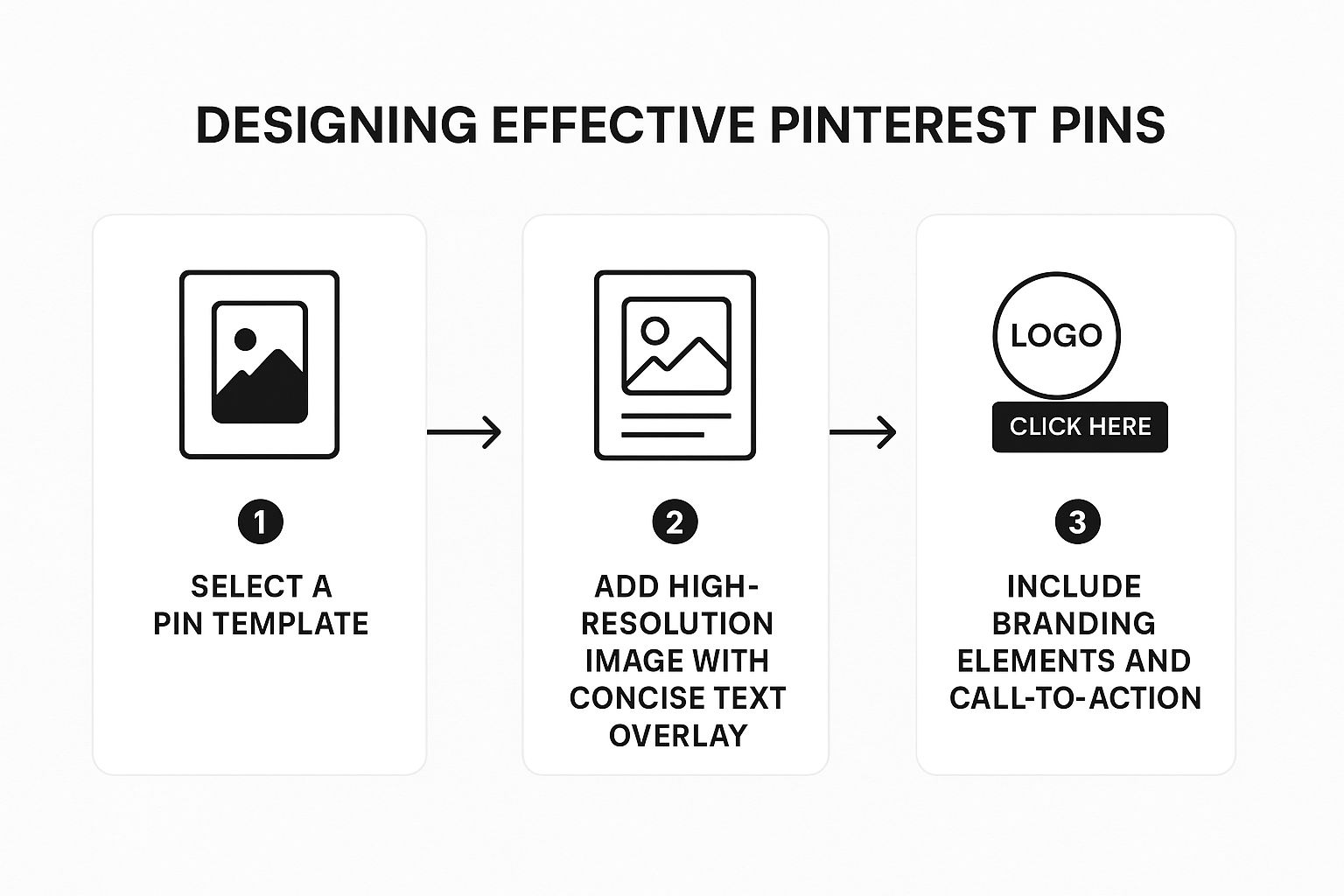
By front-loading the design work, you make the actual scheduling part incredibly fast and efficient.
Expert Insight: Many successful creators I know schedule an entire week or even a month’s worth of content in a single sitting.
They batch their tasks—designing graphics on Monday, scheduling them on Tuesday—to create a system where Pinterest is constantly working for them in the background.
Smart Scheduling: Posting at the Perfect Moment
The best schedulers offer another incredible feature: smart scheduling. Instead of you guessing when your audience is online, the tool does the work for you.
It analyzes your account’s data to pinpoint the exact times your followers are most active and likely to engage with your content.
The app then creates a custom queue filled with these optimal time slots. When you schedule a new Pin, it automatically gets added to the next available smart slot.
This removes all the guesswork and helps your Pins get maximum traction right from the get-go.
This is how you build a powerful, automated Pinterest marketing machine. To dive even deeper, our complete guide on using a Pinterest scheduler covers more advanced strategies and tips.
Developing a High-Impact Pinning Strategy

Having a great scheduling tool is one thing, but it’s the strategy behind your content that truly drives growth on Pinterest.
If all you’re doing is queueing up the same old Pins, you’re missing the bigger picture. To really get ahead, you have to think beyond simply re-pinning what you’ve already shared.
At the heart of any modern, successful Pinterest strategy is the idea of Fresh Pins. This concept can be a game-changer, and no, it doesn’t mean you have to churn out new blog posts every single day.
A Fresh Pin is simply a new image or video that Pinterest has never seen before, even if it points to an older article or product page on your site.
Why does this matter so much? Because Pinterest’s algorithm is built to reward newness. When it sees a brand-new graphic, it treats it like fresh content and gives it a nice boost in people’s feeds.
This is probably the most powerful tool you have for staying visible on the platform.
Embrace the Power of Fresh Content
Let me break it down with a real-world example. Imagine you wrote a fantastic blog post about “Easy Vegan Dinner Recipes” six months ago.
It’s still a great piece of content. Instead of just re-pinning that one original graphic repeatedly, you can create three totally new, distinct Pins for it.
- Pin #1: A clean, minimalist photo with a simple text overlay: “5-Ingredient Vegan Dinners.”
- Pin #2: A short, snappy Video Pin showing a time-lapse of you making one of the recipes.
- Pin #3: An Idea Pin that walks through one of the recipes step-by-step, right on the platform.
Each of these is a Fresh Pin. They all link back to that same awesome blog post, but they give you three unique chances to catch someone’s eye and get picked up by the algorithm.
You’re keeping your content in circulation without having to constantly create new blog posts from scratch.
Building a Balanced Content Mix
A killer schedule isn’t just a constant stream of your own stuff. A healthy, engaging Pinterest account serves up a balanced diet of different types of content.
This keeps your audience from getting bored and, just as importantly, signals to Pinterest that you’re a valuable curator in your niche, not just a relentless self-promoter.
I always recommend a simple mix for your weekly schedule, built on three pillars:
- Your Content (80%): The vast majority of what you schedule should be Fresh Pins that lead people back to your website, your products, or your email list. This is your bread and butter.
- Curated Content (20%): Spend a little time sharing high-quality, relevant Pins from other people. Pinning a helpful article from a complementary blog builds your credibility and gives your followers more value.
- Promotional Content: Don’t be afraid to directly promote your products or services, but do it thoughtfully. These Pins should still look great and offer value, not just scream “Buy Now!”
The payoff for this strategy is huge, and it’s all about playing the long game. You’re not just chasing immediate clicks; you’re building an evergreen library of assets.
In fact, Pins that are one to two years old are often the most saved, averaging 68 saves per Pin over a 90-day period.
Putting It All Together with a Sample Calendar
So, what does this actually look like day-to-day? The trick is to create a simple system you can actually follow.
You can get a much more detailed breakdown in our guide to building a complete Pinterest content calendar.
For now, here’s a sample structure for a single day that you can easily rinse and repeat:
Daily Pinning Schedule Example
| Time Slot | Pin Type | Content Source | Goal |
|---|---|---|---|
| 8:00 AM | Fresh Static Pin | Your new blog post | Drive initial traffic |
| 12:00 PM | Curated Pin | Another creator’s article | Provide value & build authority |
| 4:00 PM | Fresh Video Pin | Your old, popular blog post | Re-engage audience with new format |
| 8:00 PM | Fresh Idea Pin | Your core product/service | Educate and nurture leads |
This simple rhythm ensures you’re consistently feeding the algorithm, driving traffic where it matters most, and genuinely serving your audience.
Tap into Real-Time Trends
Want to give your strategy an extra boost? Start aligning your scheduled content with what people are actually searching for right now.
This is where the free Pinterest Trends tool becomes your secret weapon. It literally shows you which topics are gaining steam on the platform and when they usually peak.
For instance, if you hop on Trends and see searches for “outdoor patio ideas” starting to climb in March, that’s your cue.
You can start creating and scheduling content around that topic to catch the wave of interest as it builds toward spring and summer.
Scheduling Pins based on these trends means your great content is also perfectly timed for maximum discovery.
Optimizing Your Schedule for Peak Performance

Okay, so you know how to schedule Pins. Now for the million-dollar question: when should you schedule them?
A brilliant Pin posted when your audience is offline is like telling a great joke to an empty room. It just won’t land.
General best practices are a decent place to start, but the real magic happens when you figure out the unique rhythm of your specific audience.
Let’s start with the big picture. Broadly speaking, weekdays are hot, especially in the evening. This just makes sense, right?
People are scrolling after a long day at work, looking for recipes, planning weekend projects, or just winding down. That’s your window.
For instance, some 2025 data suggests specific times are better than others.
One study points to Monday around 8 p.m. and 4 p.m. as being particularly strong. Tuesday evenings at 8 p.m. and 9 p.m. also pop up as great times to get more eyes on your content.
Finding Your Own Sweet Spot
General advice is helpful, but your audience has its own quirks. If you’re a food blogger, your followers might be most active around lunchtime. A B2B consultant?
Your audience is probably scrolling during their 9-to-5. This is where you need to put on your detective hat and dig into your Pinterest Analytics.
Head over to your Analytics dashboard and find the “Audience Insights” tab.
This is your goldmine. Pinterest lays it all out for you—showing you exactly when your followers are on the platform, broken down by day and even by the hour.
Pro Tip: Don’t just copy and paste a generic schedule you found online. Your own data is king. If your analytics scream “Sunday afternoon,” then that’s your primetime, no matter what anyone else says.
This data lets you build a schedule that’s tuned perfectly to your followers’ habits.
For a more detailed guide on reading these charts, take a look at our post on finding the best time to Pin on Pinterest.
Make Your Pinterest Schedule Practically Run Itself
Scheduling Pins is so much easier when you’re not starting from a blank screen every single time.
Instead of writing every title and description from scratch, you can use Pinterest GPTs to generate batches of scroll-stopping Pin ideas, keyword-rich descriptions, and hook variations in minutes.
Create one focused content block where you spin up dozens of on-brand Pin titles and descriptions, then drop them straight into your Pinterest scheduler.
That way, your queue stays full of fresh, optimized Pins that publish at the best times—without you having to sit down and “think of something” every day.
If your goal is to turn Pinterest into a reliable, automated traffic channel, giving yourself a Pin-copy co-pilot is one of the easiest upgrades you can make.
Frequently Asked Questions (FAQs)
How Often Should You Be Pinning?
Alright, let’s talk frequency. You’ll see all sorts of crazy numbers thrown around, but I’ll tell you what really works based on years of experience: consistency beats volume every single time.
You don’t need to post 20 Pins a day. Seriously, don’t do it. That’s a fast track to annoying your followers and potentially getting flagged for spam.
What the Pinterest algorithm really loves is a steady, predictable flow of fresh content.
A smart, sustainable strategy is to schedule between 1 to 5 Fresh Pins every day.
- 1 Pin a day: Perfect if you’re just starting out and want to build a solid habit.
- 3-5 Pins a day: The sweet spot for most creators and businesses aiming for real growth.
- 5+ Pins a day: Best left to big brands with a mountain of content and a team to manage it.
This approach keeps your profile fresh and your content in front of your audience without burning you out or flooding their feeds.
Think of it like watering a plant—a little bit every day helps it grow strong. Drowning it once a month will kill it. The same logic applies when you schedule Pins on Pinterest. Slow, steady, and smart is how you win.
Alright, let’s get into the nitty-gritty. Once you’ve got the basics down for scheduling Pins, you’ll inevitably run into a few common questions.
I’ve heard these time and time again from clients and fellow marketers, so let’s clear them up. Getting these right is what separates a decent Pinterest strategy from a truly effective one.
Is Pinterest’s Own Scheduler Good Enough, or Do I Need Another Tool?
This is probably the first question everyone asks, and the honest answer is: it depends on what you’re trying to achieve.
Pinterest’s built-in scheduler is perfectly fine if you’re just starting out or only need to pop a few Pins onto your schedule now and then. It’s free, it works, and it’s a great way to get your feet wet. No complaints there.
But if you’re serious about driving real traffic and growth for your business—whether you’re a blogger, run an e-commerce shop, or manage accounts for clients—a dedicated third-party tool isn’t just a luxury; it’s essential. The difference in what you can accomplish is staggering.
Think of it like this: The native scheduler is a reliable bicycle, great for a quick trip around the block. A dedicated tool is a fully-equipped delivery van, designed for efficiency, scale, and getting serious results.
A specialized scheduling tool unlocks capabilities that the native scheduler just doesn’t have:
- Serious Time-Saving: Imagine scheduling a month’s worth of Pins in a single afternoon. That’s the power of bulk scheduling.
- Smart Scheduling: These tools don’t just guess. They analyze your audience’s activity and pinpoint the absolute best times to post for you, maximizing your reach.
- Analytics That Actually Help: You get to dig so much deeper than Pinterest’s own stats, seeing exactly which Pins are driving clicks and conversions, which is what really matters.
When you factor in the hours saved and the boost in performance, the monthly cost for a good tool pays for itself almost immediately.
What’s the Magic Number? How Many Pins Should I Schedule a Day?
Here’s where so many people go wrong. They assume more is always better and end up spamming their followers.
The truth is, the Pinterest algorithm values consistency way more than it values sheer volume. It wants to see a steady, reliable stream of fresh content, not a huge dump of Pins all at once.
For most businesses and creators, the sweet spot is somewhere between 1 and 5 new, “fresh” Pins per day.
Let me put it another way: scheduling two well-crafted, unique Pins every single day will do more for your account than dropping 14 Pins on a Sunday night and then going silent for a week.
That slow-and-steady rhythm keeps your account active and tells the algorithm you’re a consistent contributor, which is exactly what you want.
If you’re new to this, just aim for one great Fresh Pin a day. As you build up your content and get into a workflow, you can easily ramp that up to 3-5 without breaking a sweat.
Can I Actually Get in Trouble for Scheduling Too Many Pins?
Yes, you can, and you should take this seriously. Pinterest is fiercely protective of its user experience, and its systems are built to sniff out and penalize accounts that look spammy.
This is a critical piece of the puzzle when you’re learning how to schedule Pins correctly.
The biggest red flag for the algorithm is pinning the exact same Pin (the same image linked to the same URL) across multiple boards in a short time frame.
That’s a classic spam move. As a safe rule, you should always wait at least two days before pinning the same URL to a different board.
An even better, algorithm-friendly approach is to stop repinning the same exact image entirely.
Instead, create multiple “Fresh Pins”—meaning different, unique Pin graphics or videos that all lead back to the same blog post or product page. You can then schedule these unique creatives out over weeks or even months.
This strategy gives the algorithm the fresh content it craves and keeps your account in perfect health, giving you all the benefits of frequent posting with none of the risk.