Promoting your blog on Pinterest is more than just another task on your to-do list.
It starts with setting up a Business account, weaving keywords into your profile, and creating those eye-catching, vertical Pins with bold text that stop the scroll.
The real secret?
You have to treat Pinterest like a search engine.
That means writing keyword-rich Pin descriptions and consistently sharing fresh ideas that all lead back to your blog.
Why Pinterest Is a Goldmine for Blog Traffic
Before we jump into the “how,” let’s talk about the “why.” What makes Pinterest so different, and frankly, so much better for bloggers than other platforms? It all comes down to longevity.
A tweet disappears in minutes, and a Facebook post is old news by tomorrow.
But a single Pin? It can continue sending traffic to your blog for months—sometimes even years.
This isn’t just social media; it’s a visual discovery engine.
The mindset of a Pinterest user is what really sets it apart. People don’t just mindlessly scroll through family photos here.
They are actively planning, searching, and looking for inspiration. They show up with a purpose: to find the perfect lasagna recipe, a guide for a DIY bookshelf, or ideas for their next vacation.
This proactive mindset means they are not just open to clicking a link—they want to click a link that solves their problem or inspires them.
The Power of Proactive Users
This built-in user intent is a game-changer. It sends high-quality, genuinely interested traffic straight to your blog.
A visitor from Pinterest is already warmed up because they were actively searching for the exact information you provide.
This makes them far more likely to stick around, read your entire post, subscribe to your newsletter, or even buy something.
Let’s look at the numbers. As of early 2025, Pinterest has ballooned to 570 million monthly active users. And these aren’t just casual browsers.
Roughly 85% of weekly Pinners have actually bought something based on a Pin they saw. Even more telling for us bloggers, the platform drives a staggering 33% more referral traffic to websites than Facebook does.
If you want to dive deeper into the data, Thunderbit.com has some great insights.
The real magic of Pinterest is the lifespan of your content. A Pin you publish today can turn into a reliable, passive stream of traffic for a very, very long time.
That makes every minute you spend on the platform a smart investment in your blog’s future growth.
The official Pinterest Business page really hammers this home, showing how creators can turn a moment of inspiration into real-world action.
This visual perfectly captures it: users are on the platform to “do,” “try,” or “buy.” That’s a blogger’s dream audience.
A Quick Look: Pinterest vs. Other Platforms
When you’re deciding where to spend your limited time promoting your blog, it’s helpful to see how the major players stack up.
Each platform has its strengths, but Pinterest’s focus on discovery and long-term value makes it a standout choice for content creators.
Pinterest vs Other Platforms for Blog Promotion
| Feature | |||
|---|---|---|---|
| Content Lifespan | Very long (months to years) | Short (24-48 hours) | Short (a few hours) |
| Primary Goal | Discovery, planning, inspiration | Social connection, lifestyle | Community, news, updates |
| Link Clicks | High, integral to the platform | Low, limited to bio/stories | Moderate, depends on algorithm |
| User Intent | Proactive (searching for ideas) | Passive (browsing feeds) | Passive (connecting with friends) |
| SEO Value | High, functions like a search engine | Low, content isn’t easily searchable | Low, primarily internal reach |
| Traffic Quality | High-intent, engaged visitors | Lower-intent, often for visuals only | Varies, can be low-engagement |
As you can see, while Instagram is fantastic for brand building and Facebook is great for community, Pinterest is built from the ground up to send people off the platform and onto your blog.
That’s its core function.
Your Blog’s Visual Front Door
The best way to think about it is this: your Pinterest profile is the visual storefront for your blog.
Each Pin you create is like a beautifully designed billboard, giving people a sneak peek of the valuable content waiting for them on your website.
Success on Pinterest isn’t about chasing viral trends. It’s about patiently building a consistent, visually appealing library of content that steadily funnels new, excited readers right to your doorstep.
As we cover in our complete guide on using Pinterest for bloggers, once you grasp this unique ecosystem, you’ll stop seeing it as a chore and start recognizing it as one of your most powerful promotional assets.
Building Your Pinterest Profile for Success
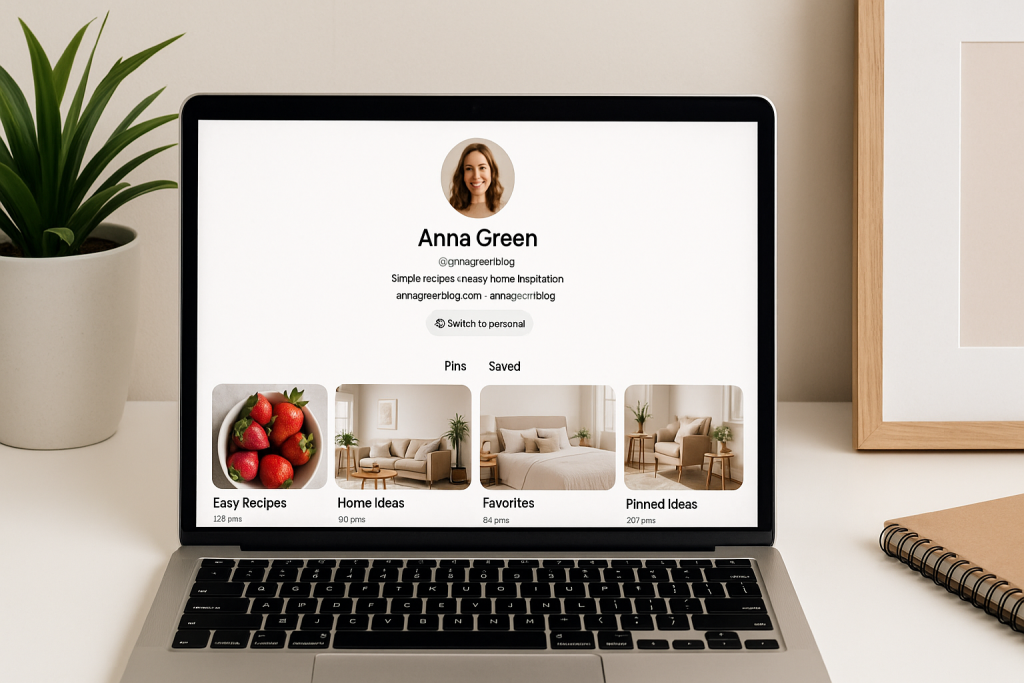
Think of your Pinterest profile as the digital storefront for your blog. It’s the very first impression you make on potential readers.
A messy, disorganized profile is like a cluttered shop window—people will just walk on by. But a thoughtfully designed profile?
That invites people in, making them curious to see what you have to offer. This is ground zero for building a Pinterest strategy that actually works.
First things first, you need to switch to a free Pinterest Business account. This isn’t just a suggestion; it’s a must-do.
Sticking with a personal account means you’re flying completely blind. A business account is your key to unlocking essential tools, especially Pinterest Analytics.
This is the only way you’ll know which Pins are driving traffic and what your audience truly wants to see.
Crafting a Keyword-Rich Bio
With your business account set up, your profile bio becomes your most valuable piece of real estate. You get a tiny space to tell people who you are and what problems you solve for them.
This is no time to be clever or vague. Put yourself in your ideal reader’s shoes: what words would they type into the search bar?
For instance, if you’re a food blogger, “Lover of food” isn’t going to cut it. Get specific and pack it with keywords.
- Weak Bio: “Sharing my favorite recipes.”
- Strong Bio: “Helping busy families with easy 30-minute meals, simple baking recipes, and healthy dinner ideas. Find your next favorite weeknight meal!”
See the difference? The strong bio immediately identifies the target audience (busy families), offers a clear solution (easy meals), and is loaded with searchable terms. This is how the right people find you.
It’s true that only about 5% of Pinterest users will click through to your actual profile. But those who do are your most engaged potential followers.
You have a split second to grab their attention and convince them you’re worth following. Your bio and overall profile need to seal the deal.
Claim Your Website and Solidify Your Brand
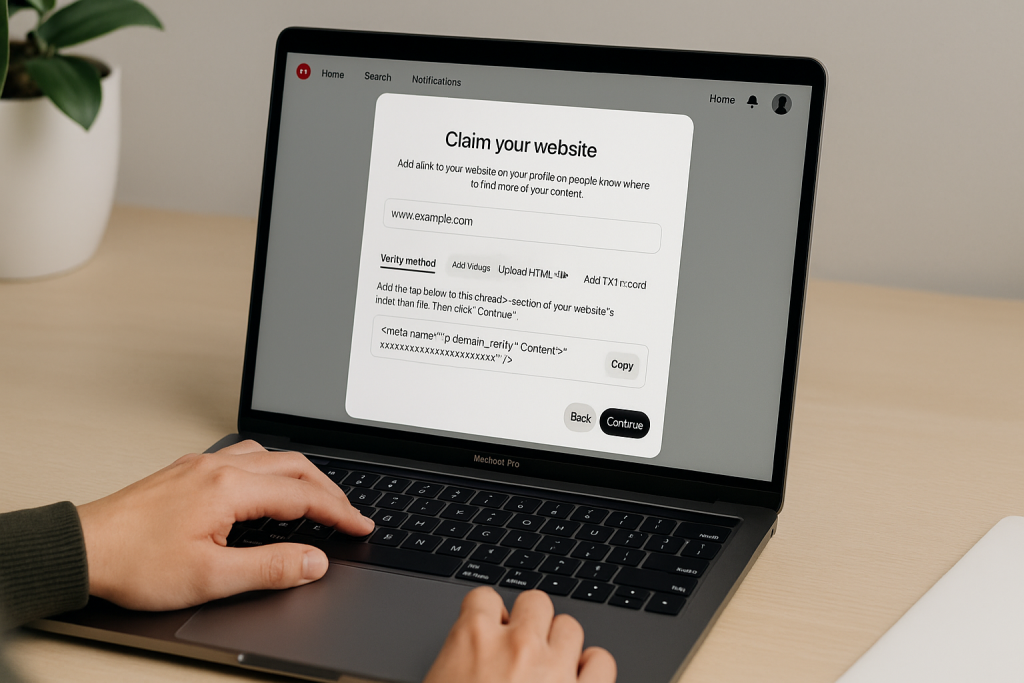
Next up is claiming your website. This is a quick but critical step that officially links your blog to your Pinterest profile.
Once you do this, a little globe icon with your URL appears on your profile—think of it as a verification badge.
Claiming your site is important for two main reasons:
- It builds authority. You’re signaling to Pinterest that you’re a serious content creator, which can give your Pins a nice little boost in distribution.
- It unlocks powerful analytics. You’ll get to see performance data for any Pin created from your website, even if someone else pinned it. This gives you the full story of your blog’s reach on the platform.
Structure Your Boards for Clarity and Discovery
Your Pinterest boards are the shelves of your digital storefront.
A random mess of boards named “My Blog Posts” or “Cool Stuff” is confusing and unhelpful. Your boards need to be just as strategic as your bio.
Think in terms of the main categories and sub-topics you cover on your blog.
Each board title should be a keyword phrase that your ideal reader is actively searching for.
Board Naming and Organization Example
Let’s say you run a personal finance blog. A single, generic board called “Finance Tips” is a missed opportunity.
Instead, you’d create a clear, organized set of boards that guide users to exactly what they need.
| Broad Category | Specific Board Title (Keyword Optimized) |
|---|---|
| Budgeting | “Budgeting for Beginners” |
| Saving Money | “How to Save Money on Groceries” |
| Investing | “Investing 101 for Millennials” |
| Paying Off Debt | “Creative Ways to Pay Off Debt Fast” |
This kind of logical structure makes it incredibly easy for a visitor to find relevant content.
Don’t stop there—write keyword-rich descriptions for every single board to give the Pinterest algorithm even more context.
The final touch? Create clean, on-brand board covers. This gives your profile a polished, professional look that makes people excited to click that “Follow” button.
Once these foundational pieces are in place, you’re truly ready to promote your blog on Pinterest.
The Anatomy of a High-Performing Pin
This is where the real magic happens. Creating Pins that actually stop the scroll and earn those coveted clicks is part art, part science.
You can’t just slap a featured image from your blog post onto Pinterest and expect traffic to pour in. Think of each Pin as a tiny, compelling billboard for your content.
A Pin that works isn’t just pretty—it’s engineered from the ground up to grab attention and make someone need to know more.
Every single choice, from the Pin’s shape to the font you pick, matters. This is your one shot to convince a user that your blog post has the answer they’ve been searching for.
The Vertical Advantage
Let’s start with the most basic, non-negotiable rule: always design vertically. Pinterest is a mobile-first world, and the feed is built for scrolling up and down.
A vertical Pin simply takes up more screen space, making it impossible to miss. Horizontal or square images just get squeezed and look like an afterthought.
For the best results, you’ll want to stick to a 2:3 aspect ratio. The gold standard dimension is 1000 x 1500 pixels.
This gives you a big, beautiful canvas that displays perfectly in the feed without getting cut off. You might see some super long, “giraffe” pins (like 1000 x 2100 pixels), but be careful with those.
Pinterest sometimes truncates them, cutting off your message.
A Pin that commands more visual space on the screen is inherently more likely to stop a user’s scroll. Sticking to the 2:3 ratio is one of the easiest ways to increase your Pin’s potential for engagement right from the start.
Crafting Compelling Text Overlays
Your image might set the tone, but it’s the text overlay that makes the promise. This is the copy you place directly onto your Pin design, and it needs to be big, bold, and incredibly clear.
It has one job: to instantly tell the user what they’ll gain by clicking.
Think of it as your Pin’s headline. It should be catchy and solve a specific problem.
- Be Bold and Legible: Use thick, easy-to-read sans-serif fonts. I can’t stress this enough—stay away from delicate script fonts for your main headline. They look beautiful on a desktop but turn into an unreadable smudge on a phone.
- Create Contrast: Your text has to pop. Make sure it stands out against the background image. You can do this by putting a semi-transparent color block behind the text, finding a clean area in your photo, or just picking a font color that has a ton of contrast.
- Keep It Punchy: Use powerful, action-oriented words. A headline like “10 Easy Dinner Recipes” or “How to Start a Blog in 30 Minutes” is direct and valuable. Vague titles get ignored.
This screenshot from Canva shows a bunch of Pin templates that nail this concept.
See how each one prioritizes readable text and a clear benefit? That’s what grabs someone’s attention in a fast-moving feed.
The Art of Keyword-Rich Descriptions
While the visuals do the heavy lifting for human eyes, the Pin’s title and description are what you write for the Pinterest algorithm.
This is your Pinterest SEO, and it’s what determines who the platform shows your Pin to. Don’t skip this.
Your Pin title is prime real estate for your main keyword. It should be clear and echo the promise you made on the Pin’s text overlay.
If your Pin says “Beginner’s Guide to Sourdough,” a great title would be “The Ultimate Beginner’s Guide to Sourdough Bread.”
The Pin description is where you can flesh things out. Write a couple of natural-sounding sentences packed with related keywords and long-tail phrases. This is your chance to tell the algorithm exactly what your content is about.
For instance, if your blog post is about “easy weeknight meals,” your description might look something like this:
“Looking for easy weeknight meals for your family? This collection of 30-minute dinner recipes has something for everyone.
From simple pasta dishes to healthy chicken recipes, you’ll find the perfect solution for busy nights. Find your next favorite quick family dinner here!”
This little paragraph weaves in several terms someone might actually search for, massively boosting the odds of your Pin showing up when it matters.
Branding for Recognition
Last but not least, always brand your Pins. When your followers are mindlessly scrolling, consistent branding is what makes them hit the brakes and say, “Oh, I know them!”
Your Pins don’t need to be cookie-cutter copies, but they should feel like they’re part of the same family.
Here’s how to do it simply:
- Use Your Brand Colors: Weave your brand’s color palette into your text, backgrounds, or borders.
- Stick to Your Fonts: Pick one or two brand fonts and use them consistently.
- Add Your Logo or URL: Place your blog’s logo or website address somewhere on the Pin, usually at the bottom. It’s great for brand recognition and also helps deter people from stealing your images.
When you bring all these pieces together—a strong vertical design, a punchy text overlay, keyworded descriptions, and consistent branding—you’ve built a Pin that’s truly engineered for success.
Each part works with the others to stop the scroll, speak to the algorithm, and drive that all-important traffic back to your blog.
Mastering Pinterest SEO for Long-Term Reach
To really win at Pinterest, you need a major mindset shift. Stop thinking of it as just a place for pretty pictures.
At its core, Pinterest is a visual search engine, and getting a handle on its SEO is the secret to unlocking a steady, organic stream of traffic that works for you 24/7.
Think of it like planting seeds. The work you do today will grow into a consistent flow of blog visitors for months, maybe even years, without you touching a thing.
This turns Pinterest from a daily grind into a sustainable traffic machine.
Finding Your Audience’s Language
Any good SEO effort starts with solid keyword research. You have to get inside your audience’s head and figure out the exact words and phrases they’re typing into that search bar.
Guessing just doesn’t work. Thankfully, Pinterest gives you all the clues you need.
The easiest way to start is by typing a broad topic from your blog post right into the Pinterest search bar. Let’s say you just wrote about “meal prepping.” Type it in and watch what happens.
Pinterest immediately drops down a list of popular, related searches. These aren’t random; they’re the most common ways real people are looking for that kind of content.
- “meal prep for beginners”
- “meal prep ideas for weight loss”
- “healthy meal prep lunch”
- “meal prep bowls”
These phrases are pure gold. They offer a direct line into what your audience wants and what problems they’re trying to solve, letting you angle your Pins and descriptions to meet them exactly where they are.
Think of the Pinterest search bar as a direct line to your audience’s thoughts. The auto-suggestions are a free, real-time report on what people are actively searching for right now. Use it.
Strategic Keyword Placement for Maximum Impact
Once you’ve got a solid list of keywords, you need to be smart about where you put them. Just sprinkling them in randomly won’t get you very far.
The key is to weave them into specific places across your Pinterest presence to send strong, clear signals to the algorithm about your content.
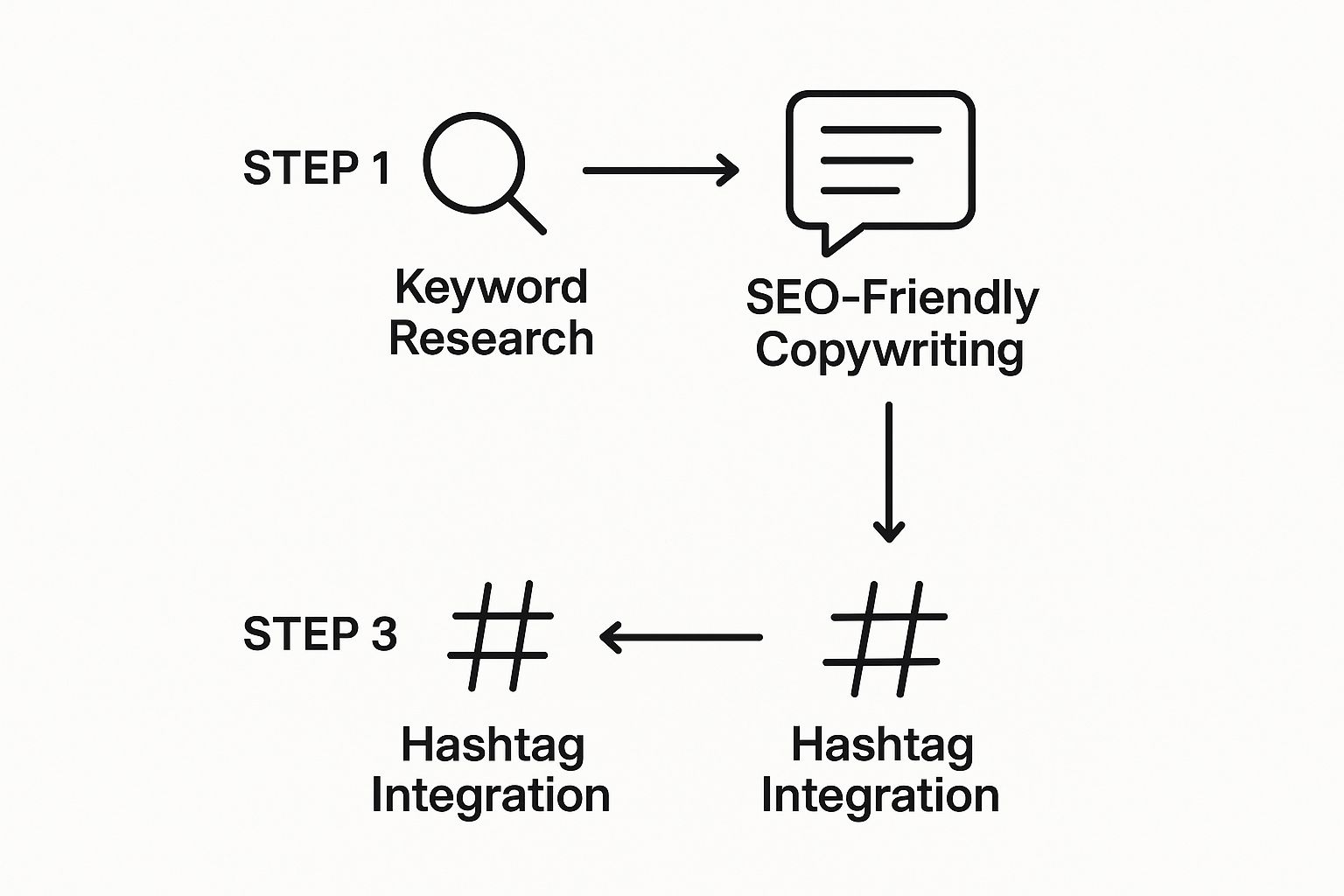
This infographic breaks down the basic workflow for getting your Pins seen, starting with keywords before you even think about writing your description.
So, where exactly do these powerful keywords need to go? Let’s break it down.
Pinterest SEO Keyword Placement Checklist
Here’s a quick reference table showing you exactly where to place your keywords to tell the Pinterest algorithm what your content is all about.
| Location | Importance Level | Example/Best Practice | |
|---|---|---|---|
| Profile Name & Bio | High | Include your primary niche. Ex: “Jane Doe | Vegan Recipes & Easy Plant-Based Meals” |
| Board Titles | High | Use specific, searchable phrases. Ex: “Healthy Breakfast Ideas” instead of “Mornings” | |
| Board Descriptions | Medium | Write a natural sentence or two with related keywords. Ex: “Find easy vegan breakfast recipes…” | |
| Pin Title | Very High | This is your headline and a huge ranking factor. Always use your main keyword here. | |
| Pin Description | Very High | Weave in 2-3 related long-tail keywords in a conversational, helpful paragraph. | |
| Hashtags | Low | Add 2-4 highly relevant hashtags at the end. Think of them as extra category tags. |
This table is your cheat sheet for on-platform SEO. By hitting all these spots consistently, you build a powerful web of relevance that helps Pinterest understand and promote your content.
For a much deeper dive into this, our guide on how to optimize Pinterest for business covers each of these elements in detail.
The Power of Fresh Pins
One of the most critical concepts you need to grasp is what Pinterest calls “fresh Pins.” The algorithm is hungry for new content, and it heavily prioritizes Pins it has never seen before.
A fresh Pin is simply a new image or video graphic.
This does not mean you have to churn out new blog posts every single day. Far from it. It means you should create multiple, unique Pin graphics for every single blog post you write.
Let’s take that one blog post on “home organization tips.” You could easily create:
- A Pin showing a perfectly organized closet with the text “5 Genius Home Organization Hacks.”
- A second Pin with a close-up of tidy kitchen drawers, titled “Finally Organize Your Kitchen for Good.”
- A third, text-only graphic with the headline “The Ultimate Decluttering Checklist.”
All three of these graphics link to the same blog post, but to Pinterest, they are three distinct pieces of fresh content.
Forget about endlessly repinning your old stuff—that strategy has very little impact anymore. Your energy is much better spent creating a steady stream of new Pin designs.
This is the single most effective way to keep your content surfacing in search results and is the real secret to how you promote your blog on Pinterest for results that last.
Nailing Your Pinning Strategy (Without It Taking Over Your Life)
Consistent pinning is what fuels your blog traffic from Pinterest, but it shouldn’t feel like a second full-time job.
The real secret to promoting your blog on Pinterest is building a workflow that’s both powerful and sustainable. This is where we shift gears from just making Pins to getting them out there strategically.
The first big question you’ll run into is how you’ll actually get your Pins published. This kicks off the age-old debate: should you pin manually or use a scheduler?
Manual Pinning vs. Automation
Pinning manually is exactly what it sounds like: you log into Pinterest every day and upload your Pins one by one.
The main perk? It’s 100% free. You also get a real-time feel for what’s happening on the platform.
The downside is that it can be a massive time sink and tough to keep up with, especially if you want to pin at peak times when you’re probably busy with other things.
On the flip side, tools like Tailwind or Post Paddle’s own smart scheduler are a total game-changer for consistency.
You can batch-create your Pins and then have them automatically published at the best times. While there’s a cost involved, most bloggers find the time they get back is well worth the money.
Here’s what I do: I actually use a hybrid approach, and it works wonders. I schedule all my core, evergreen content to make sure my account is always active.
Then, I pop in for a few minutes each day to manually pin interesting content from other creators. It keeps me engaged and in the loop with new trends.
This method gives you the reliable consistency of automation plus the authentic touch of manual engagement.
So, How Often Should You Be Pinning?
“How many Pins should I share a day?” This is easily one of the most common questions I hear, and the answer has definitely changed over time.
The days of pinning 50+ times a day are long gone. In fact, Pinterest now prioritizes quality over sheer volume, and spamming the platform with too much content can actually get your account penalized.
For most bloggers, a great starting point is sharing between 5 and 15 fresh Pins per day. This is a manageable number that shows the algorithm you’re an active, consistent creator without flooding your followers’ feeds.
And remember, a “fresh Pin” just means a new Pin image. It doesn’t have to link to a brand new blog post.
You can easily create 5-10 unique Pin designs for a single article and drip them out over several weeks or even months.
A Look at a Sample Weekly Pinning Mix
A good schedule isn’t just about promoting your own stuff; it’s about being a valuable part of the Pinterest community.
Here’s a simple framework to help you find that balance:
- Pins for New Blog Posts (20%): When you hit publish on a new article, a good chunk of your Pins should be dedicated to promoting it with various designs.
- Pins for Evergreen Content (50%): The majority of your schedule should be focused on Pins linking back to your older, but still valuable, blog posts. This is your ticket to long-term, passive traffic.
- Pins from Other Creators (20%): Share high-quality, relevant content from others in your niche. This shows your followers you’re a go-to resource, not just a self-promoter.
- Promotional & Affiliate Pins (10%): If you sell products or use affiliate links, sprinkle in Pins that lead to them. Just keep it light.
To really make this work, you need to see how it fits into your overall plan. You can dive deeper into this in our complete guide to building a winning Pinterest marketing strategy.
How to Reach More People: Group Boards & Communities
Don’t make the mistake of only pinning to your own boards. If you really want to grow, you need to get your Pins in front of fresh eyes. That’s where Group Boards and Pinterest Communities come into play.
- Group Boards: Think of these as shared boards where multiple creators contribute Pins about a specific topic. Joining a few high-quality, relevant group boards can expose your content to thousands of new potential readers.
- Pinterest Communities: These are a bit more like a forum right inside Pinterest. They’re fantastic for networking with other creators and sharing your content with a super-engaged, niche audience.
By mixing a balanced schedule with these collaborative features, you’ll turn your pinning into a well-oiled machine that consistently drives new readers to your blog.
Putting a Little Firepower Behind Your Best Content with Pinterest Ads
While your organic strategy is the bedrock of your Pinterest success, there comes a point when you want to pour a little gasoline on the fire.
That’s where Pinterest Ads come in. It’s the perfect way to get your best-performing content in front of a much larger, and very specific, audience almost overnight.
This isn’t about breaking the bank; it’s about making a smart, strategic investment.
The numbers speak for themselves. Pinterest ads aren’t just another option; they’re incredibly effective.
Research shows they can deliver a 32% higher return on ad spend (ROAS) compared to other digital platforms.
Even better, they boast a 2.3 times lower cost per conversion than ads on other social media sites. With an ad reach of 340 million users, you have a massive pool of potential readers waiting to discover you.
Picking the Right Campaign for Driving Blog Traffic
When you open up the Pinterest Ads manager for the first time, you’ll see a few different campaign goals. For bloggers, the mission is almost always the same: get people to click through to your website.
That makes the choice simple. You’ll want to focus on Consideration campaigns.
This campaign type, which used to be called “Traffic,” is engineered to do one thing really well: get you the most website clicks for the least amount of money.
It signals to the Pinterest algorithm that your goal is to find Pinners who are likely to actually leave the platform and read your blog post.
While other objectives like “Awareness” are great for big brands building a general presence, Consideration is the bread and butter for bloggers.
My Two Cents: Never, ever waste your ad budget on content that isn’t already a proven performer. Before you even think about setting up a campaign, go straight to your Pinterest Analytics.
Find the Pins that are already bringing in a solid number of organic outbound clicks. These are your winners, and they’re the only ones you should be putting money behind.
Nailing Your Targeting for the Best ROI
The real power of Pinterest Ads lies in its incredibly detailed targeting options. You can stop guessing and start putting your content directly in front of the people who need to see it.
Getting this right is the key to making your ad spend count.
Here’s how you’ll build your ideal audience:
- Interests: This is a broad-strokes approach. You can target people based on the general topics they love, like “healthy recipes,” “DIY home decor,” or “travel planning.” It’s fantastic for casting a wide but relevant net.
- Keywords: This is where you get surgical. Your ad will appear when someone searches for a specific phrase, like “how to start a blog” or “easy keto meals.” You’re catching people at the exact moment they’re actively looking for what you offer.
- Demographics: You can refine your audience even further by layering in filters for age, gender, location, and language. This helps you get laser-focused on your ideal reader.
The magic happens when you combine these. Imagine you’ve written a post on paying off student loans.
You could target women aged 25-45 in the United States who are interested in “personal finance” and are actively searching for keywords like “how to pay off debt.”
That level of precision is exactly how you make a small budget work like a big one.
Find the Exact Pinterest Keywords Your Readers Use
Promoting your blog on Pinterest only works when your Pins match the exact phrases your readers are typing into the search bar.
If your titles and descriptions miss the mark, even the most beautiful design won’t bring in consistent traffic.
With the Pinterest Keyword Research tool, you can quickly uncover the real search terms your audience uses. Use it to find keyword ideas for new blog posts, optimize existing Pins that aren’t performing and refine your board titles so they’re crystal clear to both users and the algorithm.
Instead of guessing what might work, you’ll be building every Pin around proven search demand—so more of the right people discover your content, click through and become loyal readers of your blog.
Common Pinterest Questions for Bloggers

When you first start using Pinterest to promote your blog, some questions come up again and again. Let’s get those out of the way so you can start pinning with confidence.
How Many Pins Per Blog Post?
I’ve found the sweet spot is creating 5-10 unique Pin designs for every single blog post you publish.
This might sound like a lot, but it’s all about giving yourself options. You can test different images, tweak your headlines, and play with various text overlays to see what actually catches people’s attention.
Spreading these different pins out over a few weeks helps keep your content looking new to the Pinterest algorithm.
What About Pinning Times?
Honestly, consistency beats timing any day of the week. But if you want to give your new pins a little extra nudge, it helps to post when your audience is online.
The best way to figure this out is to dive into your Pinterest Analytics. It will show you exactly when your followers are most active.
That said, don’t stress too much about the exact time—Pins have a much longer lifespan than a tweet or an Instagram post, so they have plenty of time to get discovered.
Key Takeaway: Think of Standard Pins as your direct traffic drivers; they have one job, which is to get people to click through to your blog.
Idea Pins, on the other hand, are more like mini-stories or carousels. They’re fantastic for building your brand and growing your followers, which eventually funnels more people back to your site.