Making money on Pinterest isn’t about having a huge follower count.
It’s about understanding that you’re using a visual search engine, not just another social platform.
The real secret for beginners is to focus on a few key strategies: driving traffic to a monetized blog, using affiliate links directly on your Pins, and selling your own products to an audience that is actively looking to buy.
Why Pinterest Is a Goldmine for Beginners
First things first, let’s get one thing straight: Pinterest is not just for swapping recipes or planning weddings anymore.
It’s a powerful visual discovery tool where millions of people go specifically to find ideas, plan purchases, and solve problems.
This unique user intent is what makes it a goldmine, especially if you’re just starting out.
Unlike other platforms where you’re just scrolling to see what friends are up to, people on Pinterest are in a “discovery” mindset.
They are actively searching for things with a plan to take action. That distinction changes everything.
The Power of Commercial Intent
The mindset of a Pinterest user is naturally geared toward action. They are on the platform to find things they want to try, do, or, most importantly, buy.
This forward-thinking behavior creates a direct path to earning money for creators like you.
This isn’t just a theory; the data backs it up. The journey from inspiration to purchase is incredibly short on Pinterest.
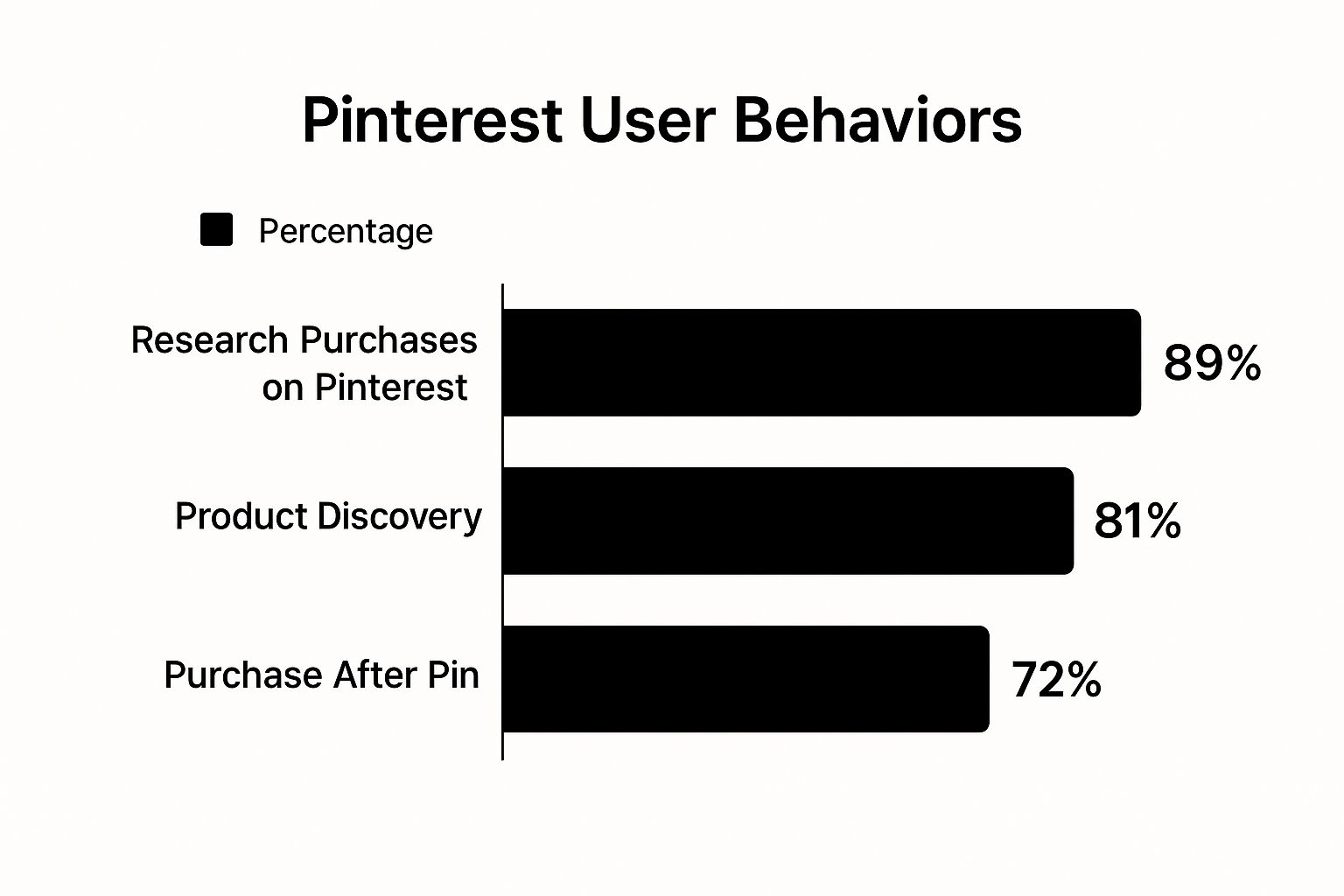
As you can see, users aren’t just window shopping. They are on a clear path that often ends with a purchase, which makes any monetization effort you put in that much more effective.
Your Roadmap to Monetization
You don’t need to try everything at once to start making money. In fact, it’s better to pick one or two proven methods and do them really well. For beginners, the most effective routes are:
- Affiliate Marketing: You earn a commission by recommending products you love from other companies.
- Selling Your Own Products: Pinterest is perfect for showcasing your physical goods or digital downloads.
- Driving Traffic to a Blog: Funneling users from Pinterest to your own website, where you can make money from ads, sponsored content, or your own offers.
The numbers are staggering. By early 2025, Pinterest is projected to have 570 million monthly active users worldwide.
Even more telling is that 85% of weekly users have actually bought something they saw on a Pin from a brand.
And if you’re a blogger, get this: Pinterest drives 33% more referral traffic to shopping sites than Facebook.
The key takeaway is simple: on Pinterest, your content’s value and its relevance to user searches matter far more than your follower count.
This levels the playing field, allowing newcomers to compete with established accounts from day one.
If you’re looking for a bird’s-eye view, this table breaks down the most common monetization paths.
Pinterest Monetization Methods at a Glance
| Monetization Method | Best For | Effort Level | Income Potential |
|---|---|---|---|
| Affiliate Marketing | Content creators without their own products | Low to Medium | $$ – $$$ |
| Selling Your Own Products | E-commerce brands, creators, and artists | High | $$$ – $$$$ |
| Driving Blog Traffic | Bloggers and niche website owners | Medium to High | $$ – $$$$ |
| Pinterest Creator Rewards | Creators with an established, engaged US-based audience | Medium | $ – $$ |
Each of these paths offers a different level of involvement and potential return, so you can pick the one that best fits your current situation and long-term goals.
To get a deeper understanding of how these strategies fit into a larger plan, it’s worth reading the Ultimate Guide to Pinterest Marketing Strategies For Business Success.
It provides a solid foundation for building a profitable presence on the platform.
Building Your Pinterest Business Account for Success
Before you can even think about making money on Pinterest, you need to set up your digital storefront.
Think of it this way: a personal account is for browsing, but a Business Account is for building a brand and an income stream. It’s the non-negotiable first step.
Switching over isn’t just a technicality; it’s like Pinterest handing you the keys to the kingdom.
You suddenly get access to a whole suite of professional tools designed to help you understand your audience, track your growth, and actually earn money.
Trying to monetize without one is like trying to navigate a new city without a map.
The great news is that getting set up is easy. You can either convert the personal profile you already have or just start fresh.
If you want a detailed, step-by-step guide, our post on how to create a Pinterest Business account will walk you through everything.
Why a Business Account is a Game-Changer
Upgrading to a business profile immediately unlocks tools that are absolutely essential for success. The most powerful of these is Pinterest Analytics.
This is your command center, showing you exactly which Pins are resonating, who your audience is, and what they’re searching for.
You can see crucial data like impressions, outbound clicks, and saves, which lets you make smart decisions based on what’s working—no more guessing.
Another huge perk is access to Rich Pins. These are supercharged Pins that automatically pull in extra information from your website.
For instance, Product Pins display up-to-the-minute pricing and stock availability, while Article Pins show the headline and a short description.
It makes your content look way more professional and gives people a real reason to click.
Fine-Tuning Your Profile to Get Found
With your Business Account up and running, it’s time to optimize it so your ideal followers can actually find you.
This is all about telling the Pinterest search algorithm what you’re all about.
Here’s what to dial in first:
- Pick a Strategic Username: Your username should be clear and professional, and if possible, include a keyword for your niche. A food blogger might go with “@HealthyEatsByAnna” instead of something random like “@AnnaBakes23.”
- Write a Keyword-Rich Bio: Your bio is valuable real estate. In just a couple of sentences, explain who you are, what you share, and who you’re trying to help. Be sure to work in 2-3 primary keywords your target audience would search for. It’s your elevator pitch for both people and the algorithm.
- Use a Professional Profile Photo: A high-quality headshot or a crisp, clean logo is a must. This builds immediate trust and helps your brand become recognizable in a crowded feed.
Pro Tip: Your profile is the first impression you make on a potential follower or customer. A polished, optimized profile tells them you’re a serious creator and a go-to source in your niche.
Don’t Forget to Claim Your Website
The last critical piece of this foundation is claiming your website. This step officially connects your site to your Pinterest profile, which is a massive trust signal to the platform.
Once you claim your domain, you unlock even more in-depth analytics, including data on content people are saving directly from your website.
Pinterest sees you as a legitimate creator, which can give your Pins a nice boost in distribution. It’s the final step in building a profile that’s truly ready for monetization.
Your Guide to Affiliate Marketing on Pinterest
Out of all the ways to make money on Pinterest, affiliate marketing is probably the easiest one to jump into.
The whole idea is pretty simple: you find a product you genuinely like, share it, and if someone buys it through your unique link, you get a small commission.
Think of it as getting paid for a recommendation you’d probably make for free anyway.
The best part? You don’t need to create your own products to get started.
What makes this so effective on Pinterest is that the audience is already in a “shopping” frame of mind.
People are actively looking for ideas and solutions, whether it’s the best running shoes for beginners, a new vegan dinner recipe, or inspiration for a home office makeover.
Your role is to be the trusted friend who points them in the right direction.
Finding Quality Affiliate Programs
First things first, you need to partner with brands and products that actually make sense for your niche.
Nothing will kill your credibility faster than promoting random stuff you don’t actually believe in. Authenticity is everything here.
A great place to start is by looking at the content you already create.
If you’re a food blogger, you could become an affiliate for your favorite stand mixer brand or that amazing spice company you always rave about.
Here are a few places I always recommend people look:
- Affiliate Networks: Think of these as huge marketplaces for brands. Sites like ShareASale, CJ Affiliate, or Rakuten Advertising bring thousands of companies together. You can browse by category, find brands that fit your style, and apply to them all in one spot.
- Brand-Direct Programs: Lots of companies prefer to run their own affiliate programs. Just scroll down to the footer on a brand’s website and look for a link that says “Affiliates,” “Partner Program,” or something similar. Amazon Associates is probably the most well-known example of this.
- Digital Product Platforms: Sites like Gumroad or SendOwl are goldmines for digital products—things like e-books, online courses, and design templates. These often have much higher commission rates, which is a nice bonus.
If you really want to turn this into a serious income stream, you need to understand the nuts and bolts.
Taking the time to master affiliate marketing will give you the strategic foundation to make your efforts pay off.
The Golden Rule of Affiliate Marketing: Disclosure
Okay, this part is non-negotiable. Before you even think about posting your first affiliate link, you have to get comfortable with disclosure.
Being upfront with your audience that you might earn a commission isn’t just a nice thing to do—it’s a legal requirement from the FTC and a hard rule on Pinterest.
Don’t try to bury it in the fine print. Just be honest and open about it.
The easiest way to stay compliant is by adding a simple hashtag like #ad, #affiliate, or #sponsored right in your Pin description.
This one small step builds trust with your followers and keeps your account in good standing.
Whatever you do, don’t try to cloak your affiliate links with generic shorteners like bit.ly. Pinterest wants to see the full, direct URL so it knows where you’re sending people.
Trying to hide your links looks sketchy and is a fast track to getting your account flagged or even suspended.
Creating Pins That Actually Convert
You can’t just slap an affiliate link on a stock photo and expect the cash to roll in.
Success on Pinterest comes from creating genuinely helpful, beautiful Pins that either solve a problem or spark inspiration. Your goal is to serve, not to sell.
Put yourself in the shoes of a Pinner. They aren’t scrolling to see ads; they’re looking for answers. Your job is to frame the product as the perfect answer to their question.
Real-World Pin Examples
Let’s break down what this looks like in practice.
- Scenario 1: The Fashion Blogger: Instead of a single Pin of a dress, create a collage Pin with a catchy title like “5 Ways to Style That Little Black Dress.” Show the dress paired with different shoes, a jacket, and maybe a cute bag. In the description, you can link to the dress and even include affiliate links for the accessories you featured.
- Scenario 2: The DIY Enthusiast: Let’s say you’re an affiliate for a power tool brand. You could create a quick video Pin showing the step-by-step process of building a simple bookshelf. Your description could say something like, “Built this entire project with my favorite cordless drill! Made the job a breeze. You can grab the same one here: [affiliate link] #ad #DIYprojects.”
See the difference? Both examples lead with value. You’re giving away free tips and inspiration first, which makes the product recommendation feel natural and helpful.
For a deeper look into a design that works, our guide to creating Pins for Pinterest is packed with actionable advice.
To give your Pins the best shot at converting, stick to these fundamentals:
- Go Vertical: Always use a 2:3 aspect ratio (a 1000 x 1500 pixel image is perfect). This format is optimized for mobile screens and simply performs better.
- Use a Text Overlay: Your image needs a clear, bold headline right on it. This tells people instantly what the Pin is about and why they should click.
- Write Keyword-Rich Descriptions: Think about what your ideal person would type into the search bar. Weave those keywords naturally into your Pin’s title and description to help it show up in search results.
- Add a Clear Call to Action: Gently nudge your viewers toward the next step. Simple phrases like “Shop the look,” “Get the full tutorial,” or “Learn more here” can make a huge difference in your click-through rate.
When you focus on authentic recommendations, transparent disclosure, and high-value content, you can build a real, sustainable income on Pinterest without ever feeling like a pushy salesperson.
Selling Your Own Products and Services
Ready to move beyond affiliate commissions and start selling your own stuff? This is a huge, exciting step, and Pinterest is basically the perfect visual storefront to make it happen.
Whether you’re an Etsy seller, run a Shopify store, or offer coaching services, the platform puts you in front of an audience that is actively looking to buy.
This is where you graduate from earning a small cut to capturing the full value of every single sale.
The real magic of selling your own products on Pinterest is that you get to control the entire customer journey.
You’re not just sending traffic away to another site; you’re inviting potential customers directly into your world. This is how you build real brand loyalty, starting from the very first Pin they see.
Showcasing Physical and Digital Goods
If you create physical products—like handmade jewelry, custom art prints, or unique home decor—think of Pinterest as your digital catalog.
You can create absolutely stunning Pins that act like little window displays, showing your items in lifestyle settings that help people immediately imagine them in their own homes.
The same exact principle works for digital products. Sell e-books, printable planners, or Lightroom presets?
Create beautiful mockups that show your products in action. A well-designed Pin can make a digital download feel tangible and incredibly desirable, sparking that “I need this now” impulse.
Your goal is to create content that doesn’t just show a product, but sells a solution or an experience.
So, instead of a Pin that just says “Buy My Planner,” try one titled “My 5-Step System for a More Organized Week.” Your planner becomes the essential tool they need to get there.
Supercharge Your Sales with Rich Pins
One of the most powerful tools in your Pinterest toolkit is the Rich Pin. These are not your average Pins.
They automatically sync information from your website to give users real-time context right there on the platform.
Specifically, Product Rich Pins pull current pricing and stock availability directly from your product pages.
This feature is an absolute game-changer for a few reasons:
- It builds trust: Shoppers see accurate, up-to-date info, which makes your brand look far more professional and reliable.
- It creates urgency: If an item is low in stock, the Pin will show it. This is a powerful nudge for people on the fence to act fast.
- It streamlines buying: Users get key information before they even click, meaning the traffic you get is much more qualified and ready to buy.
Yes, setting up Rich Pins involves a little technical work on your website, but the payoff in user experience and higher conversion rates is more than worth the effort.
Creating a Seamless Path to Purchase
To really sell effectively, you need to make the journey from discovery to checkout as smooth as possible. I like to think of every Pin as the start of a conversation that leads right to my online store.
For instance, let’s say you sell custom pet portraits. You could create a Pin that’s a cool time-lapse video of you painting.
In the description, you could share a heartfelt story about the pet and then link directly to your commissions page. You’ve connected with them emotionally before you ever asked for a sale.
Here’s a simple content strategy that just plain works:
- Inspirational Pins: Showcase the lifestyle or result your product creates. A candle maker could show a cozy reading nook scene, with their candle setting the mood.
- Educational Pins: Share helpful tips related to your niche. That same candle maker might create a Pin titled “How to Make Your Scented Candles Last Longer.”
- Direct Product Pins: These are your straightforward, beautiful product shots linked directly to the purchase page. No fluff, just the goods.
By mixing these content types, you’re providing value at every turn. You build a relationship with your audience so that when they’re finally ready to buy, your brand is the first one they think of.
Attracting High-Quality Leads for Your Services
What if you don’t sell a physical or digital product? You can absolutely still make money on Pinterest by selling your services.
I’ve seen coaches, designers, virtual assistants, and consultants find massive success using the platform as a powerful lead-generation machine.
The strategy here is a little different. Instead of linking to a product page, you’re driving traffic to a lead magnet or a booking page.
- Offer a Freebie: Create Pins that promote a free resource, like a checklist, a webinar, or a short e-book. To get it, users enter their email address, which adds them right into your sales funnel.
- Promote Your Portfolio: If you’re a designer or photographer, your Pinterest boards are your portfolio. Create Pins that showcase your absolute best work and link back to your services page.
- Share Testimonials: Turn client testimonials into eye-catching quote graphics. Social proof is incredibly persuasive, and a glowing review can be the final push someone needs to book that consultation with you.
For service providers, Pinterest is all about establishing your expertise and building trust. Every Pin is a new opportunity to show your value and guide interested followers toward becoming paying clients.
Driving Traffic to Your Monetized Blog or Website
While selling products or using affiliate links on Pinterest can bring in cash, one of the most reliable and long-term ways to make money is by funneling traffic to a blog you actually own. It’s a powerful shift in thinking.
Your Pinterest profile becomes the welcoming entrance to your own online world, and every Pin is a signpost pointing users straight to your website—a space where you call all the shots.
This approach turns Pinterest into a high-powered traffic engine for your central hub.
Once visitors are on your site, you can monetize them in a dozen different ways at once: display ads, sponsored content, your own digital products, or even building an email list you can market to later.
You’re not just chasing a single sale; you’re building a real, valuable asset.
Creating Pins That People Can’t Help But Click
The secret sauce here is creating Pins that don’t just get saved—they get clicked. A save is nice, it shows interest.
But an outbound click is what gets you traffic, and traffic is what makes you money.
To do this, you need to master the art of the “curiosity gap,” making someone feel like they have to see what’s on the other side of your Pin.
This means your Pins need to be compelling teasers, not the whole story. For instance, a food blogger shouldn’t just pin a pretty picture of a cake.
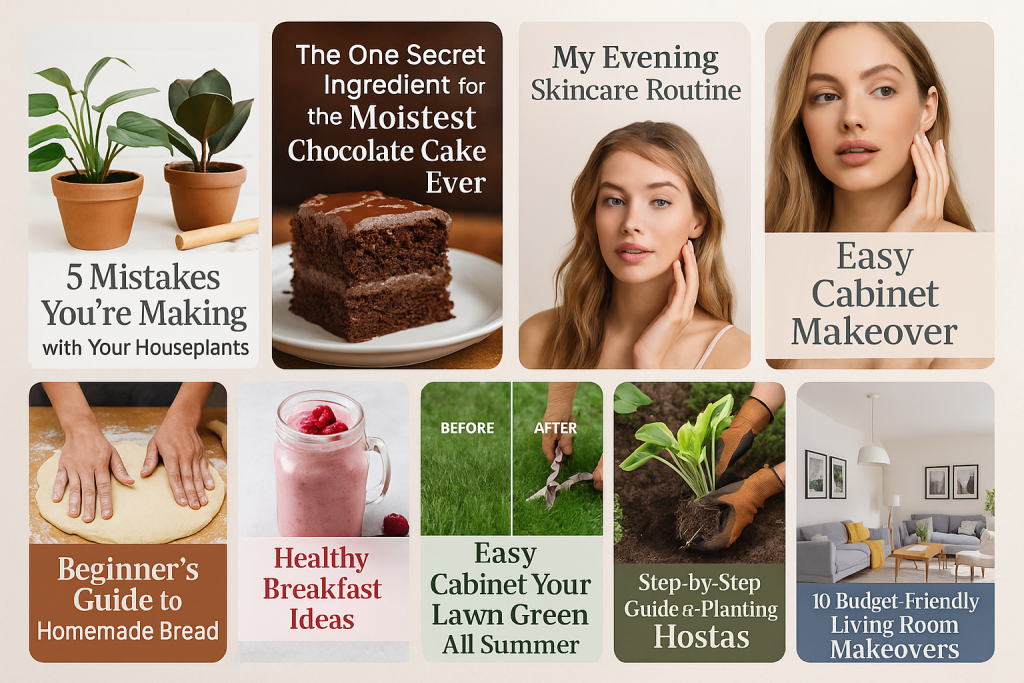
A much smarter move is to create a Pin with a text overlay that says, “The One Secret Ingredient for the Moistest Chocolate Cake Ever.” The answer, of course, is waiting for them in your blog post.
Here’s how you can start crafting these click-worthy Pins:
- Write Magnetic Headlines: Your text overlays need to be strong and action-oriented. Use numbers, ask a burning question, or promise a clear solution. “5 Mistakes You’re Making with Your Houseplants” will always outperform a generic “Houseplant Care Tips.”
- Use Intriguing Visuals: Your image or video has to back up the headline’s promise. A beautiful photo is a good start, but a collage showing a “before and after” or a quick video clip demonstrating a key step is even more powerful.
- Tease the Value in Your Description: Use your Pin description to build on that curiosity. Hint at the game-changing information they’ll find in your post. Something like, “Tired of dry, crumbly cake? My grandmother’s secret ingredient is a game-changer. Get the full recipe on the blog!” works like a charm.
The Power of Matched-Up Keywords
For this strategy to really take off, your keyword research on Pinterest and your blog needs to be perfectly in sync.
Think of it like a puzzle—the pieces have to fit. The exact terms someone uses to find your Pin should match the keywords you’ve optimized for in your blog post.
When a user searches for “beginner crochet patterns” on Pinterest, discovers your Pin, and clicks through to a blog post all about that topic, you’ve created a seamless experience.
This tells both Pinterest and Google that your content is highly relevant, which can help you rank higher on both platforms.
Key Takeaway: Don’t treat your Pinterest and blog SEO as separate tasks. They need to work hand-in-hand. Your Pin is the advertisement, and your blog post is the product. The message has to be consistent all the way through.
A great way to think about it is that Pinterest is your discovery engine, and your blog is your authority hub.
To dive deeper into making this work for you, check out our complete guide on using Pinterest for blogs to really ramp up your traffic.
How to Capture and Nurture Your New Visitors
Getting that click from Pinterest is a major victory, but your work isn’t over. The real magic happens when you turn that one-time visitor into a returning fan.
The single most effective way to do this? Get their email address.
Place email opt-in forms strategically throughout your blog. Offer them something valuable for free—a handy checklist, a quick-start guide, or a template—in exchange for their email.
This “lead magnet” should be directly related to why they clicked in the first place. If they came from a Pin about “meal prepping on a budget,” offer a free downloadable meal plan.
Once they’re on your email list, you can build a real relationship. Send them valuable tips and stories, and eventually, you’ll have an engaged audience that trusts you enough to buy your products or services.
You’ve turned a single click into a lasting, profitable connection.
The financial data from Pinterest itself proves how powerful this traffic can be.
With a global average revenue per user (ARPU) of $6.94 in 2024—and an incredible $29.15 in the U.S. and Canada—the platform is clearly driving high-value users.
If you focus your efforts on these high-ARPU regions, you can seriously boost your blog’s earning potential. You can discover more insights about Pinterest’s user stats on ExplodingTopics.com.
Turn Beginner Pins Into Profit-Ready Assets
Growing your Pinterest income isn’t just about choosing the right monetization method—it’s about making sure every single pin is optimized to earn.
A great headline, clear text overlay, and smart keyword use can be the difference between a pin that quietly disappears and one that sends clicks (and cash) to your links on repeat.
Instead of hoping a design will perform, run it through a simple checklist before you hit publish.
The Post Paddle Free Pinterest Pin Optimization Checklist walks you through the essentials: ideal image size and ratio, layout, text placement, branding, and keyword prompts tailored for search and monetization.
Use it as your quick “final pass” so every new pin you post is built to attract saves, clicks, and buyers—not just views.
Got Questions About Making Money on Pinterest?
If you’re asking questions, you’re on the right track. It shows you’re thinking strategically about how to turn your Pinterest efforts into real income.
Let’s tackle some of the most common questions and worries that new creators have when they start out.
Getting these fundamentals down will help you put your energy where it counts, instead of getting bogged down by myths or metrics that don’t actually matter.
So, How Many Followers Do I Actually Need?
This is the big one, and the answer might surprise you: you don’t need a massive following.
Seriously. Pinterest isn’t like Instagram where your follower count dictates your reach. At its core, Pinterest is a visual search engine.
Think about how you use it. When you’re searching for “patio design ideas,” you click on the Pin that catches your eye, right?
You probably don’t even check how many followers that account has. I’ve seen accounts with fewer than 1,000 followers pull in a steady affiliate income because they absolutely nailed their keywords and created beautiful, helpful Pins that showed up in search.
Stop worrying about followers. Instead, get obsessed with your monthly views and outbound clicks.
Those are the numbers that show people are finding your stuff and, more importantly, clicking through to your links.
How Long Until I Start Seeing Some Money?
Honestly, this is a long game, so patience is key. While it’s possible to get a lucky sale in your first month, a more realistic timeframe for building a reliable income stream is anywhere from 3 to 6 months of consistent work.
A few things can speed up or slow down your progress:
- Your Niche: Some topics are just easier to monetize. A popular niche with lots of products, like home organization or personal finance, will likely see results faster than a very specific hobby niche.
- Your Strategy: Going straight for affiliate sales on your Pins can bring in cash quicker. But, if your goal is to drive blog traffic for ad revenue, that’s a slower burn that pays off more over time.
- Your Consistency: This is the most important piece of the puzzle. Pinning fresh content every week signals to the Pinterest algorithm that you’re an active and valuable creator. Your efforts will build on each other, creating a snowball effect.
Don’t give up if you don’t see results right away. Think of it like tending a garden—it needs time and consistent care before you can harvest anything.
Can Pinterest Ban Me for Using Affiliate Links?
Nope, you’re safe—as long as you follow their rules. Pinterest is totally fine with affiliate marketing; they just demand that you’re upfront about it so users have a good experience.
To stay on their good side, you have to disclose that you’re using an affiliate link. It’s easy. Just add a simple hashtag like #ad, #affiliate, or #sponsored to your Pin description.
This little step builds trust and keeps your account in good standing.
Another non-negotiable rule: never cloak your links. Using link shorteners like bit.ly to hide your affiliate URL is a major red flag for Pinterest.
They see it as spammy behavior and it’s a quick way to get your account penalized. Be transparent, provide real value, and you’ll be golden.