
Before you can even dream of a Pin going viral, you have to lay the groundwork.
Growing a Pinterest account is all about building a solid, optimized foundation from the very start.
Think of it as telling the Pinterest algorithm exactly what your brand is about, which gives every single Pin you create later a massive head start.
Build a Foundation for Pinterest Growth

Your Pinterest profile is your brand’s digital storefront. You wouldn’t expect customers to flock to a messy, unfinished shop, and the same logic applies here.
A poorly optimized profile simply won’t attract followers or drive traffic.
This initial setup isn’t just about ticking boxes. It’s a strategic process. Every element, from your username to your board descriptions, works together to signal your niche to both Pinterest and potential followers.
Get this right, and you’re making your account discoverable, trustworthy, and irresistible to your ideal audience.
An unoptimized profile is just a missed opportunity—like hiding a fantastic product in a plain brown box.
From Personal to Professional: A Business Account Is Non-Negotiable
If you’re serious about growth, the first thing you need to do is switch to a Pinterest Business account.
It’s free, and frankly, it’s not optional if you want real results. Without it, you’re essentially flying blind.
A business account immediately unlocks a whole suite of professional tools. The most critical ones are:
- Pinterest Analytics: This is where you’ll find your data goldmine. You get to see exactly which Pins are earning impressions, saves, and those all-important outbound clicks. It’s the clearest way to understand what your audience actually wants from you.
- Rich Pins: Think of these as supercharged Pins. They automatically pull extra info from your website—like an article’s headline, a product’s price, or a recipe’s ingredients—right onto the Pin itself. They’re far more helpful to users and tend to get much higher engagement.
- Ad Manager: Even if you have no plans to run paid ads, the Ad Manager is an incredible keyword research tool. You can uncover the exact search terms your target audience is using on the platform.
Making the switch is easy and instantly adds a layer of professionalism to your presence.
You’re telling Pinterest you’re a serious creator, and the algorithm tends to favor that.
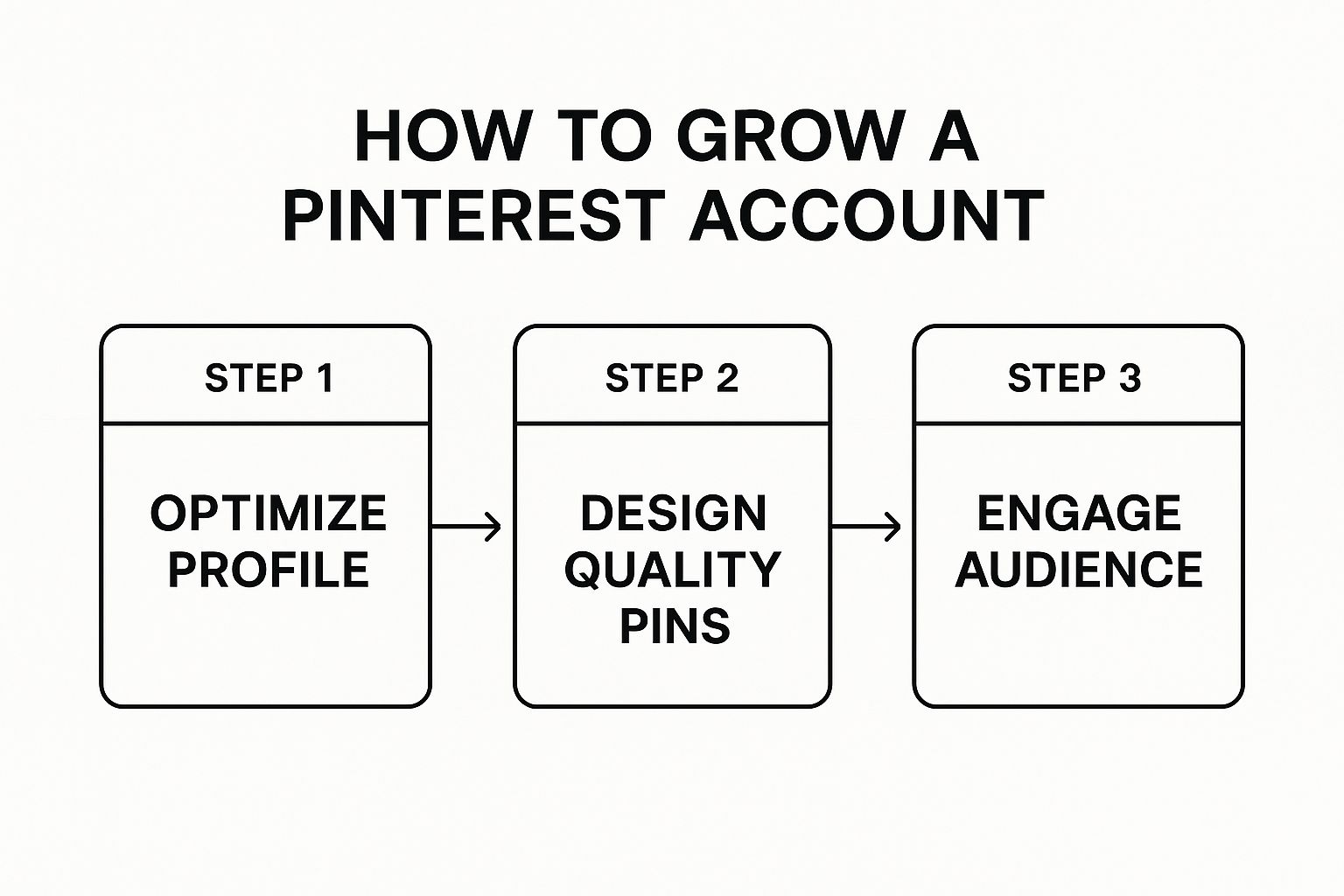
This graphic breaks down the entire process for growing a Pinterest account, and it all begins with the profile optimization we’re talking about right now.
As you can see, a strong profile is the launchpad for everything that follows, from creating killer content to building a real community.
Crafting a Magnetic and Searchable Profile
Okay, with your business account active, let’s fine-tune the details. Your username needs to be clean, easy to remember, and—if possible—the same as your handles on other social platforms for brand consistency.
Next is your bio. You get 160 characters to make an impression, so don’t fill it with fluff.
Your bio’s job is twofold: tell people who you are and what you do, while also weaving in the keywords they’re already searching for.
So, instead of “Lover of coffee and sunny days,” a business coach might write: “Helping online entrepreneurs scale to 6-figures | Business strategy & marketing tips.” See the difference?
Finally, claiming your website is a crucial step. It proves to Pinterest that you own your domain, which unlocks analytics for any Pin ever created from your site—even if someone else pinned it.
This creates a powerful, direct link between your Pinterest efforts and your website traffic.
To make sure you haven’t missed anything, I’ve put together this quick checklist.
Run through it to ensure your profile is primed for discovery right from the get-go.
Pinterest Profile Optimization Checklist
| Profile Element | Optimization Action | Why It Matters |
|---|---|---|
| Account Type | Convert to a free Business Account. | Unlocks Analytics, Rich Pins, and Ad Manager—essential growth tools. |
| Username | Use your business name; keep it consistent with other social media. | Makes your brand easily recognizable and searchable across platforms. |
| Profile Photo | Use a high-quality logo or a clear, professional headshot. | Builds trust and brand recognition at a glance. |
| Profile Bio | Clearly state who you help and what you offer, using 1-2 main keywords. | Tells users and the algorithm what your content is about in 160 characters. |
| Website | Add your website URL and go through the claiming process. | Verifies your account and unlocks analytics for content from your domain. |
| Rich Pins | Apply for and enable Rich Pins for your verified domain. | Adds extra context to your Pins, boosting engagement and clicks. |
Once these foundational pieces are in place, you’ve built a strong launchpad for all your future pinning strategies.
You’re no longer just hoping for the best; you’re strategically positioning your brand for success on the platform.
Create Pins That People Actually Save
A well-optimized profile gets you in the game, but it’s your Pins that will make you a winner.
I’ve seen it time and again: explosive Pinterest growth doesn’t come from just pinning a lot—it comes from creating Pins that people can’t resist saving.
Every single save tells the Pinterest algorithm that your content is valuable, which in turn gets it shown to more people. It’s a powerful feedback loop.
This means you have to move beyond generic, slapped-together designs.
Your goal is to create something that solves a problem or sparks enough curiosity that a user instinctively thinks, “I need to save this for later.”
Anatomy of a High-Performing Pin
Before you even think about opening Canva, you need to understand the visual language of Pinterest.
This platform is unapologetically vertical, and your Pins must embrace that to claim as much screen real estate as possible.
Let’s start with the basics: dimensions. The golden aspect ratio is 2:3. For most people, that means creating designs at 1000 x 1500 pixels.
Sticking to this vertical format is non-negotiable if you want your Pins to stand out in a crowded feed.
Next up is your imagery. Your photos and graphics need to be top-notch. I’m talking high-quality, high-contrast visuals that pop.
Blurry, dark, or generic stock photos are the kiss of death—they get scrolled past in a heartbeat.
The image you choose has to be crisp, vibrant, and directly related to your Pin’s topic.
The text overlay is your hook. It has to be bold, easy to read, and communicate the main benefit almost instantly.
Use a clean, simple font that’s legible on a tiny mobile screen and make sure it contrasts sharply with the background.
For instance, a Pin for a “Vegan Lasagna Recipe” should have those exact words front and center, not buried in some hard-to-read script font.
The goal of your Pin design is to stop the scroll in under two seconds. A user should be able to glance at your Pin and immediately understand what it’s about and why it’s valuable to them.
Finally, remember to brand your Pins. A small logo or your website URL tucked into a corner is all you need.
It builds brand recognition over time and helps protect your content from being stolen. Just make it subtle—it shouldn’t be the main event.
For a more detailed breakdown, you can learn more about how to optimize Pinterest Pins in our other guide.
Choosing the Right Pin Format for Your Goal
Pinterest has simplified its Pin formats over the years, but knowing the difference between them is still crucial for a smart strategy.
Each type serves a unique purpose, and matching your content to the right format can make a world of difference in your results.
Static Pins
These are the classic, clickable image Pins that we all know. They link directly to an external URL, like your latest blog post or a product page.
For anyone focused on driving traffic back to their own website, these are the absolute workhorse of your Pinterest strategy.
- When to Use Them: Perfect for promoting blog articles, e-commerce products, lead magnets, or literally any piece of content that lives on your site.
- Best Practices: The key here is freshness. Create multiple, unique Pin graphics for every single URL. I always recommend making 5-10 different Pin designs for one blog post, each with a different image and text overlay, to keep your content from looking stale.
Video Pins
Short-form video is a huge deal on Pinterest. Video Pins autoplay in the feed, which makes them fantastic for grabbing attention and stopping the scroll.
They are an incredible tool for showing a process or telling a quick story.
- When to Use Them: These are ideal for showing a quick DIY tutorial, a recipe coming together, a product in action, or a dramatic before-and-after. Keep them short and sweet—the sweet spot is 6-15 seconds.
- Best Practices: Always design for sound-off viewing. Most users scroll with their sound off, so use text overlays to communicate the key message or steps.
Idea Pins
Idea Pins (which have evolved from the old Story Pins) are multi-page Pins designed to provide a full experience right on the Pinterest platform.
They are a sequence of images or video clips that tell a complete story, almost like a mini-blog post.
While they don’t link out from every slide, they are incredibly powerful for building an engaged audience and racking up impressions.
- When to Use Them: Use Idea Pins for full tutorials or listicles where you can give away all the value upfront. Think “5 Ways to Style a Scarf” or “A Full Bodyweight Workout Routine.”
- Best Practices: The last slide is your most important real estate. Always include a clear call-to-action, like “Follow for more tips!” to encourage people to join your community right then and there.
Master Pinterest SEO for Organic Reach
First things first, let’s get one thing straight: Pinterest is not a social network. It’s a massive visual search engine. Grasping this distinction is the single most important key to unlocking sustainable, long-term growth.
Creating beautiful Pins is definitely part of the equation, but it’s only half the battle. If you really want to grow your Pinterest account, you have to master Pinterest SEO.
This is your ticket to getting discovered by people who are actively looking for the exact ideas, solutions, and products you provide—all without spending a dime on ads.
Finding the Keywords People Actually Use
Every solid SEO strategy starts with great keyword research. Your goal is to get inside the head of your ideal follower and figure out the exact phrases they’re typing into that search bar.
Lucky for us, Pinterest gives you some fantastic (and free) tools to play detective.
The most obvious place to start is the Pinterest search bar itself. Go ahead and type in a broad term relevant to your niche—let’s say “healthy dinner.”
Before you even hit enter, watch what happens. Pinterest instantly gives you a dropdown list of popular, related searches.
These aren’t just guesses; they’re the real-time queries people are using most.
But don’t stop there. After you search for your broad term, look at the colorful bubbles that pop up right underneath the search bar.
This is Pinterest’s guided search feature, and it is an absolute goldmine.
For our “healthy dinner” example, you’ll likely see bubbles like “recipes,” “quick and easy,” “for family,” and “on a budget.”
These are the building blocks for powerful long-tail keywords that signal exactly what a user wants. You can start combining them to create super-specific phrases your audience is searching for:
- “quick and easy healthy dinner recipes”
- “healthy dinner recipes for family on a budget”
These are the terms you want to build your content around.
They’re far less competitive than the broad terms and are used by people who are much closer to taking action.
Where to Place Your Keywords for Maximum Impact

Okay, so you’ve got a solid list of keywords. Now what? It’s time to strategically sprinkle them across your entire Pinterest presence.
Think of it like leaving a trail of breadcrumbs for the Pinterest algorithm, making it incredibly easy for it to understand your content and show it to the right people.
Consistency is everything. You need to weave these terms into every part of your account to continuously signal what you’re all about.
Here’s your checklist for keyword placement:
- Your Profile Bio: Naturally work in your top 2-3 most important keywords. A food blogger, for instance, might mention “easy weeknight meals” and “family-friendly recipes.”
- Your Board Titles: Be direct and descriptive. A vague title like “Yummy Eats” does nothing for you. “Healthy Crockpot Dinner Recipes,” on the other hand, is perfectly optimized.
- Your Board Descriptions: This is where you can expand. Use this space to write a few sentences packed with related and long-tail keywords, explaining the kind of value people will find on the board.
- Your Pin Titles: Every. Single. Pin. The title must include the primary keyword for that specific piece of content. No exceptions.
- Your Pin Descriptions: This is your prime real estate. Write a helpful, compelling description (a few sentences is perfect) that includes your main keyword plus a couple of related ones.
My Two Cents: Don’t just list a bunch of keywords. Always write for a human first, algorithm second.
Your descriptions need to be genuinely helpful and enticing, telling the user why they should click. A natural, conversational tone will always outperform a robotic string of terms.
By consistently applying this SEO framework, you’ll transform your Pinterest profile from a simple mood board into a powerful, searchable resource.
This is how you stop chasing fleeting trends and start building a reliable engine for organic traffic and steady growth.
Develop a Realistic Pinning Strategy
You’ve probably heard the advice to “be consistent” on Pinterest a million times. It’s true, but it’s also frustratingly vague. What does consistency actually look like in practice?
It’s not about overwhelming yourself. It’s about building a simple, repeatable workflow that keeps your account active without leading to total burnout.
A successful pinning strategy is one you can actually stick with for the long haul.
Forget the old advice about pinning dozens of times a day; modern Pinterest growth is built on quality and strategic frequency, not just sheer volume.
Finding Your Pinning Sweet Spot
Let’s clear the air: there is no magic number of Pins you have to publish every day.
Some experts I know swear by 1-5 Pins per day, while others have found success with more.
The real key is focusing on fresh, high-quality content instead of chasing an arbitrary quota.
Consistency will always beat intensity. Pinning three new, well-designed Pins every single day is far more effective than dropping 20 Pins one day and then ghosting the platform for a week.
The algorithm rewards a steady stream of new content because it signals you’re an active and reliable creator.
My advice? Start with a number that feels totally manageable—even one new Pin per day—and build from there.
The goal is to find a rhythm that fits your schedule and your ability to create content. This is how you avoid that all-too-common cycle of intense effort followed by complete exhaustion.
What Pinterest Considers a Fresh Pin
Understanding the idea of a “fresh Pin” is probably the most critical part of your strategy today.
This is Pinterest’s term for a new image or video that has never been seen on the platform before.
The algorithm heavily, heavily prioritizes new creative, so this is where you need to focus.
So, what counts as a fresh Pin?
- A brand-new image or video file.
- The same stock photo but with a completely different text overlay or design.
- A newly designed Pin graphic that links back to an old blog post you want to revive.
What it is not is repinning the exact same Pin image to a different board.
While sharing other people’s content has its place, repinning your own old Pins offers almost no SEO value anymore compared to just publishing a fresh graphic.
Your takeaway here is simple: always prioritize creating a new Pin image over repinning an old one.
For every single blog post or product, you should plan to create multiple unique Pin designs over time.
This keeps feeding the algorithm fresh content for the same URL, extending its life indefinitely.
Manual Pinning vs. Automation Tools
The great debate: should you pin manually or use a scheduler like Post Paddle or Tailwind?
Honestly, both approaches have their merits, and the right choice really comes down to your personal workflow.
Let’s break down the real pros and cons.
| Pinning Method | Pros | Cons |
|---|---|---|
| Manual Pinning | – It’s completely free.- You get to engage in real-time.- It forces you to learn the platform inside and out. | – It can be incredibly time-consuming.- Consistency is a real struggle.- You can’t easily schedule Pins for peak hours. |
| Using a Scheduler | – You save a massive amount of time.- It guarantees a consistent pinning schedule.- You can publish Pins when your audience is most active. | – There’s usually a monthly subscription fee.- It can feel a bit less “hands-on” and organic. |
From what I’ve seen, many of the most successful creators use a hybrid approach.
They might use a scheduler to handle their core content calendar—the “must-post” Pins—and then hop onto the platform manually to engage with trends, comment, and get a feel for what’s happening.
This gives you the best of both worlds: the efficiency of automation and the authenticity of manual engagement.
Ultimately, the best strategy is the one that removes friction and helps you show up consistently without losing your mind.
Use Analytics to Make Smarter Decisions
You can’t improve what you don’t measure. Pinning content without ever peeking at your data is like driving blindfolded—you might move forward, but you have no idea where you’re going.
That’s why getting comfortable with Pinterest Analytics is absolutely essential for real, strategic growth.
Think of it this way: your analytics dashboard is a direct line to your audience.
It stops you from guessing what they want and lets you give them exactly what they’re looking for.
This isn’t just a “nice to have”; it’s how you turn random pinning into a predictable growth engine.
Key Metrics That Actually Matter
Opening your analytics for the first time can feel like a lot. Don’t get bogged down trying to track every single number.
To make a real impact, you just need to focus on a few key metrics that tell the story of your engagement and traffic.
These are the ones I live and die by:
- Impressions: This is simply how many times your Pins were shown on someone’s screen. It’s a great starting point for measuring your overall reach, but it’s just that—a start.
- Saves: This tells you how many people loved your Pin enough to save it to one of their own boards. A high number of saves is a massive signal to the Pinterest algorithm that your content is high-quality and should be shown to more users.
- Outbound Clicks: For anyone trying to get people to their website, this is the holy grail. It’s the number of clicks that led a user off Pinterest and onto your domain. This metric is a direct measure of your ROI.
Zeroing in on these three gives you a quick, clear picture of your performance.
For instance, if you have high impressions but your clicks are low, your Pin design probably isn’t grabbing enough attention. High saves but low clicks?
Your Pin is inspirational, but it’s not creating the urgency needed to visit your site. This is the kind of actionable insight that helps you get better.
If you want to dive deeper, check out our guide on how to use Pinterest for blog traffic.
Turning Data Into Your Content Roadmap
Your analytics dashboard isn’t just a report card; it’s a crystal ball.
When you consistently review your top-performing Pins and boards, you’ll start to see patterns emerge that tell you exactly what you should create next.
Pull up your top five Pins from the last 30 days. Ask yourself:
- What do they have in common visually? A specific color palette? A certain font style?
- What about the headlines? Are they “how-to” guides, lists, or question-based?
- Do they all focus on a very specific sub-topic within your niche?
The answers to these questions are pure gold. They give you a data-backed blueprint for your future Pins.
If your audience goes crazy for Pins with bold, pink text overlays, it’s time to ditch the subtle, gray fonts. Double down on what you know already works.
This strategy is especially powerful when you consider Pinterest’s massive growth. As of late 2024, the platform hit a record 553 million monthly active users, marking an 11% jump from the previous year.
And with its potential ad audience projected to grow by 10.6% to reach 340 million users by January 2025, the opportunity is huge. You can find more details on Pinterest’s user growth on Printful.com.
By marrying these big-picture platform trends with your own performance data, you create a powerful feedback loop.
You stop throwing spaghetti at the wall and start making smart, informed decisions that fuel your account’s growth day in and day out.
Taking Your Growth to the Next Level: Advanced Tactics
Alright, you’ve built a solid foundation. Your profile is humming along, you’re pinning consistently, and you’re seeing some steady growth. Now it’s time to hit the accelerator.
These aren’t your basic, day-one strategies. These are the moves you make when you’re ready to scale your efforts and turn that steady growth into something much more powerful.
Moving from a purely organic game to a more layered approach can feel like a big step, but it’s how you amplify what’s already working to reach entirely new pockets of your audience.
Put Your Best Content to Work with Pinterest Ads
I get it—many creators are hesitant to spend money on ads. But hear me out.
A small, strategic ad spend can deliver an incredible return, especially if you’re smart about it.
The best way to start is by not creating ads from scratch. Dive into your analytics and find your top-performing organic Pins.
I’m talking about the ones with the highest save rates and the most outbound clicks. These Pins are your proven winners.
By “promoting” these Pins, you’re just pouring fuel on a fire that’s already burning brightly. It’s a low-risk, high-reward strategy because you’re investing in content you know people love.
A simple “Considerations” campaign is a great way to start, giving a popular Pin a massive boost in reach.
Pinterest’s own growth, with projected revenues of $837 million to$ 852 million for Q1 2025, is heavily tied to its advertising tools.
With over 2 million active advertisers and a US market expected to hit $5.1 billion by 2027, it’s a platform built for this.
As you create ads, remember that Pins evoking positive emotions consistently drive higher action from users. For a deeper dive into the numbers, SocialPilot has some fantastic insights on this.
Tap into Niche Group Boards
Want to get your content in front of a built-in, highly relevant audience? Group boards are your answer. But you have to be selective.
Steer clear of those massive, spammy boards with thousands of contributors and zero real engagement. Your goal is to find smaller, carefully curated group boards that are hyper-focused on your specific niche.
When you contribute genuinely valuable Pins to these communities, you get to borrow the board owner’s authority and expose your content to their dedicated followers.
It’s an amazing tactic for reaching people who don’t follow you yet but are absolutely interested in what you have to say.
Master the Calendar with Seasonal Content
Pinterest is a planner’s paradise. Users are searching for ideas weeks, sometimes even months, ahead of time.
Getting in front of this behavior is simple with a seasonal content calendar.
- Summer: Start pinning travel ideas, backyard BBQ recipes, and summer fashion in late spring.
- Fall: Get your cozy home decor, Halloween costumes, and Thanksgiving recipes out there by late summer.
- Winter: Holiday gifts, festive decor, and New Year’s resolution ideas should be live by October.
- Spring: Think spring cleaning checklists, gardening tips, and Mother’s Day gift guides well before the snow melts.
Pro Tip: Pin your seasonal content 45-60 days in advance. This gives the Pinterest algorithm plenty of time to index and start distributing your Pins right as user searches for those topics begin to spike.
These advanced methods build on the hard work you’ve already put in, creating a more sophisticated and effective approach.
For an even deeper look, check out our complete guide on building a winning Pinterest marketing strategy.
Turn Random Pinning into a Clear Pinterest Growth Plan
You’ve already learned how important fresh Pins, consistent posting, and a strong profile are for growth. But none of that works well if you’re guessing which words to use.
The accounts that grow fastest speak the same language as their audience in every board title, Pin headline, and description.
Instead of trying to “be creative” with phrases that no one is searching for, you can build your strategy around real keyword data.
That makes it easier to decide which topics to focus on first, how to group your ideas into boards, and which Pin angles are most likely to show up in search.
My free Pinterest Keyword Research tool helps you collect those phrases in one place and turn them into a simple content map for your account.
Use it to plan boards, outline new Pins, and update old descriptions so the algorithm clearly understands what you’re about.
Ready to build your growth around the keywords your audience actually uses?
Answering Your Top Pinterest Growth Questions
Even with the best strategy in place, you’re bound to run into a few specific questions as you work on growing your Pinterest account. I’ve been there.
Let’s tackle some of the most common ones I hear from creators and brands so you can get clear answers and keep moving forward.
How Many Times a Day Should I Be Pinning?
If you’ve heard advice about pinning 20, 30, or even 50 times a day, you can officially let that go. That’s old-school thinking, and the platform has changed dramatically. These days, quality has completely crushed quantity.
The real sweet spot is 1-5 new, high-quality “fresh” Pins each day. What’s a “fresh” Pin? It’s a brand new image or video file you’re uploading.
The link can be old—pointing to a blog post you wrote last year—but the creative itself must be new to Pinterest’s eyes.
Consistency is the name of the game. The Pinterest algorithm absolutely loves accounts that deliver a steady, reliable stream of new content.
Showing up every single day with a handful of great Pins will serve you far better than batch-pinning 30 times on a Monday and then ghosting the platform for the rest of the week.
Is a Business Account Really Necessary for Growth?
Yes. 100%. If you’re serious about getting results, a free Pinterest Business account is non-negotiable.
Trying to grow without one is like trying to drive a car blindfolded—you have no idea where you’re going or what’s working.
Switching to a business account unlocks the critical tools you need to make smart, data-driven decisions. You’ll gain access to:
- Pinterest Analytics: This is your dashboard for seeing what’s resonating. Track your impressions, saves, and most importantly, outbound clicks to see which Pins are actually driving traffic.
- Rich Pins: These pull extra metadata from your website, automatically adding helpful context like recipe ingredients or product prices right onto your Pin. They make your content look more professional and clickable.
- Ad Manager: Even if you don’t plan on running ads, the Ad Manager contains a goldmine of keyword and trend data. It’s an invaluable research tool.
Simply put, you can’t measure your progress, understand your audience, or scale your strategy without the insights a business account provides.
Pinterest is a long-term game, not an overnight success story. While a Pin’s lifespan can be months or even years, seeing significant, predictable growth usually takes time.
How Long Until I Start Seeing Real Results?
This is probably the most common question, and the answer requires a bit of patience. Pinterest isn’t like other social platforms where your content’s lifespan is a mere few hours.
A single, well-optimized Pin can continue to gain traction and send you traffic for months, sometimes even years.
You’ll likely see some early glimmers of hope—a few clicks here, a spike in impressions there—within the first few weeks of consistent effort.
However, to build that powerful, steady momentum where you see predictable traffic every month, you should expect it to take 3-6 months.
That’s assuming you’re consistently applying a solid SEO and content strategy. Just stick with the plan, and you’ll see the results compound over time. It’s a marathon, not a sprint.