If you want to get more followers on Pinterest, you have to stop thinking of it as just another social media feed.
It’s not. Pinterest is a visual search engine, and that one shift in mindset changes everything.
The secret to turning casual visitors into loyal followers is a combination of a search-first strategy and eye-catching, high-quality visuals.
Building Your Profile for Follower Growth
Before you even dream about your Pins going viral, let’s focus on your home base: your profile. An empty or sloppy profile is a red flag.
It quietly tells potential followers that you aren’t really invested here, so why should they be?
On the flip side, a sharp, optimized profile is the bedrock of all your future growth.
Think of your profile as your digital storefront. It needs to be welcoming, easy to understand, and crystal clear about what you’re all about.
This all starts with a great profile picture. If you’re a personal brand, use a clear, friendly headshot. For businesses, a crisp, clean logo is the way to go.
It’s all about building that initial flicker of trust and recognition.
Craft a Compelling First Impression
Your bio is incredibly valuable digital real estate. You get a few short lines to grab someone’s attention and convince them you’re worth a follow.
Who are you? What kind of content do you share? Give them a reason to stick around.
Don’t just write a generic sentence. Weave in the keywords people are using to find content just like yours.
A food blogger, for example, shouldn’t just say “I love to cook.” Instead, they should use something like: “Easy vegan recipes | Healthy weeknight meals | Plant-based desserts.”
This simple tactic does two things: it tells a human what to expect, and it tells the Pinterest algorithm what your account is all about.
This helps Pinterest show your profile to the right people. Also, claiming your website is non-negotiable.
It gives your profile a professional edge and, crucially, unlocks Pinterest Analytics—which you’ll need to see what’s working.
Organize Your Content with Keyword-Rich Boards
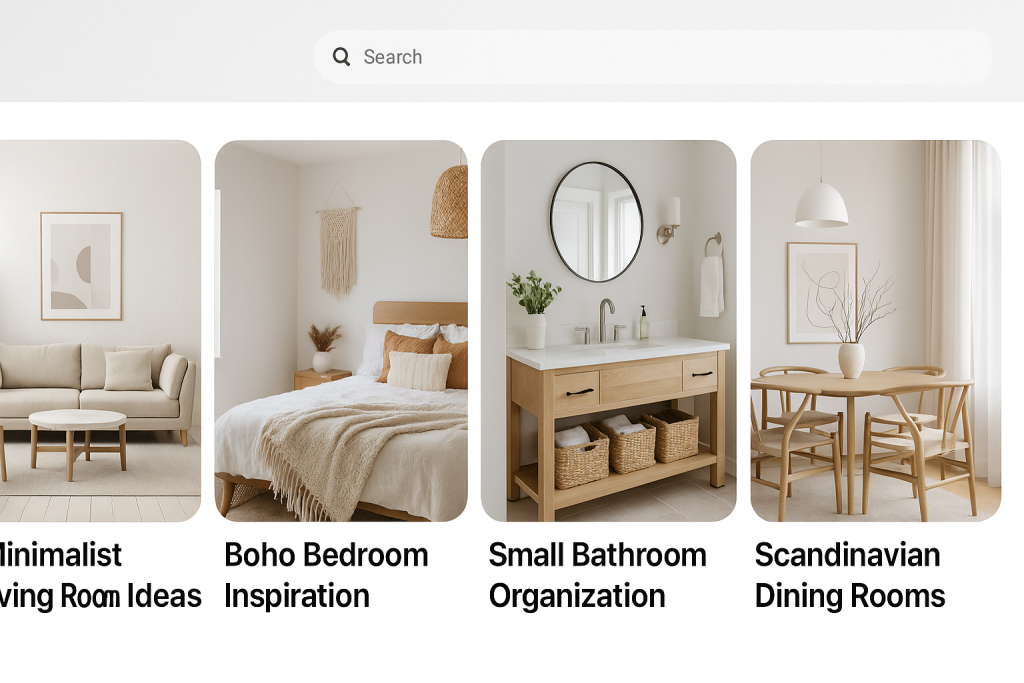
Your Pinterest boards aren’t just for you to stash your Pins. They are powerful tools for your Pinterest SEO. Every single board should have a tight, specific focus.
If you have a home decor account, a single “Home Decor” board is a huge missed opportunity.
Break it down into what people are actually searching for, like “Minimalist Living Room Ideas,” “Boho Bedroom Inspiration,” and “Small Bathroom Organization.”
Your goal is to make it incredibly easy for both users and the Pinterest algorithm to understand what your content is about.
When someone lands on your profile, they should immediately see organized, relevant topics that entice them to explore further.
This is where you can really lean into the search engine nature of the platform. An incredible 96% of top searches on Pinterest are unbranded.
People are looking for ideas, not for specific companies. This is a massive opening for smaller creators to get discovered if their content is well-organized and optimized.
While this guide focuses specifically on Pinterest, many of the same proven strategies to grow social media followers apply universally across platforms.
I’ve put together a quick checklist to help you dial in your profile. Run through these points to make sure your digital storefront is ready for visitors.
Your Pinterest Profile Optimization Checklist
Focus on these key elements to build a profile that attracts your target followers.
| Profile Element | Actionable Tactic | Impact on Growth |
|---|---|---|
| Profile Picture | Use a clear headshot or a crisp logo. | Builds immediate trust and brand recognition. |
| Username | Keep it consistent with your other social handles. | Makes your brand easily searchable and recognizable. |
| Bio | Pack it with 3-5 keywords describing your niche. | Helps Pinterest match your profile to relevant searches. |
| Website | Claim your website and enable Rich Pins. | Unlocks analytics and adds a professional touch. |
| Board Titles | Use descriptive, keyword-rich titles for each board. | Improves the discoverability of your boards and Pins. |
| Board Covers | Create cohesive, branded covers for a polished look. | Creates a strong, professional first impression. |
Working through this list ensures that anyone who lands on your profile knows exactly who you are and why they should follow you.
Finally, don’t sleep on your board covers. While they aren’t a direct ranking factor, good-looking, cohesive covers give your profile a polished, professional vibe that signals you’re a serious creator.
You can design custom covers or just pick the most attractive Pin from each board to feature.
For a little help with the specs, check out our guide on the ideal Pinterest cover photo size to make sure everything looks perfect.
Know Your Audience: The First Step to Gaining Real Followers

Before you even think about creating a Pin, you have to know who you’re creating it for.
Gaining followers on Pinterest isn’t just a numbers game; it’s about building a genuine community of people who are actually interested in what you have to share.
Too many creators make the mistake of casting a wide net, putting out generic content that they hope will appeal to everyone.
That’s a surefire way to get lost in the noise. To really connect and build a loyal following, you need to get specific and define your ideal follower down to the last detail.
Who Is Actually on Pinterest?
It helps to start with a bird’s-eye view of the platform’s user base. Pinterest has some clear demographic trends that can give you a major head start in your content planning.
The platform’s powerhouse demographic is women aged 25–34, who make up a massive 20% of users worldwide.
Right behind them are women aged 18–24, at nearly 19%. If your niche falls into interests popular with young to middle-aged women, you’re in a great spot.
You can dig even deeper into the numbers with these Pinterest statistics to refine your strategy.
But don’t count other groups out. The platform is seeing a huge surge in growth from both Gen Z and male users, which is cracking open exciting opportunities for all kinds of different niches.
Crafting Your Ideal Follower Persona
Now, let’s zoom in. A follower persona is your secret weapon—it’s a detailed, semi-fictional profile of the exact person you want to attract.
This isn’t just an abstract concept; it’s about turning data into a relatable person so you can create content that feels like it was made just for them.
To bring your persona to life, start by asking some simple questions:
- What are their goals? Are they a bride-to-be meticulously planning a wedding, a busy parent desperate for quick weeknight recipes, or a new homeowner hunting for DIY renovation hacks?
- What problems are they trying to solve? Maybe they’re struggling to organize a tiny apartment or need creative ideas for a budget-friendly family vacation.
- What’s their vibe? Think about their aesthetic. Are they all about minimalist, clean lines? Or do they gravitate toward a vibrant, boho-chic style or a cozy, rustic farmhouse feel?
Answering these questions is how you go from creating broad, easily ignored content to producing specific, high-value Pins that your target audience is actively searching for.
When you have a crystal-clear persona, every single Pin you create has a purpose. You’re no longer just shouting into the void; you’re offering a specific solution or a spark of inspiration to a real person.
This is the key to turning a casual browser into a die-hard follower.
Once you know exactly who you’re talking to, you can use our free Pinterest keyword research tool to discover the precise search terms they’re typing into that search bar.
This is where it all comes together—aligning your deep audience understanding with a smart keyword strategy is what transforms your profile from just another account into a must-follow resource.
Designing Pins That Actually Attract Followers
Think of every single Pin you create as a tiny billboard for your brand. It’s your most powerful tool for grabbing someone’s attention on Pinterest.
If your Pins look amateurish, blurry, or just plain confusing, people will scroll right on by. But a well-designed Pin?
That’s what stops the scroll and gets them curious enough to check out your profile and click “Follow.”
The starting point for any great Pin is its shape. Pinterest is built for mobile, which means it loves a vertical, 2:3 aspect ratio.
A size like 1000 x 1500 pixels is perfect because it fills up the screen, making your Pin impossible to ignore.
A common mistake I see is people using square or horizontal images—they just get lost in the feed and don’t stand a chance.
The Anatomy of a Scroll-Stopping Pin
Getting the size right is step one, but a truly successful Pin is a combination of a few key ingredients.
It’s not just about posting a pretty picture; it’s about smart design that screams value in an instant.
Your goal is to create something that is both beautiful and useful. A high-quality, crisp image or video is absolutely non-negotiable.
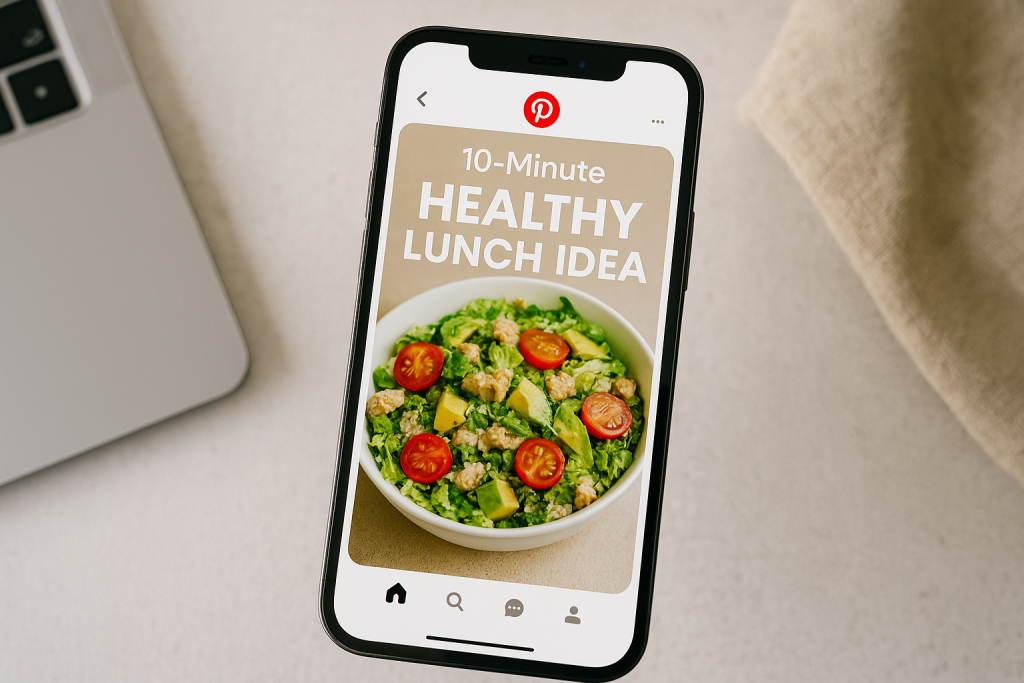
Blurry visuals look unprofessional and make people trust you less. You need to pair that strong visual with a bold, easy-to-read text overlay that tells people exactly what they’re going to get.
For instance, don’t just post a photo of a salad. Your overlay should practically shout, “10-Minute Healthy Lunch Idea.”
That’s the hook. You’re not just showing them a meal; you’re solving their “what’s for lunch?” problem.
A follower is earned when you consistently provide value. Your Pin design is your first promise of that value. It needs to be clear, compelling, and instantly understandable to a user who is scrolling at lightning speed.
This is your split-second chance to solve their problem or spark their imagination.
Crafting Titles and Descriptions for Discovery
Once your visual has done its job and grabbed someone’s attention, the text you add is what helps Pinterest show your Pin to the right people.
Your Pin’s title and description are absolutely critical for Pinterest SEO.
You have to think like your ideal follower. What words or phrases are they actually typing into that search bar?
- For a recipe Pin: “Chicken Recipe” is way too broad. Something like “Easy Lemon Herb Roasted Chicken Recipe” is much better because it catches those specific, high-intent searches.
- For a home decor Pin: Instead of a generic “Living Room,” try “Small Apartment Living Room Ideas on a Budget.”
Weave these keywords into your title and the very first sentence of your description.
The description should then build on the promise you made in your title, giving a little more context and encouraging them to click through.
For a deeper dive, our complete guide on how to create Pins that get noticed is a fantastic resource.
Choosing the Right Pin Format for Your Goal
Not all Pins are the same, and different formats work best for different goals. Knowing when to use each one is key.
- Static Image Pins: These are your trusty workhorses. They’re perfect for showcasing a finished project, a product, or a stunning photo that gets an idea across quickly. They’re easy to scan and super saveable.
- Video Pins: These are brilliant for telling a story or showing a process. Think quick tutorials, behind-the-scenes glimpses, or a product in action. Video can be far more engaging and hold attention longer than a static image.
- Idea Pins: This multi-page format is fantastic for building a community right on Pinterest. Use them for step-by-step guides, checklists, or tutorials that keep people tapping through within the app. Because they stay on Pinterest, users are more likely to follow you for more content just like it.
Developing a Smart and Sustainable Pinning Strategy
If there’s one secret to real, sustainable follower growth on Pinterest, it’s consistency.
I’ve seen it time and time again: pinning ten pins in one day and then going radio silent for two weeks just doesn’t work.
It confuses the algorithm and, more importantly, it confuses your audience. To really grow a following, you need to build a steady, reliable presence.
This doesn’t mean you have to be chained to your desk. The goal is to find a smart, sustainable rhythm that keeps your content flowing into people’s feeds without causing total burnout on your end.
It’s all about creating a powerful pinning schedule that works for you.
This infographic really nails the core elements that make a Pin successful.
As you can see, a winning Pin is a mix of a great visual, a clear title, and the right dimensions. Get those three things working together, and you’re golden.
Finding Your Perfect Pinning Frequency
So, what’s the magic number for pinning? While every account is different, a solid benchmark for most creators is somewhere in the range of 3 to 10 Pins per day.
This is frequent enough to keep your profile active and let you test out new ideas without spamming your followers’ feeds.
But let me be clear: quality always beats quantity. Pinning three fantastic, well-designed Pins is infinitely better than pushing out ten mediocre ones. The focus has to be on providing consistent value.
Don’t just pin for the sake of pinning. Every single Pin should have a purpose. Is it meant to inspire, teach, or solve a problem? That kind of intention is what transforms a casual browser into a loyal follower.
Mix Original Content with Curated Pins
Look, nobody expects you to create brand-new, original content from scratch every single day. That’s a fast track to creative burnout.
This is where content curation becomes your best friend. Curation is simply finding and sharing high-quality, relevant Pins from other creators in your niche.
Here’s a simple rule of thumb: for every one of your own Pins, try sharing one or two Pins from others. This simple strategy does a few powerful things for your account:
- Fills Your Schedule: It lets you maintain a consistent pinning frequency without the constant pressure to create.
- Adds Value: You become a trusted resource by offering your audience a diverse collection of ideas, not just your own.
- Builds Goodwill: It signals that you’re an active member of your community, not just a broadcaster.
This balanced approach keeps your content calendar full and your audience genuinely engaged.
Automate Your Workflow with Scheduling Tools
The real secret to maintaining this kind of consistency without going crazy? Automation. Scheduling tools are an absolute game-changer for anyone serious about Pinterest.
They let you batch-create your content and then schedule it to post at the best times, even when you’re nowhere near your computer.
This is the very definition of working smarter, not harder. To really lock in your consistency and optimize your schedule, I highly recommend exploring some of the Top Social Media Scheduling Tools available.
When you can plan your Pins a week or even a month ahead, you guarantee a steady stream of content that turns your Pinterest strategy into a follower-growing machine.
Using Community Engagement to Boost Your Following
It’s easy to fall into the trap of treating Pinterest like a one-way street: pin your stuff and hope someone notices. But that approach completely misses the “social” part of this social media platform.
If you’re serious about getting more followers, you have to get involved in the community. It’s about building real relationships, not just broadcasting your content into the void.
When you start participating, you send strong signals to both the Pinterest algorithm and other users that you’re an active, valuable member.
This simple shift from passive posting to active engagement puts your profile in front of entirely new audiences—people who are much more likely to follow you because they see you contributing to the same communities they love.
Tap Into the Power of Group Boards
Group Boards are one of the best-kept secrets for explosive growth on Pinterest. Think of them as shared spaces where a bunch of creators all contribute Pins focused on a single, specific theme.
Joining a few high-quality Group Boards in your niche can get your content in front of a massive, ready-made audience.
Let’s say you’re a food blogger who specializes in vegan recipes.
Finding and joining a popular board like “Easy Vegan Dinners” instantly exposes your Pins to thousands of people who are already looking for exactly what you create.
It’s a shortcut to visibility that’s tough to get on your own, especially when your account is new.
The trick is to be selective. A board with 10,000 active, engaged followers is infinitely more valuable than one with 100,000 ghost followers.
Always look for boards where Pins get a steady stream of saves and comments.
Build Real Connections Through Comments and Follows
Don’t just post and run. You have to interact. When someone takes the time to leave a genuine comment on one of your Pins, don’t just heart it—write back!
Thank them, answer their question, or even ask a follow-up to get a real conversation going.
These small moments of connection make people feel valued and far more likely to stick around.
You should also make a habit of following other creators in your niche. And I don’t mean this as a “follow-for-follow” scheme.
This is about strategic networking. When you follow and genuinely engage with your peers, they notice.
They’ll check out your profile, and if they like what they see, they might even share your content with their own followers.
This kind of proactive engagement creates a positive feedback loop:
- You become more visible: Your profile pops up in other people’s notifications.
- You build authority: Consistent, helpful interactions establish you as an expert in your field.
- You inspire reciprocity: People are naturally wired to support those who engage with them first.
When you start treating Pinterest like the bustling community it truly is, you’ll find that simple interactions can snowball into a steady stream of loyal, engaged followers.
Using Analytics to Refine Your Follower Strategy
Creating beautiful Pins and sticking to a schedule are big pieces of the puzzle, but if you’re not paying attention to your data, you’re just flying blind.
Guesswork can only take you so far. To build a strategy that actually brings in new followers, you have to get comfortable with Pinterest Analytics and let the numbers tell you what to do next.
Think of your analytics dashboard as a direct line of communication from your audience. It shows you exactly what they love, what they scroll past, and what genuinely makes them click.
We’re not talking about vanity metrics here; this is about digging up real intelligence to make smarter decisions.
By checking in on your data regularly, you can stop pouring energy into content that’s not landing and double down on what truly works.
Decoding Your Key Performance Metrics
The first time you open up Pinterest Analytics, it can feel like a lot. Don’t stress about tracking every single number right away.
Instead, just focus on a few key metrics that tell the story of your content’s performance and how well it’s attracting followers.
Here are the ones I always keep an eye on:
- Impressions: This is simply how many times your Pins were shown on screen. High impressions are a good sign that your SEO and timing are working, getting your content in front of more people.
- Saves: This metric is pure gold. When someone saves your Pin, they’re bookmarking it for later. It’s a huge signal to the Pinterest algorithm that you’re creating high-quality stuff, which in turn helps get your content in front of potential new followers.
- Outbound Clicks: This tracks how many people clicked through a Pin to your website. It’s a fantastic indicator that your Pin was compelling enough to make someone leave Pinterest to learn more from you.
Your main goal here is to spot the patterns. Are your Video Pins getting tons of impressions but very few saves?
The visuals might be grabbing attention, but the idea itself isn’t hitting home. Are your tutorial-style Pins getting a ton of saves? That’s a crystal-clear signal to make more of that.
Finding and Replicating Your Wins
Believe it or not, your analytics dashboard holds the blueprint for how to get followers in pinterest—you just need to know where to look.
Your best-performing Pins are your greatest teachers.
Jump into your analytics and filter your view to see your top Pins by saves or outbound clicks over the last 30 or 90 days.
Now, look closely. What do these winners have in common?
- Topics: Do they all zero in on a specific sub-niche?
- Formats: Are they mostly step-by-step Idea Pins, or are they quick, punchy Video Pins?
- Visuals: Is there a consistent color palette, font style, or type of imagery that keeps popping up?
Once you start seeing these common threads, your path forward becomes much clearer. The data is telling you exactly what resonates with the people you want to attract.
Replicating these successful elements in your future Pins isn’t about being unoriginal; it’s a smart, data-backed strategy for creating content you know people are looking for.
And that’s what turns viewers into followers.
Make Every Pin Ready to Attract Followers
More followers start with better Pins. When your images, text, and keywords are all working together, it becomes much easier for the right people to find and follow you.
This free Pinterest Pin Checklist walks you through the basics step by step.
You’ll get an easy way to double-check your image size, text overlay, keywords, and call to action before you hit publish—so every Pin has a real chance to perform.
Use it as a quick review whenever you create new content, or keep it open while you batch your Pins for the week.
A few small tweaks can turn “just another Pin” into one that gets saves, clicks, and new followers.
Frequently Ask Question
Alright, let’s tackle some of the most common questions that pop up when you’re trying to grow your Pinterest following. If you’ve ever asked yourself these, you’re in good company. Let’s get them answered.
How Long Does It Really Take to See Growth?
This is the big one, isn’t it? The truth is, Pinterest is a marathon, not a sprint. You have to be patient.
I’ve seen it time and time again: it typically takes a solid three to six months of consistent effort before the algorithm really starts to notice you and you see that steady climb in traffic and followers.
Think of it this way: your first few months are all about laying the groundwork. You’re setting up your profile, optimizing your boards, and consistently pinning quality content.
You’re planting seeds, and it just takes a little while for them to sprout.
Do Followers Even Matter on Pinterest?
Yes, they absolutely do—but maybe not for the reason you think. Unlike other platforms where follower count is king, on Pinterest, saves and outbound clicks are often the more valuable metrics.
It acts more like a visual search engine than a social network. A single killer Pin can send you traffic for years, no matter how many followers you have.
So, where do followers fit in? They give your new content an initial push.
Your followers are your first audience. When they engage with a new Pin by saving or clicking it, they send a powerful signal to the Pinterest algorithm that your content is worth showing to more people.
They’re the ones who get the snowball rolling downhill.