If you’re a blogger, you need to stop thinking of Pinterest as just another social media channel. It’s not.
Pinterest is a visual search engine, and that distinction is the key to unlocking a massive, continuous stream of traffic to your website.
Unlike an Instagram post that vanishes into the ether in a day, a Pin can work for you for months—sometimes even years.
This makes blogging on Pinterest one of the most sustainable ways to grow your audience over the long haul. The effort you put in today truly compounds.
Why Pinterest Is a Goldmine for Bloggers
Let’s get right to it: people on Pinterest are planners and doers, not passive scrollers.
They’re actively searching for ideas, solutions, and inspiration for their next project, purchase, or passion. This high-intent mindset is a blogger’s dream. Every single Pin you create is a visual doorway leading an engaged user straight to your content.
This completely changes how you frame your blog posts.
They become the answer to a question someone is actively asking. For instance, instead of just pinning a picture of a nice couch, you can write a detailed post like “5 Genius Ways to Style a Small Living Room.”
Then, you create a handful of different, eye-catching Pins that all point back to that one article.
This approach immediately positions you as a helpful expert and gives Pinners the value they came searching for.
Pinterest vs Other Platforms for Bloggers
To really understand why this is such a big deal, a quick comparison helps. It’s all about where you invest your time for the best return.
| Feature | Instagram/Facebook | |
|---|---|---|
| Content Lifespan | Months to Years (Evergreen) | 24-48 Hours (Fleeting) |
| User Intent | High (Searching, planning, buying) | Low (Passive scrolling, connecting) |
| Traffic Driver | Excellent (Designed to lead off-platform) | Poor (Designed to keep users on-platform) |
| Discovery | Search-based (SEO is key) | Algorithm-based (Recency is key) |
As you can see, for driving actual, sustained blog traffic, Pinterest is in a league of its own.
The Power of Longevity and User Intent
The incredible lifespan of a Pin is your secret weapon. Seriously.
While your Instagram story is gone in 24 hours, a well-optimized Pin can gain momentum over time, consistently sending new readers your way long after you’ve hit “publish.”
This long-term visibility gets even better when you consider the platform’s huge, engaged audience. As of the first quarter of 2025, Pinterest had an incredible 570 million monthly active users, and that number keeps growing.
The real magic happens when you pair Pinterest’s visual search with your blog’s detailed, keyword-rich content. You’re meeting people at the exact moment they’re looking for an answer, making your blog the destination they need.
This powerful relationship is what it’s all about. Pinterest provides the visual hook and the click, and your blog delivers the in-depth value that turns a casual visitor into a loyal follower.
Of course, a smart traffic strategy is a diverse one. It’s always a good idea to learn about other proven strategies to get more website traffic to create a well-rounded approach. To go deeper on this specific topic, don’t miss our complete guide on how to use Pinterest for blog traffic.
Building a Pinterest Profile That Actually Converts
Think of your Pinterest profile as your blog’s front door.
It’s often the very first impression someone gets of your brand, so it needs to be professional, clear, and intriguing enough to make them want to step inside. The whole point is to create a cohesive experience that not only attracts followers but, more importantly, sends them clicking over to your website.
The absolute first thing you need to do is set up a Pinterest Business account. This is a complete non-negotiable if you’re serious about getting traffic from the platform.
Flying blind with a personal account means you’re missing out on analytics, Rich Pins, and advertising tools—the very things that make Pinterest a powerhouse for bloggers.
Unlocking Your Profile’s Potential
Switching to a business account instantly gives you a dashboard full of data. You’ll see how your pins are performing, including impressions, saves, and those all-important outbound clicks.
This information is pure gold for figuring out what’s working and what’s not.
Next up, you have to claim your website. It’s a quick verification step that proves to Pinterest that you own your blog. Once you do this, a little globe icon appears on your profile, which builds trust with users.
But the real prize is enabling Rich Pins—a feature that automatically pulls your blog post title and meta description right onto the pin itself. It’s a game-changer for getting more context and clicks.
This is a peek at the kind of tools you’ll get, straight from Pinterest’s own business page.
As you can see, it’s all about reaching more people and understanding your performance—two things that are critical for growing your blog traffic.
Crafting a Keyword-Rich Bio and Boards
Your profile bio is prime real estate for Pinterest SEO. You only have a little bit of space, so you need to tell people exactly who you are, what you blog about, and who you’re trying to help.
Be sure to weave in the main keywords your ideal reader is typing into the search bar.
For instance, a food blogger could write something like: “Easy weeknight recipes & meal planning tips for busy families. Helping you get healthy, delicious dinners on the table in under 30 minutes.” This bio is packed with searchable terms like “weeknight recipes,” “meal planning,” and “healthy dinners.”
Your profile isn’t just a mood board of pretty pictures. It’s a strategically organized library designed to lead people straight to the solutions on your blog. Every single element, from your bio to your board names, needs to be optimized for search.
This same SEO mindset applies to your Pinterest boards. Think of them as the main categories of your blog.
- Board Naming: Give your boards clear, searchable names. Instead of something cute like “Yummy Things,” go for “Healthy Breakfast Recipes” or “Gluten-Free Dessert Ideas.” Be direct.
- Board Descriptions: Never, ever skip the board description! This is your chance to write a couple of sentences packed with related keywords. It helps both Pinterest and Google understand what that collection of pins is all about, making your content much easier to find.
By taking the time to set up your profile the right way from the start, you’re building a powerful foundation for your entire Pinterest strategy. It’s how you turn casual browsers into loyal blog readers.
Mastering Pinterest SEO for Your Blog
If you ignore Pinterest SEO, it’s like setting up a beautiful storefront on a deserted street. You have to treat Pinterest for what it really is: a visual search engine.
Honestly, understanding how its algorithm works is the single biggest key to driving long-term, sustainable traffic to your blog.
This isn’t just about creating pretty images. The real goal is making your content discoverable to a massive audience that’s actively searching for what you offer. ‘
And the opportunity is huge.
In 2025, Pinterest users are making over 2 billion searches every month, and a staggering 96% of those searches are unbranded.
Think about that for a second—it means users are wide open to discovering new creators and ideas. It’s the perfect place for bloggers to connect with a super-receptive audience.
If you want to go deeper, checking out more Pinterest statistics can really open your eyes to this unique user behavior.
Uncovering What Your Audience Wants
Good keyword research is the bedrock of any solid Pinterest strategy. Before you even think about complex tools, your best starting point is right there in the Pinterest search bar.
Just start typing a broad term related to your blog’s niche—something like “healthy lunch.” Pinterest will instantly autofill with popular, long-tail keywords people are actually searching for, like “healthy lunch ideas for work” or “healthy lunch meal prep.” These suggestions are pure gold.
Don’t stop there. After you hit enter, look at the colorful bubbles that pop up right below the search bar. These are guided search terms, and they give you another layer of insight into what users want to find next on their journey.
The key to winning at blogging on Pinterest is to shift your mindset from a social media creator to a search engine optimizer. Every title, description, and board name is an opportunity to be found.
By digging around with these built-in tools, you can quickly build a strong list of keywords that perfectly mirror what your ideal reader is looking for. This ensures your content is exactly what they want to find.
The Anatomy of a Perfectly Optimized Pin
Once you’ve got your keywords, you need to know exactly where to put them for the biggest impact. I like to think of each pin as a mini-SEO powerhouse, with a few key spots you need to optimize.
- Pin Title: This is your headline. It has to be catchy while also including your main keyword. So, instead of a vague “Yummy Salad,” you’d use something like “Easy Quinoa Salad Recipe for Quick Lunches.” See the difference?
- Pin Description: You get up to 500 characters here, so make them count. Write a couple of conversational sentences describing what someone gets when they click through. Weave in your main keyword and a few related ones, but keep it natural. Don’t just stuff it with terms.
- Text Overlay on the Image: This is a big one that people often forget. Pinterest’s visual search tech can actually read the text on your pin graphic. Make sure your primary keyword is right there in a bold, easy-to-read font.
For instance, let’s say you’re a home organization blogger.
You could create a pin with the title “Genius Small Pantry Organization Ideas.” In the description, you’d talk about the tips from your blog post, naturally working in phrases like “pantry storage,” “kitchen organization,” and “organizing hacks.”
This multi-layered approach sends strong signals to the Pinterest algorithm, telling it exactly what your content is about and dramatically increasing your chances of ranking well in search.
Designing Pins That Stop the Scroll
On Pinterest, your pin design is everything. It’s a fast-moving, visual platform, and a bland graphic will get scrolled past in a heartbeat—no matter how brilliant your blog post is.
Your one and only job here is to create a pin that acts as a visual “speed bump,” forcing someone to pause, read, and (most importantly) click.
This goes way beyond just making something look pretty. A great pin is a strategic mix of your brand’s personality, a little bit of psychology, and crystal-clear communication. It’s the first impression your blog post makes, and you’ve got maybe two seconds to make it count.
Core Elements of a High-Converting Pin
Every single pin that successfully drives traffic shares a few key design traits. Think of these less as suggestions and more as the non-negotiable building blocks for getting clicks.
First, always use a vertical aspect ratio. The sweet spot is 1000 x 1500 pixels, which is a 2:3 ratio. This format simply takes up more screen real estate on a phone, which is where most of your audience is scrolling.
Next, your text overlay needs to be big, bold, and incredibly easy to read. Go for a clean, simple font that pops against your background image. The headline itself should be all about the benefit, telling the user exactly what they’ll get when they click through to your blog.
A pin’s job is to create a curiosity gap. It should answer just enough of a user’s question to make them realize they need the full story, which is waiting for them on your blog.
To consistently nail your designs, keep these components front and center:
- High-Quality Imagery: Use bright, clear photos or graphics that are actually relevant to your topic. Stay away from dark, blurry, or overly cluttered images that make your text hard to see.
- Compelling Text Overlay: Your pin’s headline is its hook. Grab attention with power words and numbers, like “5 Genius Hacks” or “The Ultimate Guide To.”
- A Clear Call-to-Action (CTA): It doesn’t have to be loud, but a subtle CTA like “Read More” or “Get the Recipe” can give people that extra nudge to click.
- Subtle Branding: Always add your logo or website URL somewhere on the pin, usually at the bottom. This builds brand recognition over time without being obnoxious.
Choosing the Right Pin Format
Pinterest gives you a few different pin formats to play with, and picking the right one for your content is a smart move. You don’t have to use all of them, but understanding what each one is for helps you build a much more effective strategy.
Choosing the right format can make or break your pin’s performance. Here’s a quick rundown of the main players and how I think about using them for my blog content.
Pin Format and Use Case
| Pin Type | Best For | Key Tip |
|---|---|---|
| Standard Pin | Driving direct traffic to a specific blog post. | This is your workhorse. I aim to create multiple, unique standard pins for every single blog post I publish. |
| Video Pin | Demonstrating a process, showing a transformation, or grabbing attention with movement. | Keep them short (15-30 seconds) and always design them to work with the sound off, using text overlays for context. |
| Idea Pin | Building brand awareness and growing your followers. These are multi-page story-like pins. | Use Idea Pins to share quick tips or a tutorial that doesn’t require a click-through, positioning you as an expert. |
As you can see, each format has a specific job. Your Standard Pins are for traffic, while Idea and Video Pins are fantastic for building an audience directly on the platform.
The Power of Templates and Testing
Honestly, creating every single pin from scratch is a massive time sink. The real secret to a sustainable workflow is a solid set of branded templates.
I use a tool like Canva to design 5-10 different pin layouts that already have my brand’s colors and fonts locked in.
This approach gives my profile a consistent, professional look and lets me whip up new pins in just a few minutes. When you’re putting your designs together, it’s worth looking at general ad creative principles to get a better handle on what visually makes people stop and pay attention.
Finally, and this is crucial, never assume you know what will work best.
The most successful Pinterest marketers are constantly testing their designs. Pit different headlines, images, colors, and CTAs against each other for the same blog post.
Let the data from your Pinterest Analytics tell you what your audience actually wants to see. If you want a deeper dive, you can learn more about how to create pins for Pinterest that are truly built to perform.
Your Sustainable Pinterest Workflow
A brilliant Pinterest strategy is worthless if you can’t stick with it.
Let’s be real—the secret to winning on Pinterest isn’t spending hours glued to the platform every day. It’s about building a smart, repeatable workflow that feels almost effortless.
This is how you run your Pinterest account without letting it run your life.
The entire system hinges on one core idea: content repurposing. Think about it—a single blog post is a goldmine of pin ideas just waiting to be dug up.
Instead of making one pin and moving on, your goal is to slice that blog post into multiple, unique pins. Each one can have a different visual hook, a fresh headline, or a new angle.
This visual breaks down the cycle perfectly. It’s not about luck; it’s a simple, repeatable process.
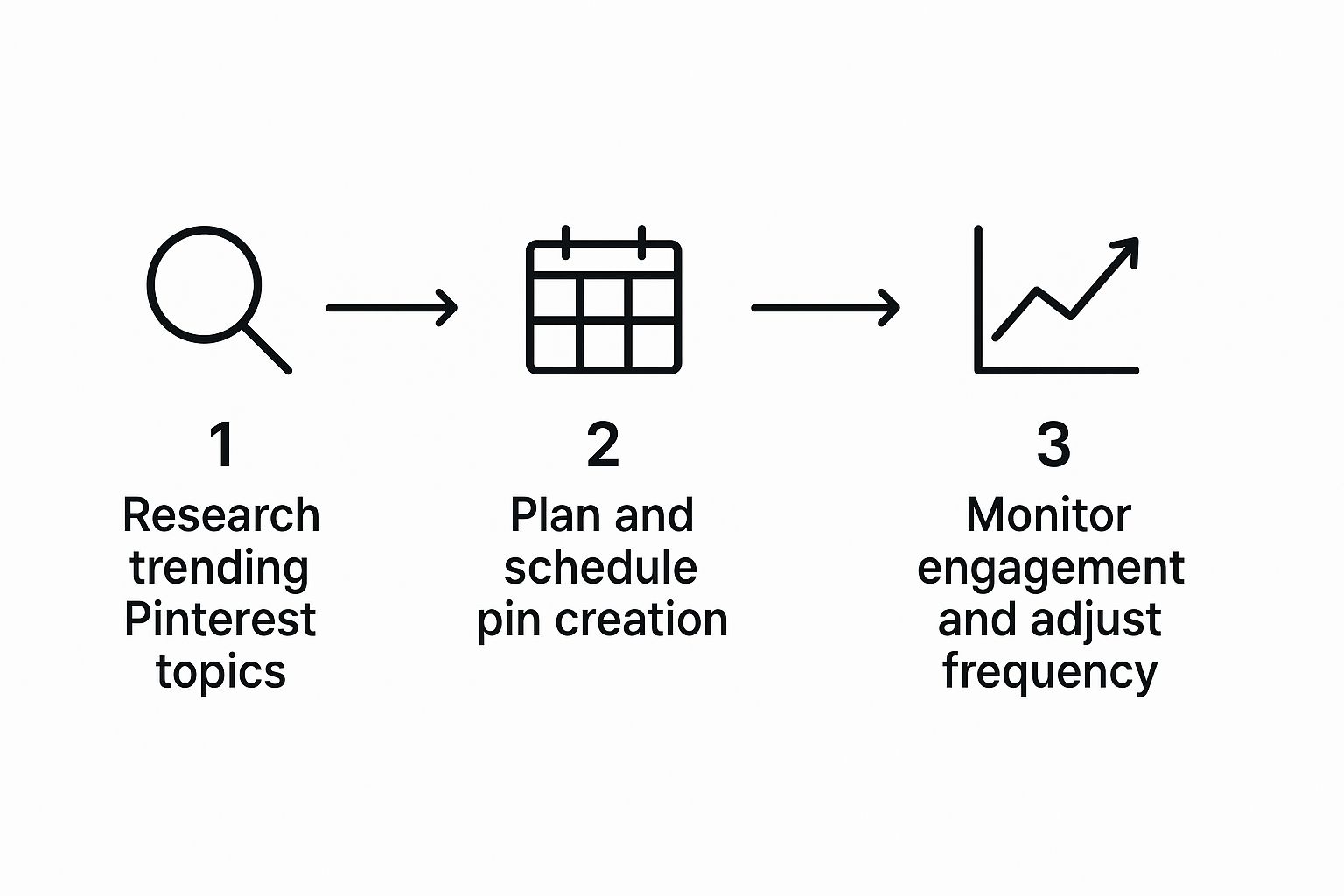
As you can see, success isn’t random. It’s a loop of research, creation, and analysis that feeds itself over time, getting smarter with every cycle.
Smart Scheduling And Automation
The Pinterest algorithm loves consistency. It’s the clearest signal you can send that you’re a serious creator worth paying attention to.
This is where scheduling tools become an absolute game-changer. Whether you use a platform like Tailwind or stick with Pinterest’s native scheduler, you can batch-create your pins and then let them drip out over days or weeks.
This approach keeps your content flowing even when you’re busy with other parts of your blog. It’s a set-it-and-forget-it method that works.
You can learn more about how to automate pinterest strategy and seriously cut down on your daily workload.
So, should you schedule everything or pin manually?
Honestly, for most bloggers, a hybrid approach is the sweet spot. Schedule your evergreen content to maintain a baseline of activity, but jump in and manually pin timely or trending topics to stay right in the moment.
Organizing Your Boards For Maximum Impact
Your Pinterest boards are basically the organized shelves of your content library.
When they’re well-structured, it’s not just easier for users to find what they’re looking for—it also helps the Pinterest algorithm understand exactly what your content is about.
Here’s a simple framework I use for organizing boards:
- Evergreen Boards: These are your blog’s core categories. If you’re a food blogger, you might have boards like “Easy Weeknight Dinners,” “Healthy Breakfast Recipes,” and “Vegan Desserts.”
- Seasonal Boards: Tap into what’s timely by creating boards for holidays or seasons. Think “Fall Decor Ideas” or “Summer Grilling Recipes.” Once the season passes, you can just archive them to keep your profile clean.
- Group Boards: Their influence has changed over the years, but a good group board can still give your new pins a nice initial boost. The key is to find active, relevant boards and always contribute high-quality, non-spammy content.
A huge advantage you have on Pinterest is the user’s mindset. The average session duration is 14.2 minutes, which is an eternity in the social media world. This gives your well-organized content a fantastic opportunity to be discovered, as users are actively looking for ideas and are more likely to explore your boards and click through to your blog.
By systemizing how you repurpose content, schedule pins, and organize your boards, you’re not just posting on Pinterest—you’re building a powerful and sustainable engine for driving predictable traffic to your blog.
Turn Pinterest Into a Predictable Blog Traffic Engine
Reading about Pinterest is useful. Building a system around it is what actually grows your blog. Instead of trying to do everything at once, turn this guide into a clear, repeatable plan you can run every single week.
Here’s a simple way to put it into action:
- Fix your foundation this week. Switch to a Pinterest business account, claim your site, enable Rich Pins, and update your bio and board names so they match your core blog categories and keywords.
- Choose 3 pillar blog posts. For each one, create at least 5 unique, keyword-optimized Pins with strong headlines, clear text overlays, and vertical 2:3 layouts.
- Set up a weekly “Pinterest session.” Once a week, batch-create new Pins from your latest or best-performing posts, schedule them, and spend a few minutes reviewing analytics to see which titles, designs, and keywords are actually driving clicks.
- Iterate, don’t reinvent. When a Pin performs well, make more variations of that idea instead of starting from scratch. Let the data tell you what your audience wants and lean into it.
If you commit to this process for the next 60–90 days, Pinterest stops being a vague “extra” channel and starts behaving like a reliable, search-driven engine that sends you new readers every day your blog exists.
Ready to Turn Every Blog Post Into a Pinterest-Ready Asset?
Publishing great blog content is only half the job. But to actually get readers from Pinterest, every Pin that promotes your posts needs to be clear, on-brand, and properly set up before it goes live.
To do this, use PostPaddle’s FREE Pin Optimization Checklist as a quick review step for each new Pin, so you consistently remember important details and keep your blog promotion on Pinterest running smoothly.
Unpacking Common Pinterest Questions for Bloggers
When you start digging into Pinterest as a serious traffic source for your blog, a ton of questions pop up. It’s totally normal.
Let’s walk through some of the big ones I hear all the time so you can get past the confusion and build a strategy that actually works.
I’ll give you the straight-up, practical answers you’re looking for.
How Many Pins a Day is the “Magic Number”?
This is probably the first question every blogger asks, and the answer isn’t a hard and fast number. It’s more about rhythm and quality.
Instead of obsessing over a specific number, focus on consistency. A great place to start is creating 3-5 high-quality, fresh pins every single day. The most important word there is “fresh.” Pinterest wants new content—new images, new takes on a topic.
This is a huge strategic shift for many. It means your time is much better spent designing new pin graphics for your existing blog posts than just repinning the same image over and over. Pour your effort into fresh visuals and solid, keyword-loaded descriptions.
As your account matures, you can play around with pinning more, but never at the expense of quality. Keep an eye on your Pinterest Analytics to see what your audience responds to.
Is Making Money from Pinterest Blogging a Real Thing?
Yes, one hundred percent. While Pinterest isn’t sending you a check for getting views, it’s an incredible engine for driving people to your blog, where you do make money.
The user base here is primed to buy; a staggering 83% of weekly Pinners have bought something based on brand content they saw on the platform.
Here’s how that translates into actual income for you:
- Ad Revenue: More traffic from Pinterest means more eyeballs on the ads running on your blog. Simple as that.
- Affiliate Marketing: You can direct pinners straight to your review posts, gift guides, or tutorials that feature affiliate links. You can even use affiliate links directly on pins, just make sure you disclose it properly.
- Your Own Products: Got an ebook, a course, or physical products? Pinterest is the perfect place to warm up an audience and send them to your sales pages.
What’s the Big Deal with Rich Pins?
Think of Rich Pins as the VIP upgrade for your content.
For any blogger using Pinterest, they are absolutely essential. They work by pulling extra information from your website and displaying it directly on the pin itself, showing your blog post’s headline and a snippet of your description.
This little bit of extra context makes your pins look way more professional and trustworthy. It gives users a reason to click because they know exactly what they’re getting.
Setting up Rich Pins is a simple, one-time process. You add a bit of code to your site and then validate it with Pinterest. From that moment on, every single pin you create from your blog gets that professional boost, which can seriously improve your click-through rate.