Let’s be real—trying to keep up with social media’s endless appetite for new content is exhausting.
That’s where auto social media posting comes in. It’s not about being lazy; it’s about being strategic.
Think of it as using smart tools to schedule your content ahead of time, so it goes live automatically without you having to manually hit “publish” every single day.
What Is Auto Social Media Posting, Really?
Forget the idea of a robot taking over your accounts. An auto-posting tool is more like a highly efficient assistant for your marketing. You’re still the one creating the posts, but you do it in focused, planned batches.
Then, you simply load everything into a scheduling tool that handles the rest, publishing your content at the best possible times for you.
This simple change pulls you off the relentless content treadmill. Instead of scrambling for something to post every morning, you can block off time to be creative and thoughtful.
The result? The quality and consistency of your posts shoot way up, and you suddenly have time for the things that actually grow your business.
The Core Idea Behind Automation
At its heart, automating your social media is all about working smarter, not harder. Manually posting on Facebook, X, and Pinterest at different peak times is a logistical nightmare and a huge time-sink.
An automation tool takes care of all that, making sure your message gets out when your audience is actually online and paying attention.
This is a key piece of a much larger strategy. To get a feel for its real power, you need to see how it fits into the broader world of automating your marketing. A great place to start is by reading up on what is content automation, which explains the full picture.
Getting a handle on this frees you up to spend your time where it truly counts, like:
- Engaging with your audience: Actually talking to people in comments and DMs is how you build a real community.
- Analyzing performance: Diving into the data to see what’s working and what’s not, so you can double down on the good stuff.
- Building real connections: Focusing on the genuine, human side of social media that a machine simply can’t fake.
The goal of automation isn’t to remove the human element from social media. It’s to handle the repetitive tasks so you can amplify the human element where it matters most.
From Chaos to Consistency
Picture this: you sit down for one afternoon and map out your entire month of social media content. You decide on your themes, batch-create your graphics, write all your captions, and schedule everything to go out at the perfect times. Done.
For the rest of the month, your accounts are consistently active, building brand trust and keeping your followers engaged.
That’s the power of an auto social media posting system. It turns a chaotic, reactive daily task into a structured, proactive strategy. You’re no longer a slave to the clock; you’re the architect of a content plan that works for you 24/7, driving growth even while you sleep.
How Automation Changes the Social Media Game
Bringing auto social media posting into your routine isn’t just a minor tweak—it’s a complete overhaul of how you work. You stop being a reactive content creator, scrambling for daily posts, and start becoming a proactive strategist.
This shift is a game-changer, freeing you from the constant pressure to “post now” and opening up real opportunities for growth. The results show up in three key areas: how you manage your time, the consistency of your brand, and the way you connect with your audience.
Think about what you could do with all the hours you’d get back each week.
All that time spent logging in and out of different platforms, uploading photos and videos, and manually hitting “publish” can be condensed into a few focused, strategic sessions.
That reclaimed time is pure gold, letting you focus on the bigger picture—the stuff that actually grows your business.
Reclaim Your Most Valuable Asset: Time
The first thing you’ll notice with automation is just how much time you save. The daily scramble to find something, anything, to post is replaced by dedicated blocks of time where you plan, create, and schedule out your content for the entire week or even month.
This “batching” approach is wildly efficient.
A small business owner might easily spend 30-45 minutes every single day on social media tasks. With a smart automated workflow, they could get the same (or better) results from a single three-hour session once a month.
Automation isn’t about working less; it’s about making your work count more. It takes care of the repetitive, tedious tasks so you can pour your energy into strategy, creativity, and genuine connection.
This efficiency becomes even more critical as your brand grows. Juggling one social account by hand is tough enough. Trying to manage five is a recipe for burnout and sloppy work.
An auto social media posting system brings everything under one roof, making it possible to scale your efforts without losing your mind.
Build Unbreakable Brand Consistency
Consistency is what makes a brand stick. When your audience knows they can expect regular, high-quality content from you (with a cohesive look and feel) it builds familiarity and trust.
But let’s be honest, maintaining that consistency manually is a huge challenge. Life happens, creative sparks fizzle out, and before you know it, your posting schedule is all over the place.
Automation fixes this by putting your content calendar on rails.
Your posts go out at the best possible times, day in and day out, without you having to lift a finger. This creates a reliable, steady presence that your followers can depend on, strengthening your brand with every single post.
Boost Audience Engagement and Reach
Finally, automation has a direct line to better engagement.
By scheduling posts to go live during peak hours (even if that’s late at night or on a weekend) you drastically increase the odds of your content getting seen, liked, and shared. This is how you play the algorithm’s game and win.
And the audience you can reach is massive.
As of 2025, the worldwide social media user base has ballooned to roughly 5.45 billion people. These users are active, too, spending an average of 2 hours and 24 minutes a day on their favorite platforms. Automation ensures you’re consistently showing up where they are, right when they’re looking.
When the “what” and “when” of posting are handled, you can finally focus your real-time energy on the “who”—your community.
You’ll have the mental space to jump into conversations, reply to comments, and build the real relationships that are the secret sauce of social media success.
Building Your First Auto Posting Workflow

Moving from the daily grind of manual posting to a smart, automated system might feel like a huge project, but it’s actually pretty straightforward.
Think of it less like launching a rocket and more like building with LEGOs—you just need to connect the right pieces in the right order to create something that works for you.
This guide will walk you through building your own auto social media posting engine, one step at a time. The main idea is to switch your focus from reactive, last-minute content creation to proactive, strategic planning.
Instead of waking up and asking, “What am I going to post today?” you’ll have a system that has the answer ready for weeks in advance.
Define Your Content Pillars and Batch Creation
Before you can automate anything, you need a solid supply of content. The best place to start is by defining your content pillars. These are the 3-5 core topics or themes your brand consistently talks about.
For example, if you run a local coffee shop, your pillars might be “Behind the Scenes,” “Customer Spotlights,” and “Coffee Education.”
Once you know what you’re talking about, it’s time to embrace batch creation.
This is a game-changer. Instead of scrambling to design one graphic and write one caption every single day, you set aside a block of time to create a ton of content at once. It’s incredibly efficient and helps maintain a consistent look and feel for your brand.
Here’s what that could look like:
- Block out four hours on a Monday to write all your social media captions for the next month.
- Schedule a separate session just for taking photos, recording quick videos, or designing graphics in Canva.
- Organize everything in a cloud folder, with clear file names, so it’s ready to go when you need it.
This flips content creation from a nagging daily chore into a manageable, scheduled task.
Build a Smart and Flexible Content Calendar
Your content calendar is the brain of your entire operation. It’s where you map out what gets posted, on which platform, and at what time. A great calendar does more than just list post ideas; it strategically balances your content pillars to keep your feed interesting and on-brand.
You can start with a simple spreadsheet or use the built-in calendar in a tool like Post Paddle.
A content calendar is your strategic roadmap. It ensures you’re not just posting content, but posting the right content at the right time to achieve your goals.
Think of your calendar as a living document. Plan a month ahead, but stay flexible. If a new trend pops off or you have timely company news, you should be able to shuffle things around easily.
The goal is consistency, not rigidity. A well-planned calendar also helps you weave in evergreen content—posts that stay relevant for a long time—to fill any gaps and keep your schedule full of value.
Choose the Right Tools for Your Needs
Your workflow is only as good as the tools you use to run it. There are tons of options out there, so you need to find a platform that actually fits your goals.
For instance, if you’re laser-focused on driving website traffic from a visual platform, a Pinterest-centric tool like Post Paddle is a fantastic choice. It’s built specifically to optimize content for that environment, not just schedule it.
At their core, these tools follow a simple three-step process: connect your accounts, build out your schedule, and then watch the results.
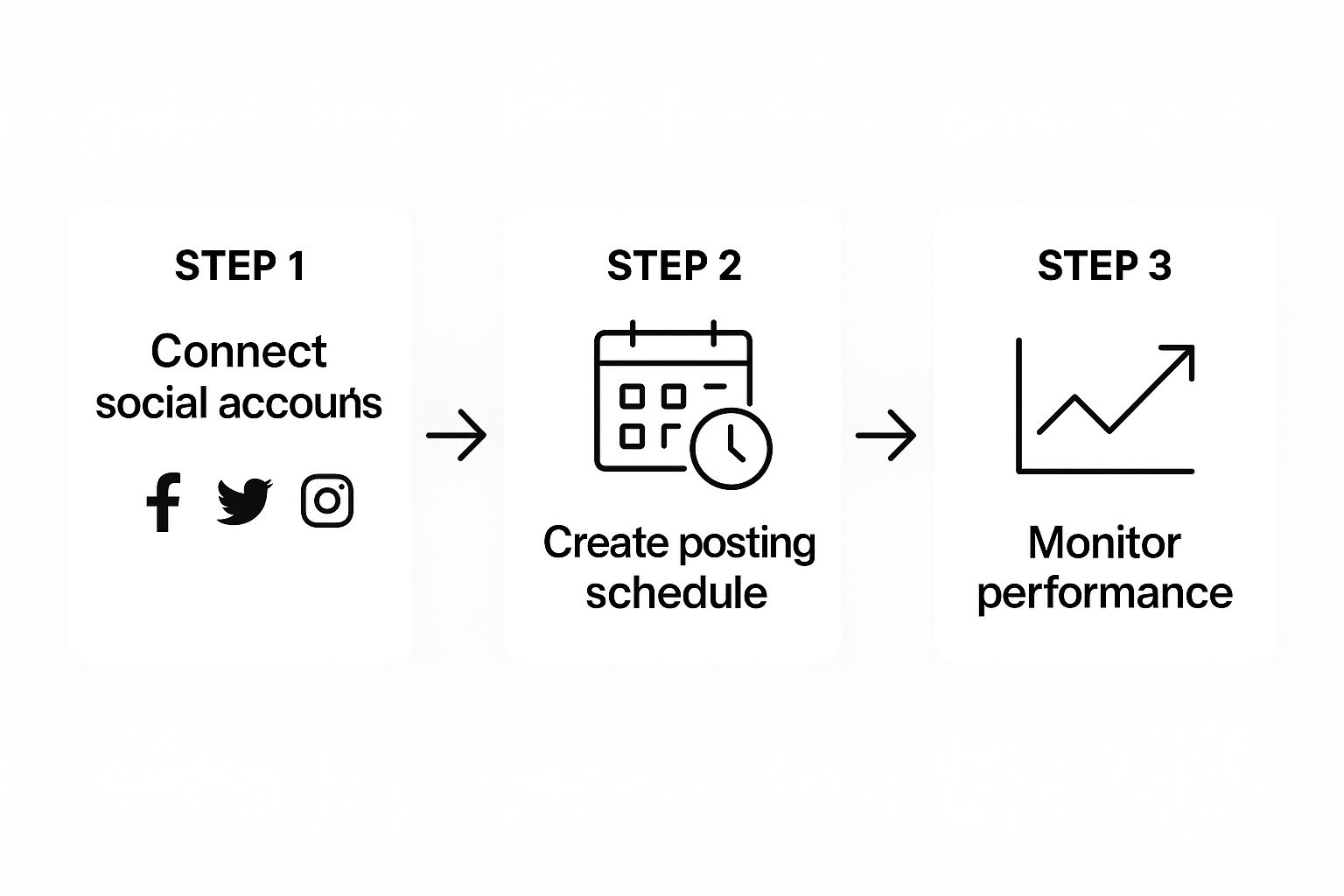
This cycle is key. A successful auto social media posting strategy isn’t about “set it and forget it.” It’s about creating a system that you can continuously improve based on real data.
To see just how different the day-to-day looks, let’s compare the old way with the new.
Manual Posting vs Auto Posting Workflow
| Task | Manual Posting Approach | Auto Posting Approach |
|---|---|---|
| Daily Content Creation | Create and write a new post from scratch every day. | Pull from a pre-made library of batched content. |
| Scheduling | Log in to each platform and publish in real-time. | Schedule dozens of posts at once using a single dashboard. |
| Strategy | Often reactive, based on what feels right for the day. | Proactive and planned a month or more in advance. |
| Time Management | Daily, time-consuming task that interrupts other work. | Focused blocks of work (batching, scheduling) done weekly or monthly. |
| Consistency | Can be sporadic, with gaps in posting when busy. | Consistent presence with a steady stream of content. |
| Performance Analysis | Checking stats on each platform individually, often inconsistently. | Centralized analytics allow for regular, high-level review. |
This table really highlights the shift in mindset. Instead of being a content creator every day, you become a strategist who executes in focused bursts.
Schedule Posts for Maximum Impact
With your content ready and your calendar planned out, the final step is to load everything into your scheduling tool. This is where the automation really kicks in.
A crucial part of this is knowing when to post.
Check your social media analytics to see when your followers are most active online. Don’t just guess! Use that data to set your posting times. If your audience is scrolling on weekday evenings, that’s when your best stuff should go live.
Many tools also offer “queues,” where you can add content to a list, and the tool will automatically publish it at your pre-selected best times.
Monitor Performance and Refine Your Strategy
The final piece of the puzzle is the feedback loop. Once your automated posts start going out, you need to pay attention to how they perform. The main metrics to watch are:
- Engagement Rate: Are people liking, commenting, sharing, and saving?
- Reach and Impressions: How many eyeballs are actually seeing your content?
- Click-Through Rate (CTR): How many people are clicking the links in your posts?
Check these numbers weekly. Did you notice that your video posts get 50% more engagement than static images? Great, it’s time to adjust your plan and make more videos. Are posts scheduled for 9 PM crushing the ones from 9 AM? Tweak your schedule accordingly.
This ongoing process of monitoring, analyzing, and refining is what turns a good workflow into a truly great one.
Choosing the Right Auto Posting Tool
Your automated workflow is only as good as the software driving it. With dozens of options on the market, picking the right partner for your auto social media posting can feel like a huge task.
The secret is to look past the flashy marketing and zero in on the features that actually save you time and get you results. A great tool isn’t just a scheduler; it’s a command center for your entire social strategy.
Think of it like picking a car for a road trip.
A tiny two-seater is fine for zipping around town, but for a cross-country journey? You’ll want something reliable, with great navigation and plenty of room.
In the same way, your social media tool needs to be built for the long haul, with features that support your growth from day one and beyond.
Core Features Every Great Tool Needs
Let’s be clear: not all auto posting platforms are built the same. As you start looking around, there are a few non-negotiable features that should be on your checklist.
These are the things that separate a basic scheduler from a genuine marketing powerhouse.
- Multi-Platform Integration: Your tool has to play nice with all the social networks that matter to your brand. This simple feature saves you from juggling multiple apps just to cover all your bases.
- A Visual Content Calendar: Seeing your entire schedule at a glance is a game-changer. A clean, drag-and-drop calendar makes it easy to spot gaps, balance your content mix, and plan ahead.
- Bulk Scheduling Capabilities: What’s the point of automation if you’re still scheduling posts one by one? A solid tool will let you upload and schedule content in big batches, saving you hours of mind-numbing work.
- Insightful Analytics and Reporting: “Set it and forget it” is a recipe for disaster. You need clear, actionable data on how your posts are performing, what your engagement rates look like, and how your audience is growing. This is how you get smarter over time.
These features are the foundation of any effective auto social media posting system. Without them, you’ll probably spend more time wrestling with the tool than you save by using it.
For a deeper dive, check out our complete guide to the best social media automation tools and see how the top platforms compare.
Why User Experience Matters More Than You Think
A tool can have every feature imaginable, but if it’s a pain to use, you won’t. It’s that simple. An intuitive, user-friendly interface is absolutely critical.
You and your team should be able to jump in, schedule content, and pull reports without needing a technical manual.
This is where a platform like Post Paddle really shines. It was designed from the ground up to be clean and straightforward, making complex tasks feel easy.
The whole workflow, from generating AI-powered pin descriptions to customizing visual templates, is built to be efficient and frustration-free. When the user experience is this good, you spend less time fighting with software and more time thinking strategically.
The best automation tool is the one you actually enjoy using. A simple, intuitive design encourages consistency, which is the cornerstone of a successful social media strategy.
Aligning Tools with Your Strategic Goals
Ultimately, the “best” tool is the one that fits your specific business goals.
Are you an e-commerce brand trying to drive traffic from Pinterest? Then a specialized tool like Post Paddle, built for Pinterest optimization, makes way more sense than a generic, all-in-one platform.
Its features are tailor-made to help you create high-performing pins and maximize those valuable outbound clicks.
The digital marketing world is always on the move, with a massive focus on mobile-first content. The explosion in social media advertising and automation is a direct reflection of this.
By 2029, social media ad spending is projected to blow past $406 billion, and a mind-boggling 83% of that will come from mobile devices. This trend highlights just how important it is to have tools that can consistently push out perfectly optimized content at the right time.
Choosing the right platform for auto social media posting is a major strategic decision.
If you prioritize the core features, a great user experience, and a tight alignment with your goals, you’ll find a partner that doesn’t just save you time—it actively helps your brand grow.
Getting Your Social Media Automation Strategy Right

Let’s get one thing straight: auto social media posting isn’t a magic button you press to forget about your accounts.
If you treat it that way, you’ll quickly turn your social media presence into a robotic, one-sided conversation that nobody wants to be a part of.
The real win with automation is the time it frees up.
This isn’t time to go on vacation; it’s time to reinvest in the things a machine can’t do. Think real-time engagement, thoughtful replies to comments, and actually building relationships with the people who follow you.
Stick to the 80/20 Rule for Content
A smart automation strategy is all about balance. The 80/20 rule is a fantastic framework to keep your audience engaged and your brand from sounding too salesy.
- 80% High-Value Content: The bulk of your scheduled posts should be genuinely helpful or interesting. We’re talking about educating, entertaining, or inspiring your audience with tips, behind-the-scenes content, or fun questions.
- 20% Promotional Content: Only a small slice of your content should be about selling. When you lead with value most of the time, people are much more open to hearing your pitch when it comes.
This approach makes your feed a go-to resource, not just another billboard.
Tailor Your Content for Each Platform
One of the biggest blunders in social media automation is blasting the exact same message everywhere.
Every network has its own vibe, its own audience, and its own rules of engagement. A quippy, text-heavy post that kills it on X will completely bomb on a visual-first platform like Pinterest.
Automation is there to make your workflow smoother, not to make your brand sound like a broken record. Always take a few extra minutes to tweak your content for each platform.
For example, you could share a blog post on Facebook with a thought-provoking question, frame it with a professional takeaway for LinkedIn, and turn it into a beautiful graphic for Pinterest.
Keep Your Brand Voice Human
Automation tools don’t have personalities, but your brand does. Whether you’re witty, serious, or super encouraging, that voice needs to come through in every single scheduled post.
This is where creating content in batches can be a lifesaver—it helps you get into a consistent creative headspace.
The explosion of AI-generated content makes this even more critical. It’s a wild statistic, but 71% of images shared on social platforms are now AI-generated.
While AI can certainly help you keep your content calendar full, you have to balance it with genuine, human interaction to maintain trust.
At the end of the day, your automation strategy is only as good as the results it gets. Once you’ve put these ideas into practice, you need to see what’s working.
Our guide on how to measure ROI on social media is the perfect next step to connect your social media efforts to real business growth.
Turn Auto Posting Into a System You Actually Run
Auto social media posting only works if you treat it like a process, not a one-off experiment. Take what you’ve just read and turn it into a simple workflow you follow every single week.
Here’s a practical way to put this into action over the next 30 days:
- Choose your core channels and one auto-posting tool. Stop juggling five platforms and three schedulers. Pick the 2–3 networks that matter most and one tool to run them.
- Define 3–5 content pillars and batch-create. Block a recurring slot in your calendar to create a month’s worth of posts around those pillars in one focused session.
- Build a realistic posting schedule. Use your analytics to pick a handful of peak times per platform, then load your batched content into those slots.
- Set a weekly “review and refine” block. Once a week, check engagement, reach, and clicks. Keep what works, cut what doesn’t, and adjust timing or formats accordingly.
If you stick to this loop (batch, schedule, review, refine) auto posting stops being a nice idea and becomes the backbone of a social presence that runs reliably in the background while you focus on the work that actually grows your business.
Ready to Fill Your Auto Posting Queue With Pins That Practically Write Themselves?
Automation only pays off when you have strong content ready to schedule.
Use PostPaddle’s FREE Pin Title Generator and Pin Description Generator GPTs to quickly come up with clear, on topic Pinterest pin titles and descriptions in focused batches.
That way, when you sit down to load your auto posting tool, you already have optimized copy ready to drop into each pin instead of writing everything from scratch.
Common Auto Posting Mistakes to Avoid
Jumping into auto social media posting can feel like you’ve just been handed a marketing superpower. But like any good origin story, there are a few classic blunders to watch out for. Lots of people stumble right out of the gate, turning a tool meant for connection into a one-way ticket to audience burnout.
Let’s make sure that doesn’t happen to you. By sidestepping these common pitfalls from day one, your strategy will start strong and actually get you the results you’re after.
The “One-Size-Fits-All” Trap
The most tempting mistake is treating all your social profiles like one giant echo chamber. It’s so easy to write a single post and just blast it across every platform without changing a thing.
This “copy-paste” approach saves a few minutes upfront, but it absolutely tanks your engagement over time.
Think about it: each social network has its own vibe, its own rules of engagement.
A quippy, text-heavy update that kills it on X is going to land with a thud on a visual-first platform like Pinterest. That buttoned-up, professional tone that works so well on LinkedIn? It just feels weird and out of place on a more laid-back network.
When your followers see the exact same message on every single channel, it feels lazy. It breaks the illusion that there’s a real person behind the screen and makes your brand look like it’s just checking a box.
Instead of building unique communities, you end up pushing people away.
The Fix: Tailor your content. Start with a core idea, but tweak the caption, change up the visuals, and use platform-specific hashtags. Those few extra minutes of customization make a world of difference.
Forgetting the “Social” in Social Media
Automation is your assistant, not your replacement.
The single most damaging mindset is “set it and forget it.” Scheduling posts for weeks on end without ever logging in to reply to a comment or answer a question turns your profile into a ghost town with a pre-recorded announcer.
People can tell when no one’s home. Engagement dries up when questions go unanswered, and your brand comes across as cold and robotic.
Don’t forget, a whopping 48% of consumers say responsive social media support is a key reason they decide to buy something.
So, how do you avoid this? Reinvest the time you save with automation directly into human interaction.
- Schedule daily check-ins: Block out 15-20 minutes a day just to respond to comments, DMs, and mentions.
- Join the conversation: Don’t just wait for people to come to you. Find discussions happening in your niche and add real value.
- Say thank you: If someone shares your content or leaves a nice comment, acknowledge it! A little appreciation goes a long way.
Ignoring Your Analytics
Your analytics dashboard is your strategy’s report card. It tells you exactly what’s resonating, what’s falling flat, and where you need to put your energy.
Pushing out post after post without ever checking the data is a massive mistake.
Are your video posts getting 50% more shares than static images? Is your audience online and ready to engage on Tuesday evenings? This information is gold. Ignoring it is like driving with a blindfold on—sure, you’re moving, but you have no clue if you’re even on the right road.
Make it a habit to regularly review your analytics.
Use those insights to make smarter decisions and constantly fine-tune your auto social media posting schedule for the biggest possible impact.
Answering Your Top Auto-Posting Questions
So, you’re thinking about automating your social media posts, but you’ve got some questions.
That’s a good thing. It’s smart to wonder how this will actually play out for your accounts and your relationship with your audience. Let’s tackle some of the most common concerns head-on.
One of the biggest worries I hear from marketers is that automation will somehow get them penalized by the platforms, tanking their reach and engagement.
Let’s bust that myth right now.
Will Auto-Posting Hurt My Engagement?
Honestly, no—not if you’re smart about it. The social media algorithms don’t care how you posted something; they care if people like it. They’re looking for quality content that sparks a reaction.
In fact, good automation can actually boost your engagement.
How?
By letting you consistently post when your audience is scrolling. Hitting those peak activity times means more eyeballs on your content, which naturally leads to more likes, comments, and shares.
Think of it this way: the time you get back from not having to manually upload every single post is time you can now spend on what really builds a community. You can finally get to all those comments, jump into conversations, and actually talk to your followers.
Automation isn’t about replacing human interaction; it’s about freeing you up to do more of it. It handles the tedious logistics so you can focus on the meaningful conversations.
How Far Ahead Should I Schedule My Posts?
This is a classic “it depends” question, but there’s a sweet spot. You’re looking for the perfect balance between planning ahead and staying nimble enough to jump on a trend or respond to breaking news.
For most people, a good rule of thumb is to schedule content two to four weeks in advance.
This gives you enough runway to batch-create your posts and keep a consistent flow, but it’s not so far out that you can’t pivot if you need to. If you have evergreen content that’s always relevant, feel free to schedule that stuff even further out.
Is It Safe to Use an Auto-Poster for My Accounts?
Yes, it is completely safe, provided you pick the right tool. The secret is to use a service that connects to social platforms through their official APIs (Application Programming Interfaces).
These are the front doors that networks like Pinterest and Instagram build specifically for trusted, third-party tools to use.
A reputable tool like Post Paddle is built to play by the rules. It uses these official APIs, which means it’s working with the platforms, not against them.
It’s just automating the same actions you’d be taking yourself. Where you get into trouble is with sketchy apps that ask for your password directly or use back-door methods—avoid those at all costs.