If you want to genuinely increase your Pinterest engagement, you need to start thinking differently.
It’s not about just pinning pretty pictures; it’s about a deliberate strategy built on three core pillars: creating high-value, original content consistently, optimizing everything with the right keywords, and actively engaging with the Pinterest community.
The biggest mental shift is moving from being a passive Pinner to an active, strategic creator. Once you make that change, you’ll start seeing real results.
Your Foundation for High Pinterest Engagement
Before we dive into specific tactics, let’s get one thing straight about what actually works on Pinterest. This isn’t just a digital scrapbook anymore.
It has evolved into a powerful visual search engine where millions of people are actively searching for ideas, solutions, and products to buy.
Your entire success on the platform boils down to how well you can meet that searcher’s intent with compelling, high-quality content.
This means you have to move past the old habit of just repinning other people’s stuff.
While sharing great content is still part of the Pinterest ecosystem, the algorithm now heavily favors fresh, unique Pins.
Think about it from Pinterest’s perspective: original content adds new value and keeps users on the platform longer. This is your single biggest opportunity to stand out from the noise.
The Power of Original Content
When you consistently create and share original Pins, you’re sending a strong signal to Pinterest that you’re a valuable contributor.
This doesn’t have to be complicated—it can be a simple graphic for a new blog post, a short video tutorial, or a well-styled photo of your product.
The data absolutely supports this.
I’ve seen it firsthand, and a fascinating study from Tailwind found that top-performing accounts (those getting 20 or more saves per Pin) were creating far more original content than they were repinning.
With the platform now at a staggering 570 million monthly active users, prioritizing originality is the only way to capture a piece of that attention.
Key Takeaway: Think of every original Pin as a new digital doorway for users to discover your brand. The more doors you build, the more foot traffic and engagement you’re going to get.
This is why understanding the platform’s scale and user behavior is so crucial.
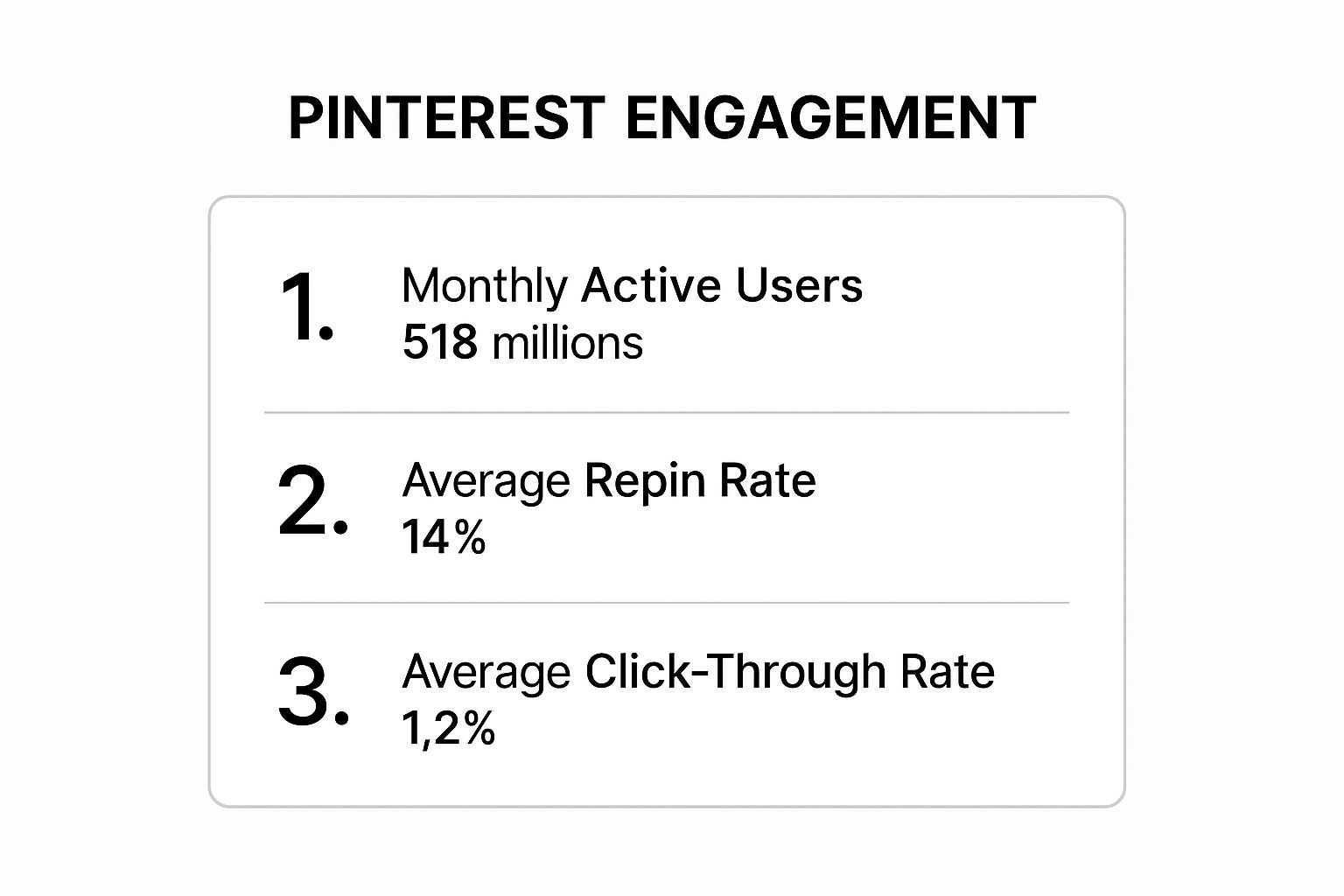
The numbers don’t lie. We’re talking about a massive, highly active user base with incredible engagement signals. This isn’t a platform to ignore; it’s one to master.
To get started, it’s best to focus on the fundamentals. The following table breaks down the three pillars that form the bedrock of any successful Pinterest strategy, giving you a clear roadmap for what to do first.
Core Pillars of Pinterest Engagement
| Pillar | Core Action | Why It Works |
|---|---|---|
| Consistent Content Creation | Develop a content plan to publish a steady stream of fresh, original Pins that solve your audience’s problems. | Signals to the algorithm that you’re an active, valuable creator, which boosts your visibility and reach. |
| Strategic Keyword Optimization | Research and use relevant keywords in your Pin descriptions, board titles, and profile bio. | Helps your content appear in search results when users are actively looking for the ideas and products you offer. |
| Active Community Interaction | Respond to comments, engage with other Pinners in your niche, and join relevant Group Boards. | Builds relationships and social proof, encouraging more people to trust and engage with your content. |
Nailing these three areas will give you a powerful foundation to build upon. They aren’t just one-off tasks but ongoing habits that will compound your results over time.
Designing Pins That Actually Stop the Scroll
Let’s be real: Pinterest is a fast-moving, visual firehose of content. If your Pin design doesn’t immediately grab someone, it’s gone. Vanished in the scroll.
You could have the best recipe or product in the world, but if it’s wrapped in a weak design, it’s invisible.
So, the first step in learning how to increase Pinterest engagement is mastering the art of creating visuals that people simply can’t ignore.
It all starts with embracing Pinterest’s vertical world.
The 2:3 aspect ratio (think 1000 x 1500 pixels) is your best friend. It’s the optimal size because it takes up maximum screen space on mobile phones, which is where most people are pinning from. A taller Pin automatically has more presence and pushes competing content out of view.
It’s a small detail that makes a huge difference.
Make Your Visuals and Text Pop
This should go without saying, but high-resolution imagery is a must. Fuzzy, pixelated photos just scream unprofessional and untrustworthy, which kills your credibility before you even get a chance.
You need crisp, bright, and clear photos. I’ve also noticed over the years that images with warmer color palettes—reds, oranges, and pinks—tend to get more traction and repins than those with cooler blues and greens.
But a beautiful photo isn’t always enough on its own. You need a bold text overlay to tell people why they should care. This is your hook.
Your text overlay needs to be legible in a fraction of a second. Use a big, bold font that’s incredibly easy to read at a glance. Steer clear of fancy script fonts; they might look pretty, but they’re a nightmare to read on a small phone screen. This text is your headline—make it count.
For example, don’t just post a photo of a cake.
Your overlay needs to promise something irresistible, like “5-Ingredient Chocolate Lava Cake.”
See the difference?
That instantly communicates value and tempts the user to click. It’s also smart to subtly add your logo or use your brand colors. Over time, people will start to recognize your style in their feed, giving your content an immediate advantage.
Tailoring Design to Pin Format
Pinterest offers a few different Pin formats, and a one-size-fits-all design strategy just doesn’t cut it. You have to adapt your approach to fit the medium.
Here’s how I think about it:
- Standard Pins: These are the bread and butter of most strategies. Your goal here is a stunning vertical image, a punchy text overlay, and a clear call-to-action that gets people to your blog or product page.
- Video Pins: You have 3-5 seconds to stop the scroll. Max. Your video must show action right away to catch the eye. And since most people browse with the sound off, use text overlays to guide them through what’s happening. Don’t rely on audio.
- Idea Pins: Treat these like a mini-story or a slideshow. Each slide should build on the last, guiding the user through a list, a tutorial, or a quick story. Keep the design consistent across all the slides so it feels like a cohesive package.
Getting a handle on these design fundamentals will completely change your results.
For a much deeper look at the nitty-gritty of what makes a Pin click-worthy, check out our complete guide on how to optimize Pinterest Pins.
When you start applying these principles consistently, you’ll be creating Pins that not only look fantastic but also drive real engagement.
It’s Time to Press Play on Video Pins

If you feel like your static Pins are getting lost in the shuffle, the answer is simple: add some motion.
Video Pins aren’t just a fun extra anymore; they’re a core part of any serious Pinterest strategy. There’s just something about a moving image that makes people stop scrolling and pay attention.
And you don’t need a Hollywood budget or a full film crew. Seriously. Some of the best-performing Video Pins I’ve seen were shot on a smartphone.
Think quick how-to demos, a peek behind the scenes of your workshop, or even a fast-cut montage of your finished products. The trick is to tell a story or show a clear benefit, and do it fast.
The stats don’t lie.
Pinterest sees nearly 1 billion video views every single day. That’s where the eyeballs are.
I saw one case study that was just mind-blowing—a brand used Video Pins and their audience impressions shot up by 6000%, while engagement jumped 1968%.
Making Videos People Actually Watch
To make your videos work, you have to think like a Pinner.
Most people are scrolling through their feed with the sound off, so your video has to grab them visually, without needing any audio. This is where text overlays become your secret weapon.
Use big, bold, easy-to-read text to walk people through what’s happening. If you’re showing a recipe, pop up text like “Add Flour” or “Mix Until Smooth” for each step.
This makes your content super easy to digest and follow, which is a huge factor in getting that coveted save.
Pro Tip: Don’t sleep on your cover image! The video’s thumbnail is just as crucial as the video content itself. Pick a stunning, high-quality still frame that sums up the video’s promise and slap an irresistible headline on it. This is your first and only shot to earn the tap before the video even starts playing.
Keep it snappy. While Pinterest lets you upload longer videos, the real engagement magic happens in that 15 to 60-second window. Your mission is to deliver value and get out before they get bored and scroll on.
The Nitty-Gritty: Tech Specs and Best Practices
Getting the technical stuff right is the difference between a Pin that looks polished and one that looks amateur. Following Pinterest’s own guidelines isn’t just a suggestion—it’s essential for getting the best performance.
Here’s the cheat sheet for perfect Video Pins:
- Aspect Ratio: Go vertical. A 2:3 or 9:16 ratio is non-negotiable. This format fills up the screen on mobile phones, making your Pin impossible to ignore.
- File Type: Keep it simple. Stick with .MP4, .MOV, or .M4V files for smooth uploading and playback.
- File Size: Don’t go overboard. Keep your file size under 2GB.
- Length: You have a wide range, from 4 seconds to 15 minutes. But trust me on this: shorter is almost always better. Aim for under a minute.
When you nail the combination of a strong visual hook, clear text overlays, and the right tech specs, you create Video Pins that do more than just get seen—they drive action.
It’s this thoughtful approach that will turn casual browsers into loyal followers.
Pinning and Scheduling for Peak Visibility
Creating fantastic Pins is just the first part of the puzzle. The other, arguably more critical part, is getting them in front of the right people at the right time.
Pinning whenever you feel like it is a bit like throwing a party but forgetting to send out invitations—you can’t expect anyone to show up.
To get traction, you need to post when your audience is actually scrolling.
Forget those generic “best time to post” articles. Your first stop should be your own Pinterest Analytics. It’s a goldmine of information, showing you the exact days and times your followers are most active.
This data is your secret weapon for building an effective schedule.
Build a Consistent Content Rhythm
If there’s one thing the Pinterest algorithm loves, it’s consistency.
It rewards creators who show up regularly with fresh, valuable content. Dropping 5-10 Pins one day and then going silent for a week confuses the algorithm and your audience. You’re better off establishing a steady, manageable pace.
This doesn’t mean you need to be a content machine, churning out new blog posts every single day.
A smart tactic is to create multiple Pin graphics for a single link. Try different images, tweak the headlines, or use a different call to action. This approach keeps your profile active and interesting without leading to creative burnout.
One of the biggest mistakes I see people make is only pinning their own content. A much healthier strategy is to aim for an 80/20 split: 80% your content and 20% relevant, high-quality Pins from others. This shows you’re a valuable resource and an engaged member of the community, not just someone shouting into the void.
Manual Pinning vs. Automation
So, should you pin everything by hand or let a tool handle it?
It’s a classic debate, and honestly, there’s no single right answer. Both methods have their place.
- Manual Pinning: This means you’re on Pinterest every day, pinning in real-time. It’s fantastic for spotting emerging trends and getting a real feel for what’s resonating right now. The major downside? It’s incredibly time-consuming and can be tough to stick with long-term.
- Scheduling Tools: Using an official Pinterest partner like Tailwind is a game-changer for efficiency. You can sit down for an hour and schedule weeks’ worth of Pins, which the tool then publishes at the best possible times. If you want to see how this works, our guide on how to schedule Pins on Pinterest breaks down the entire process.
So, which path should you choose?
I’ve found that the most successful Pinterest marketers often use a hybrid model.
They’ll schedule their core content to maintain a consistent presence but also spend 10-15 minutes each day manually pinning timely or trending content. This gives you the consistency of automation with the spontaneity of real-time engagement.
It’s truly the best of both worlds.
Using Analytics to Guide Your Next Move

Publishing gorgeous Pins without ever checking your analytics is like driving with your eyes closed. Sure, you’re moving, but you have no earthly idea if you’re actually heading in the right direction.
Your Pinterest Analytics is the roadmap, but only if you know which signs to follow.
It’s easy to get sidetracked by vanity metrics.
I see it all the time—creators fixating on their monthly views. While a big number feels great, it doesn’t tell you what’s truly working. You need to look deeper.
The numbers that really matter are saves, outbound clicks, and engagement rate. These are the metrics that signal genuine interest from your audience, showing you what content resonated enough for them to take action.
Think of it this way: Views are like window shoppers. Saves and clicks are people actually walking into your store. A save means your Pin was so valuable they tucked it away for later. An outbound click means you were so compelling you pulled them off Pinterest and over to your website. That’s the goal.
Your Monthly Analytics Check-In
To really boost your engagement, you need a routine. I always recommend setting aside just one hour each month to do a simple analytics audit.
This isn’t about getting lost in a sea of spreadsheets; it’s about pulling out a few key insights you can act on immediately.
When you sit down for your review, ask yourself these three critical questions:
- Which Pins got the most saves? Start looking for patterns here. Are they detailed “how-to” guides? Are they list-style infographics? Maybe product close-ups are your big winner. The answer tells you exactly what to create next.
- Which Pins drove the most outbound clicks? This is your money metric—your direct line to website traffic. Pinpoint the topics and call-to-action styles that are actually getting people to leave the platform for your content.
- Which of my boards are the most popular? Your top boards are a goldmine of information, revealing your audience’s core interests. Always add your best new Pins to these boards first to give them the biggest possible launchpad.
Turning Insights Into Action
Once you have this information, your next move becomes crystal clear. It’s no longer a guessing game.
For example, what if you discover your short “how-to” Video Pins are getting three times as many saves as your static images? Boom.
Your content plan for the next month just wrote itself: make more short video tutorials. If you notice a specific color palette or font style keeps showing up in your top-performing Pins, lean into that visual identity. It’s obviously working.
This data-driven approach takes the guesswork out of your strategy.
You stop creating content you think will perform and start creating content you know your audience already loves. This is how you shift from random shots in the dark to a predictable system for growth.
For a more detailed look at the setup, our guide on Pinterest tracking can help you build a more advanced measurement plan.
By consistently listening to what your analytics are telling you, you create an incredibly powerful feedback loop. You post, you measure, you learn, and you refine.
That iterative cycle is the most reliable way to build momentum and see a real, sustainable jump in your Pinterest engagement.
Fostering a Community to Drive Interaction

It’s easy to fall into the trap of treating Pinterest like a digital billboard—a place where you just push out content and hope for the best. I see brands do it all the time.
But at its heart, Pinterest is a social network. If you really want to learn how to increase Pinterest engagement, you need to stop broadcasting and start building a community.
That shift in mindset begins with something incredibly simple: responding to comments on your Pins. When someone takes a moment to leave a comment, they’re handing you a golden opportunity.
A quick, thoughtful reply doesn’t just make that person feel seen; it sends a strong signal to the Pinterest algorithm that your content is creating meaningful conversations, which can give your Pin a nice visibility boost.
Start Conversations with Calls to Action
Your Pin descriptions are valuable real estate. Don’t just stuff them with keywords and call it a day. Use that space to actually start a conversation. A small change in how you write your descriptions can make a world of difference.
For example, instead of a flat “Our favorite fall soup recipe,” try asking a question: “What’s your go-to comfort food for fall? Let us know in the comments below!”
See the difference? You’re actively inviting people into the discussion.
Here are a few simple but effective CTAs I’ve seen work wonders:
- “Save this Pin for your next project!”
- “Which of these tips will you try first? Tell us below!”
- “Tag a friend who would love this idea.”
A well-crafted CTA does more than just ask for a comment or a save; it transforms a passive viewer into an active participant. This small change is fundamental to fostering a sense of community around your content.
Expand Your Reach with Group Boards
Looking for another powerful tactic? Start collaborating on Group Boards.
Think of them as shared spaces where multiple creators can add Pins, effectively pooling their audiences together.
Joining active, relevant Group Boards in your niche is a fantastic way to get your content in front of a fresh, highly targeted audience that might never have found you otherwise.
When you participate in these shared boards (and I mean really participate, by engaging with other people’s Pins too) you start building a reputation as a helpful member of the community. It’s a move away from pure self-promotion and toward genuine connection.
And that, ultimately, is what drives sustainable engagement on Pinterest.
Turn Your Engagement Plan Into a Weekly System
You don’t need more tactics—you need a simple routine you can repeat.
Start by choosing one core pillar to focus on each week: original content, scroll-stopping design, Video Pins, smarter scheduling, or community interaction.
Set a clear output goal (for example: 15 fresh Pins + 3 Video Pins this week), then batch-create and schedule them for the times your analytics say your audience is most active.
Next, block one hour every week for a quick engagement review.
Look at saves, outbound clicks, and your top-performing boards, then make one concrete adjustment based on what you find: more of a certain Pin style, more videos, stronger CTAs in descriptions, or deeper replies to comments.
When you treat engagement as a test–refine–repeat loop instead of a one-off push, Pinterest stops being a guessing game and starts becoming a predictable growth channel.
Ready to Turn Engagement Tips Into Everyday Habits?
Getting more saves, clicks, and follows doesn’t happen by accident—it happens when every Pin you publish is intentional.
PostPaddle’s FREE Pin Optimization Checklist helps you quickly review each Pin before it goes live, so you stay consistent with your best practices and don’t skip simple details that can hurt engagement.
Keep it beside you as a quick final step in your workflow to make stronger Pins, more often.
Your Pinterest Engagement Questions, Answered
If you’re feeling a little lost trying to boost your Pinterest engagement, you’re not alone.
The platform operates on its own unique rhythm, and figuring it out takes time. Let’s tackle some of the most common questions I hear from creators.
“How long will it take to see real results?”
This is the big one, isn’t it? While there’s no magic wand, I’ve found that most accounts see a noticeable uptick in traffic and engagement within 3 to 6 months of consistent effort.
You have to be patient. Think of Pinterest as a long-term investment—unlike a tweet or an Instagram story, a Pin’s lifespan is incredibly long, meaning the work you do today can pay off for months, or even years.
“How many Pins should I be posting every day?”
This naturally leads to the question of volume. While it’s tempting to flood the platform, quality is always more important than quantity.
A solid goal for most creators is to share between 5 to 10 Pins per day. That might sound like a lot, but remember, you don’t need to create a new piece of content for every single Pin.
A much smarter approach is to create several unique Pin designs that all point back to the same blog post or product page. This keeps your boards fresh and active without burning you out.
“Should I delete Pins that aren’t performing well?”
I get asked this all the time, and my answer is almost always a firm “no.” Deleting Pins can create broken links and mess with your account’s data.
A Pin with a handful of impressions isn’t actively hurting your account. It’s simply sitting there, waiting for its moment. I’ve seen Pins suddenly take off months after being posted. It’s far better to focus your energy on creating your next great Pin than to worry about tidying up old ones.