An editorial calendar template is more than just a place to jot down blog post ideas. It’s the reusable framework that powers your entire content strategy.
Think of it less like a simple schedule and more like the strategic blueprint for everything you create and publish.
It’s the command center for your entire marketing operation.
What a Modern Editorial Calendar Actually Is?

Let’s get one thing straight: a modern editorial calendar isn’t just a glorified spreadsheet with dates. It’s a living, breathing system that becomes the single source of truth for your entire content workflow.
We’re not just talking about scheduling blog posts here.
We’re talking about aligning your entire team, tracking a piece of content from a spark of an idea to its final published form, and making absolutely sure every article, video, or social post has a clear, strategic purpose.
With a well-built calendar, you get a bird’s-eye view of your whole operation. At a quick glance, you can see what’s in the pipeline, who’s on deck to write it, and when it’s set to go live.
This kind of clarity is what separates a smooth, consistent publishing engine from the frantic, last-minute scrambles we all want to avoid.
More Than Just a Schedule
A truly powerful editorial calendar template is a strategic weapon. It’s how you purposefully map content to specific marketing campaigns, different stages of the customer journey, and your biggest business goals.
You stop creating content just for the sake of it and start intentionally building topic clusters, planning ahead for seasonal spikes, and ensuring you have a healthy mix of formats to keep your audience engaged.
Before you start building your own, it’s crucial to understand what goes into a calendar that truly works. These are the non-negotiable fields that turn a simple list into a strategic powerhouse.
Essential Components of a High-Impact Editorial Calendar
| Component | Purpose & Key Data | Example |
|---|---|---|
| Core Content Details | The basics: tracks the what, when, and who. Includes the working title, assigned author, and key deadlines. | Title: “10 Ways to Repurpose Blog Content for Pinterest” Author: Jane Doe Due Date: 10/15/2024 |
| Strategic Pillars | Connects content to your overarching strategy. Includes the target keyword, the content pillar it supports, and its primary CTA. | Keyword: “repurpose content” Pillar: Content Marketing Strategy CTA: Download our Content Repurposing Checklist |
| Workflow Status | Provides at-a-glance visibility into the production pipeline. | A dropdown menu with options like: ‘Idea,’ ‘Outlined,’ ‘Drafting,’ ‘In Review,’ ‘Ready to Publish,’ ‘Published.’ |
| Distribution & Promotion | Ensures content gets seen. Notes where and when it will be promoted after publishing. | Channels: Pinterest, LinkedIn, Newsletter Promo Date: 10/25/2024 |
Having these elements in place is the difference between a calendar that just tracks dates and one that actively helps you manage your entire content lifecycle from start to finish.
A Command Center for Collaboration
One of the biggest wins you’ll see is how much it improves team alignment. When your content writers, social media managers, and even your PR folks are all working from the same central hub, everything just clicks.
Collaboration feels effortless. Tools like Asana have really championed this integrated approach, letting teams manage every little detail in one spot.
This isn’t just a “nice-to-have.” This kind of organized system is a game-changer. Companies with tightly aligned marketing teams have been shown to achieve up to 20% faster revenue growth.
By giving everyone total visibility, a well-managed calendar ensures deadlines are hit and the pipeline stays full with a good mix of evergreen and timely content, which is a surefire way to boost audience engagement.
The true power of an editorial calendar lies in its ability to connect strategy to execution. It’s the bridge between your high-level marketing goals and the day-to-day tasks required to achieve them.
At the end of the day, a modern calendar is all about creating order out of chaos. It provides the structure you need to be consistently creative and the data you need to be ruthlessly strategic.
By taking the time to build a robust editorial calendar template, you’re not just getting organized—you’re investing in a more efficient, collaborative, and impactful content marketing engine.
It’s how you go from just publishing content to publishing content with purpose.
Picking the Right Tool for Your Editorial Calendar

The quest for the perfect editorial calendar template can feel a bit like a wild goose chase. Here’s a secret I’ve learned from years in the trenches: there is no single “best” tool.
The right choice is deeply personal and depends entirely on your team’s size, your specific workflow, and what you’re trying to achieve.
A tool that’s a game-changer for a solo blogger could completely bog down a large publishing team. So, instead of asking “What’s the best tool?”, let’s ask, “What tool will make my life easier?”
You want something that provides structure without getting in the way of your creativity.
Comparing Editorial Calendar Tools by Team Type
To help you find your match, I’ve broken down the most common options. This table compares different tool categories based on who they’re best suited for, giving you a quick snapshot of the pros and cons of each.
| Tool Category | Best For | Pros | Cons |
|---|---|---|---|
| Simple Calendar Apps | Solo creators, freelancers, and small business owners | Free, easy to use, and familiar interface. Great for basic deadline tracking. | Lacks advanced collaboration features; can become cluttered quickly. |
| Spreadsheets | Small teams, agencies, and structured solopreneurs | Highly customizable, excellent for detailed tracking, and allows real-time collaboration. | Can become cumbersome with large volumes of data; lacks automated workflows. |
| Project Management Platforms | Growing teams, agencies, and businesses with complex workflows | Visual workflow management, robust task assignment, and integration capabilities. | Can have a steeper learning curve; might be overkill for simple needs. |
| Database Tools | Large publishers, enterprise teams, and data-driven marketers | Infinitely flexible, powerful for linking different data sets, and highly scalable. | Requires significant setup time and expertise; can be expensive. |
Think of this as a starting point. Your perfect solution might even be a combination of tools, but understanding these core categories will guide you toward a system that actually works for you, not against you.
Simple Tools for Focused Creators
If you’re a solopreneur or a freelance blogger, simplicity is your best friend. You don’t need a hundred features; you need a clear, straightforward way to plan and stick to your deadlines.
This is where basic calendar apps shine.
- Google Calendar: This is often the first stop for a reason. It’s free, you probably already use it, and it’s accessible everywhere. I’ve seen countless creators succeed by simply creating a dedicated “Content” calendar and using colors to track status—like blue for an idea, yellow for a draft, and green for published.
The real advantage here is the near-zero learning curve. You’re adapting a familiar tool, not wrestling with a complex new system.
This keeps your energy focused on what really moves the needle: creating great content.
Spreadsheets for Small Team Collaboration
The moment you bring on another person—an editor, a VA, a social media manager—a simple calendar starts to feel cramped.
This is the perfect time to graduate to a spreadsheet, like Google Sheets or Microsoft Excel. A spreadsheet-based editorial calendar lets you track so much more detail collaboratively.
These tools hit a sweet spot between ease of use and power. They’re accessible to everyone, incredibly flexible, and allow multiple people to jump in and make updates in real-time.
It’s a fantastic setup for small marketing teams or agencies managing a few clients.
Key Insight: Moving from a personal calendar to a shared spreadsheet isn’t just a tool change. It’s a strategic shift from individual scheduling to true team-based workflow management, giving everyone visibility into the entire content pipeline.
Advanced Platforms for Scaled Operations
When you’re juggling different content formats, multi-step approval processes, and a high-volume publishing schedule, even the most organized spreadsheet will start to creak under the pressure.
This is your cue to look at more robust, database-driven platforms.
- **Airtable:** Think of this as a spreadsheet that went to the gym and got a PhD. It’s a relational database that lets you build incredibly customized views, link articles to writers and social campaigns, and automate parts of your workflow. It’s a powerhouse for teams managing multiple content streams
- **Asana or Trello:** These project management tools are masters of visualizing workflow. Using their Kanban-style boards, you can physically drag a content “card” from ‘To Do’ to ‘Writing’ to ‘Editing’ and finally to ‘Published.’ This gives everyone on the team an at-a-glance update on every single project.
Making the jump to these platforms is a bigger commitment. They are best for teams who desperately need a single source of truth to prevent things from falling through the cracks.
As your system grows, you’ll also want to look at how it connects to your distribution channels.
Exploring the best social media scheduling tools will help you build a more integrated and efficient machine.
How to Build Your Custom Calendar Template

Let’s be honest: a generic, one-size-fits-all editorial calendar template just doesn’t cut it. Trying to shoehorn your unique process into a pre-made spreadsheet often creates more headaches than it solves.
The real power comes from building a system that’s a perfect reflection of how your team actually creates, approves, and publishes content.
It all starts with defining your core content pillars. Think of these as the 2-4 big-picture topics your brand wants to own. For a fitness coach, this might be “Strength Training,” “Nutrition,” and “Mindful Recovery.”
For a SaaS company, maybe it’s “User Onboarding,” “Productivity Hacks,” and “Team Collaboration.”
These pillars are the guardrails for your entire content strategy. They keep you focused and help you consistently build authority in the areas that matter most to your audience.
Without them, it’s easy to fall into the trap of creating a random, scattered collection of ideas that don’t add up to anything.
Establish a Clear Production Workflow
Once your pillars are locked in, it’s time to map out your production workflow. This is the A-to-Z journey every single content idea takes, from a fleeting thought to a published piece.
A clearly defined workflow is what transforms your calendar from a static to-do list into a dynamic, living project management tool.
Think through every single handoff. What does the process actually look like for your team? A typical workflow might include stages like these:
- Idea/Backlog: A parking lot for all those brilliant new topics.
- Assigned/Outlining: A writer has grabbed the topic and is building the skeleton.
- Drafting: The first version is actively being written.
- In Review: The draft is with an editor or stakeholder for feedback.
- Ready for Graphics: The words are approved and it’s time to make it look good.
- Scheduled: The finished piece is loaded into your CMS and ready to go live.
- Published: It’s out in the world!
Each of these stages should become a status you can track right in your calendar. This simple change gives anyone on the team an instant, at-a-glance snapshot of where every piece of content stands.
No more “Hey, what’s the status of that blog post?” emails.
Here’s a pro-tip: Build your workflow with your team, not for them. Sit down with your writers, editors, and designers. Ask them what they need for a smooth handoff.
When everyone helps build the system, they’re far more likely to actually use it.
With a solid backlog of ideas, you can begin filling out your new template. A great way to get started is to use a structured brainstorming session template to generate and organize those initial ideas before they hit the production pipeline.
This visual shows how your pillars, schedule, and team roles all click together to create a cohesive content machine.
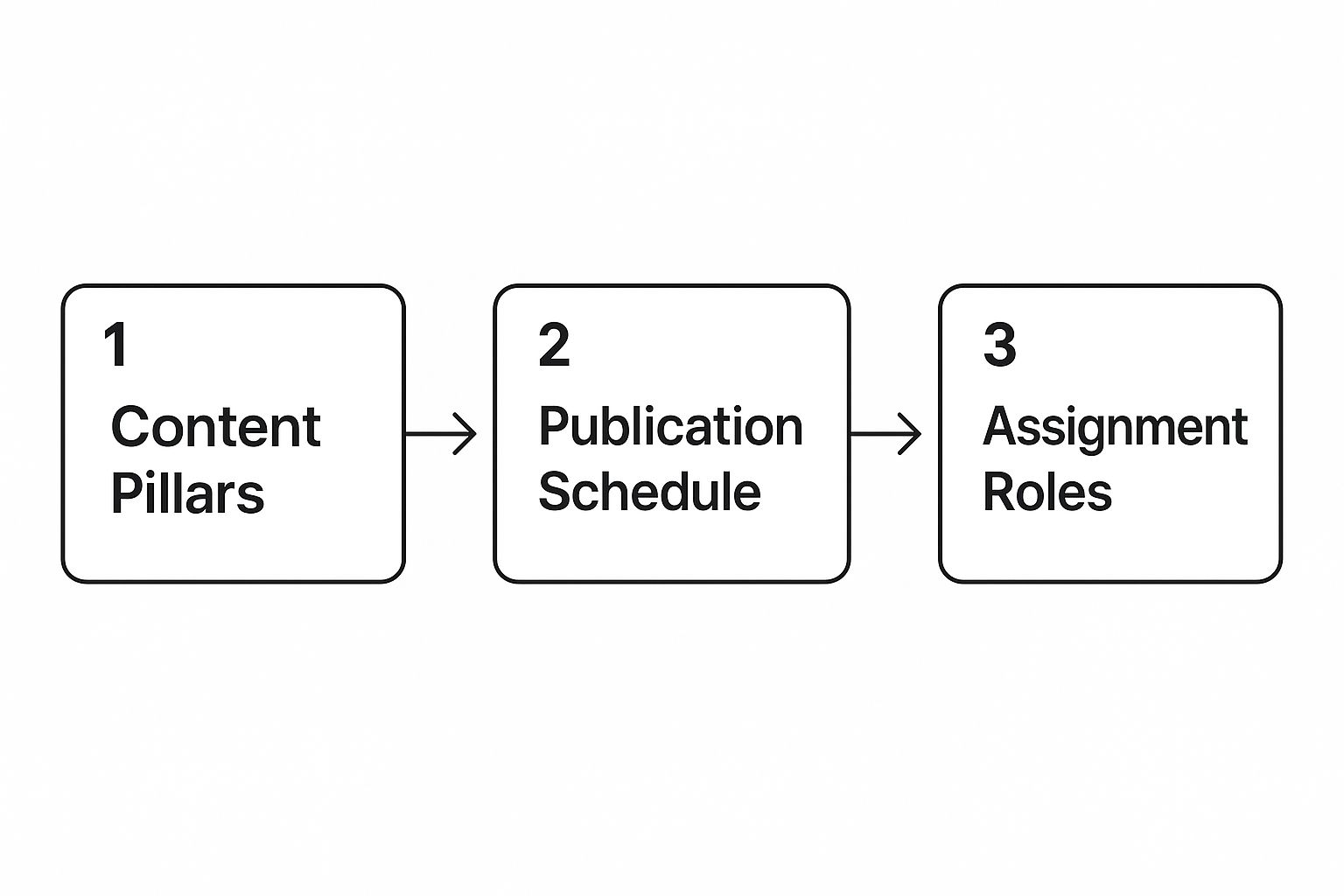
As you can see, strategic planning (your pillars) directly feeds your publishing timeline, which in turn clarifies who is responsible for what.
Add Custom Fields That Matter
This is where you get to make your editorial calendar truly yours. Sure, you need the basics like “Title” and “Due Date,” but the real value comes from adding custom fields that track what’s most important to your specific strategy.
Think about adding columns or properties for things like:
- Target Keyword: The main SEO phrase you’re aiming for.
- Content Format: Is this a blog post, a video, a case study, or an infographic?
- Content Pillar: Which of your big-picture topics does this support?
- Call to Action (CTA): What do you want the reader to do next? (e.g., “Download Ebook,” “Start Free Trial”).
- Distribution Channels: Where will you promote this? (e.g., Pinterest, LinkedIn, Newsletter).
- Campaign: Is this tied to a larger marketing initiative or product launch?
That distribution field is especially important. It forces you to think about promotion from day one, not as an afterthought.
This one small addition can help you squeeze so much more value out of every single piece you create. For more on this, we’ve got a great guide on how to https://www.postpaddle.com/blog/reuse-blog-content.
By building your template with these three elements—strategic pillars, a clear workflow, and tailored custom fields—you create something much more powerful than just a schedule.
You build a command center that gives you a complete, 360-degree view of your entire content engine, making planning easier and ensuring every action has a purpose.
Weaving Social Media Into Your Calendar

Let’s be honest: creating great content is only half the work. The other half—making sure people actually see it—is just as crucial.
This is where your editorial calendar transforms from a simple production schedule into a powerful distribution command center.
By weaving your social media strategy directly into your calendar, promotion stops being an afterthought and becomes a deliberate, planned part of your process.
This means you need to add dedicated columns or sections to your template for social promotion. Don’t just settle for a single checkbox that says “Shared on Social.”
Instead, create specific areas for each of your key platforms—like Pinterest, Instagram, LinkedIn, and X—so you can plan platform-specific copy, visuals, and hashtags right alongside your main content details.
Building Out Your Distribution Layer
The goal here is to get a bird’s-eye view of your entire promotional landscape. When you see it all laid out, your efforts become strategic instead of sporadic.
A truly functional editorial calendar template needs dedicated fields for the nitty-gritty details:
- Platform-Specific Copy: You know it’s true—the hook for a LinkedIn post sounds totally different from an Instagram Reel caption. Plan these variations ahead of time.
- Visual Assets: Keep track of your graphics. Do you need a vertical video for TikTok, a square image for Instagram, and a set of five unique Pin images for Pinterest? List them out.
- Relevant Hashtags: Research and store a bank of primary and secondary hashtags for every post to give your reach a serious boost.
- Optimal Send Times: Make a note of the best times to post on each platform, based on what your own analytics are telling you.
This level of detail might feel like a lot at first, but it’s the secret sauce that separates chaotic, last-minute posting from a smooth, high-impact distribution machine.
When you start digging into platform-specific tools, resources like a LinkedIn content calendar template can give you great ideas for structuring your calendar, especially for professional networks.
Timing Your Promotions Strategically
One of the biggest wins of an integrated calendar is the power to time your promotions for maximum impact.
You can map out your social media activity around key dates, making sure your content taps into conversations your audience is already having.
This goes way beyond major holidays. Smart marketers plan around industry events and even quirky “hashtag holidays.”
In the social media world, you can find templates designed specifically to optimize schedules around these peak engagement windows.
For example, some content calendars come pre-loaded with major holidays and industry-specific dates. It’s a proven strategy—posts published around events like National Pizza Day can see engagement rates jump by 15-25%.
Think about it: with social media ad spend soaring past $138 billion in 2023, cutting through the noise is harder than ever.
And considering 70% of consumers say they’d rather learn about products through content than traditional ads, timing your valuable content perfectly is a massive advantage.
Repurposing Content Like a Pro
Your editorial calendar is the absolute best place to plan a solid content repurposing strategy. A single, well-researched blog post shouldn’t just lead to one social media update.
It can be the raw material for a dozen different assets.
Key Takeaway: Think of every blog post as a “pillar” piece of content. Your job is to break it down into smaller “micro” pieces for social media, and your calendar is where you plan this deconstruction.
For example, you can take a single 2,000-word guide and turn it into:
- Five unique Pinterest Pins, with each one highlighting a different tip from the article.
- A short-form video for TikTok or Reels that summarizes the key takeaways.
- A text-based carousel post for LinkedIn that breaks down one section in more detail.
- A series of three tweets, each sharing a compelling statistic or quote from the post.
When you map all of this out in your calendar, you guarantee every piece of content works harder for you. This systematic approach also keeps a steady stream of material flowing, which is vital for engagement.
If you’re looking for more inspiration on that front, check out our detailed guide on how to improve social media engagement.
An integrated system like this ensures your promotional efforts are just as organized and strategic as your content creation.
Advanced Strategies to Maximize Your Calendar

So, you’ve built your editorial calendar template and finally have a handle on your content workflow. That’s a huge win.
But don’t stop there. The real magic happens when you evolve your calendar from a simple scheduling tool into the strategic brain of your entire marketing operation.
A static calendar is a missed opportunity. A dynamic, data-infused one? That’s your competitive advantage.
The biggest power move you can make is to turn your forward-looking plan into a historical record of what actually worked. This means going back and plugging in performance data right where you plan.
Weave Performance Metrics Directly into Your Calendar
Forget about endlessly switching between your calendar, Google Analytics, and your social media reports. It’s time to bring your most important data home to the place where your planning happens.
Once a piece of content has been out in the wild for a bit—I usually wait 30 to 90 days—go back into your calendar and add columns for key metrics.
This one simple habit creates incredible clarity. At a glance, you can see which topics, formats, and channels are your true heavy hitters.
What key metrics should you track?
- Page Views/Traffic: The classic “how many people saw this?” metric.
- Time on Page: A fantastic indicator of real engagement. Are people actually sticking around to read or watch?
- Conversion Rate: This is the big one. Did the content do its job? Track email sign-ups, downloads, or whatever your goal was.
- Top Referring Channel: Where did the best traffic come from? Organic search? Pinterest? Your email list?
By logging this right in your calendar, you stop guessing what works. You’re building an evidence-based library of your own successes (and failures).
Your calendar should tell a story not just about what you plan to do, but about what you’ve accomplished.
Integrating performance data turns it from a simple schedule into a strategic command center that informs every future decision.
Run Regular Content Audits (The Easy Way)
With all this rich performance data baked directly into your calendar, a content audit is no longer a scary, monumental project you put off for months. It becomes a simple, ongoing process.
Once a quarter, just sort your calendar by your performance metrics. Instantly, you’ll see your winners and losers. This practice gives you hard data to answer the most important strategic questions:
- Which content pillars are actually driving conversions?
- Are our videos getting more engagement than our blog posts?
- Which writers consistently produce our top-performing content?
This data-driven review helps you double down on what’s working and gives you permission to either fix or forget what isn’t. According to a study from the Chartered Institute for Marketing, 56% of marketers worry about burnout.
Having a clear, data-backed strategy that focuses your team on high-impact work is a powerful antidote to that stress.
Build SEO-Boosting Content Clusters
An advanced calendar is the perfect command center for executing a sophisticated SEO strategy around topic clusters.
The idea is to create a central “pillar” page on a broad topic, then surround it with multiple, more specific “cluster” pages that all link back to the pillar and to each other.
Your calendar makes this complex strategy totally manageable. You can use tags or categories to group all the content pieces belonging to a single cluster.
This ensures you’re methodically building out your topical authority over time—a huge signal to search engines.
For example, a “Pinterest Marketing” pillar page could be supported by cluster posts on creating a Pinterest content calendar, designing viral pins, and understanding Pinterest analytics.
Organizing it this way in your calendar makes it easy to spot gaps and plan future content to create a powerful, interlinked web of articles.
Recycle and Refresh Your Evergreen Winners
Not every piece of content needs to be built from scratch. Your calendar, now packed with historical data, is a goldmine for finding top-performing evergreen content that’s ready for a refresh.
Scan your calendar for posts that did really well in the past but have seen traffic start to dip. Those are your prime candidates for an update.
My go-to refresh workflow is simple:
- Identify: Find a high-potential post from about 12-18 months ago.
- Update: Add new information, check for updated stats, and swap out old images.
- Optimize: Re-evaluate the target keyword and strengthen the calls-to-action.
- Republish: Change the publication date to the current day to get it back to the top of your blog.
- Promote: Treat it like brand-new content and push it out across all your channels again.
Schedule these refreshes right into your editorial calendar just like any other new post. It’s one of the most efficient ways I know to drive significant traffic with a fraction of the effort.
Turn Your Calendar Into Ready-to-Pin Content
You’ve got the calendar—now make it actually do something. The fastest way to turn a scheduled topic into real momentum is to generate your promotion assets while the plan is still fresh.
That’s exactly what our free Pinterest GPTs are for. Drop in a blog title, a topic from your editorial calendar, or a link, and it instantly creates Pinterest-ready Pin ideas, titles, and descriptions you can schedule right away. No blank-page staring.
No last-minute scrambling. Just a clean workflow from “planned” to “published.”
If you want your editorial calendar to feel like a real command center (not just a list of dates), start here—then repeat the same system for every post you plan.
Common Questions About Editorial Calendars
Whenever you start using a new system, even something as straightforward as an editorial calendar template, questions are bound to pop up. It’s totally normal to wonder if you’re doing things “the right way” or worry about falling into common traps. Trust me, I’ve heard them all.
So, I’ve gathered the most frequent questions I get right here. Think of this as your friendly guide to sidestepping those initial hurdles, so you can start reaping the benefits of your new calendar from day one. Let’s dig in.
How Far in Advance Should I Plan My Content?
This is the big one, and the honest-to-goodness answer is: it depends. The right planning window is really tied to the pace of your industry and how nimble your team is.
A frantic, day-to-day schedule is a recipe for burnout, but planning a full year out with military precision can crush your ability to react to what’s happening right now.
For most businesses, a fantastic starting point is planning your big-picture content themes quarterly. This sets a clear strategic direction.
From there, you can flesh out the details for specific blog posts, videos, or social campaigns 4-6 weeks in advance. This approach strikes a great balance, giving you structure while leaving enough room to jump on timely opportunities.
Of course, some industries have to think much further ahead.
- Retail businesses, for example, often start planning for major events like Black Friday or Christmas a good 6-12 months out.
- Travel companies also need a long runway to make sure their content aligns with seasonal booking patterns.
The trick is to find a rhythm that gives you a sense of control without boxing you in. My advice? Start with quarterly themes and a detailed monthly plan, then tweak it as you get a feel for your team’s unique workflow.
What Are the Most Common Mistakes to Avoid?
It’s easy to get excited about building a new editorial calendar, but a few common missteps can trip you up before you even get going. Just knowing what they are is half the battle.
The single biggest mistake I see is creating a system that’s way too rigid. Your calendar should be a guide, not a straitjacket.
If a huge story breaks in your industry, you need the flexibility to shuffle your schedule and address it. Never be afraid to deviate from the plan when a golden opportunity lands in your lap.
Another classic error is overcomplicating the template itself. It’s so tempting to add dozens of fields to track every metric under the sun.
But a calendar with 30 columns quickly becomes a monster to manage, and your team will just stop using it. Stick to the essentials—the fields that actually help you make strategic decisions.
The most critical mistake is treating your calendar as a static file that you create and forget.
A calendar is absolutely useless if it isn’t a living document, updated daily and weekly by the entire team. It must be woven into your routine.
How Can I Get My Team to Actually Use the Calendar?
This is where the rubber meets the road. A beautifully designed editorial calendar is worthless if it just gathers digital dust in a shared drive.
Getting your team on board isn’t about issuing a command; it’s about a thoughtful, human-centered approach.
The best way to get buy-in is to involve your team in creating the calendar. When people have a hand in building the tool, they feel a sense of ownership.
Ask them what information would make their jobs easier or what their ideal workflow looks like. This helps ensure the final product actually works for the people who need to use it.
From there, you have to make the calendar a central, visible part of your team’s culture.
- Start every marketing meeting by pulling up the calendar and walking through the plan for the week.
- Clearly define roles. Who is responsible for changing a status from ‘Drafting’ to ‘In Review’? Make it explicit so there’s no confusion.
- Lead by example. If you, as the team leader, are constantly using and referencing the calendar, it signals its importance. The rest of the team will naturally follow.
At the end of the day, team adoption comes down to making the calendar genuinely helpful and integrating it seamlessly into how you already work.