Creating a pin on Pinterest isn’t just about uploading a pretty image and hoping for the best.
On a platform that behaves more like a visual search engine than a traditional social feed, every pin you publish has the potential to become a long-term traffic asset, if you build it the right way.
That means understanding how Pinterest works, what your audience is actually searching for, and how to package your content so it’s both clickable and save-worthy.
In this guide to creating a pin on Pinterest, we’ll walk through every step of the process, from tapping into Pinterest’s massive, motivated audience to choosing visuals, writing SEO-friendly titles and descriptions, and optimizing for the save-first algorithm.
Whether you’re a blogger, creator, or eCommerce brand, you’ll learn how to design pins that don’t just look good in the feed, but consistently bring people back to your website, products, and content long after you hit publish.
Why Pinterest’s Massive Audience Changes Everything
Pinterest isn’t just another social media platform. It’s a visual search engine, a virtual mood board where millions of users search for inspiration, products, and solutions.
This sets Pinterest apart from platforms like Instagram or Facebook, where content primarily updates followers. This difference is key to understanding the power of creating a pin.
Instead of a fleeting post, each pin becomes a potential long-term traffic source, discoverable long after its creation.
The Power of Discoverability
Creating a pin on Pinterest exposes your content to a massive audience actively searching for what you offer.
For example, a visually appealing pin for a chocolate cake recipe becomes searchable by anyone looking for “chocolate cake recipes,” “dessert ideas,” or “birthday cake inspiration.”
Your content can reach far beyond your existing followers, driving significant traffic to your website or blog.
Pinterest’s visual nature lets your content connect with users emotionally. Evoking positive feelings is particularly effective, boosting user engagement.
This emotional resonance connects with your target audience and drives conversions. Creating a pin contributes directly to this engagement and expands the user base.
As of 2025, Pinterest reports over 553 million monthly active users, an 11% year-over-year increase. This growth comes from strategic content creation and innovative features.
Learn more about these Pinterest statistics here: https://thesocialshepherd.com/blog/pinterest-statistics
Turning Pins Into Long-Term Assets
Unlike other social media platforms where content quickly disappears, Pinterest pins have remarkable longevity. They can be discovered and repinned for months, even years, after creation.
Each pin becomes a valuable long-term asset, continually driving traffic and building your brand.
Pinterest’s algorithm prioritizes saves. The more users save your pins, the larger your reach. This encourages creating high-quality content that users save for later.
Understanding this save-first algorithm lets you strategically craft pins that resonate with your audience and build long-term success.
Every pin is an investment in online visibility and reach, making it an effective content marketing strategy.
Understanding Your Pinterest Audience Like A Pro

Creating a pin on Pinterest that truly resonates begins with understanding your audience.
Pinterest boasts a diverse user base, and recognizing the nuances within these demographics is key to maximizing your reach and engagement.
Understanding age group preferences, for example, allows you to fine-tune your visuals and messaging for better results. This knowledge is the foundation of a successful Pinterest strategy.
Decoding Pinterest Demographics
The demographic breakdown of Pinterest users is essential for crafting effective pins. Female users between 18 and 24 years old comprise 20% of Pinterest’s global ad audience.
The 25 to 34 age group follows closely behind at 18.5%, and the 35 to 44 age group represents 11.2%. Within the U.S., ads reach approximately 46% of users aged 18-24, 40% of those aged 25-34, and 39% of those aged 35-44.
This data clearly demonstrates the importance of creating age-targeted content. For a deeper dive into Pinterest statistics, check out this resource: Pinterest Statistics
To further refine your approach, let’s examine the breakdown in more detail. The table below provides a clearer picture of Pinterest’s user demographics, highlighting the distribution across different age groups and regions.
To illustrate these demographics further, the following table offers a detailed breakdown:
Pinterest Demographics by Age Group:
Breakdown of Pinterest’s global ad audience by age and gender demographics
| Age Group | Female Users (%) | U.S. Ad Reach (%) | Global Audience (%) |
|---|---|---|---|
| 18-24 | 20 | 46 | 20 |
| 25-34 | 18.5 | 40 | 18.5 |
| 35-44 | 11.2 | 39 | 11.2 |
This table highlights the concentration of Pinterest users in younger age brackets, particularly within the 18-34 range.
This information is crucial for tailoring content to resonate with the largest segments of the Pinterest audience.
Beyond age, understanding regional variations is also vital. Different cultures and interests influence how users interact with visual content.
A pin that performs well in one region might not have the same impact in another. Tailoring your visuals and messaging to resonate with specific regional preferences can significantly improve engagement.
Visualizing Engagement Boosters
Optimizing your Pinterest profile is just as crucial as understanding your audience. The infographic below highlights how a complete profile can positively influence engagement:
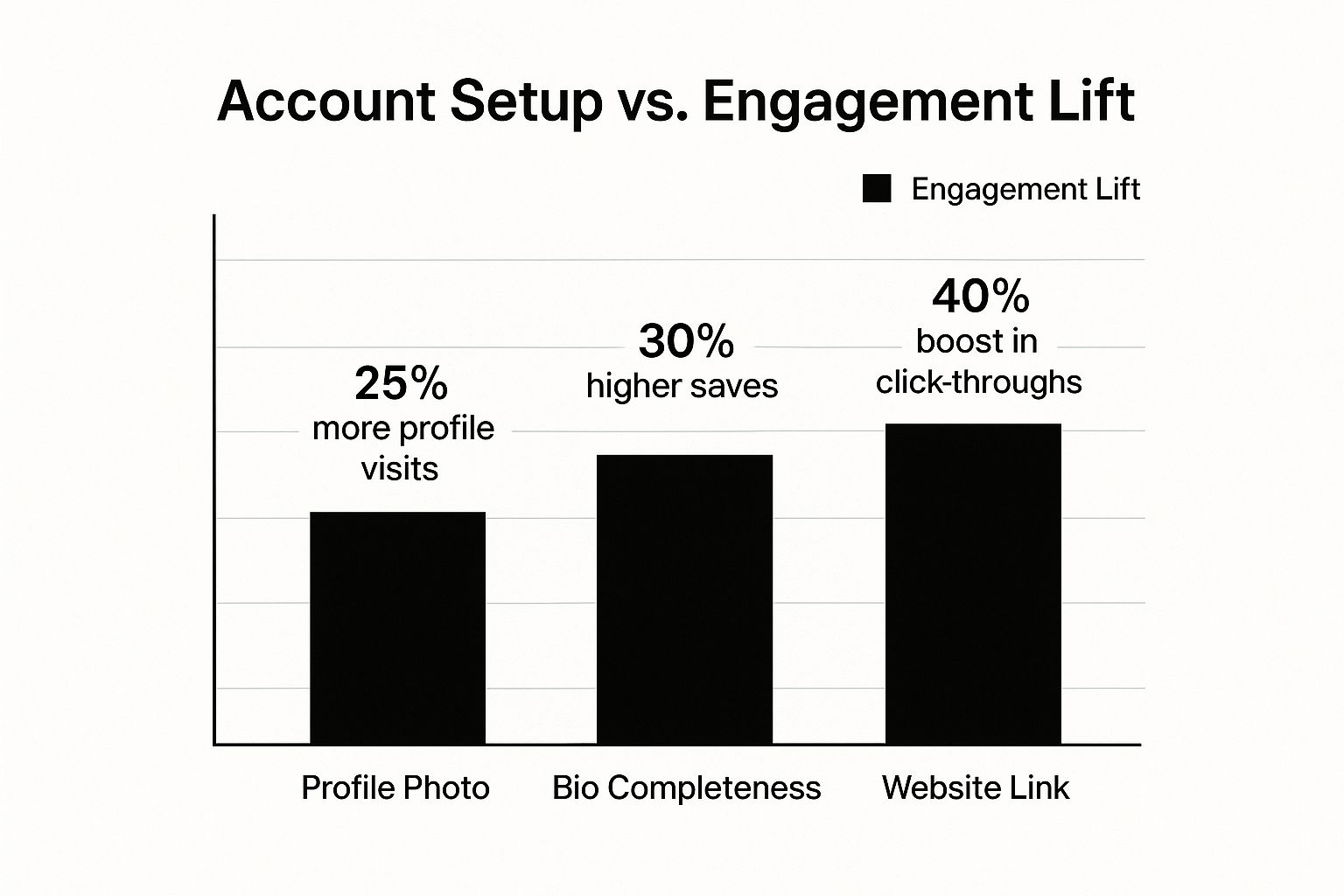
A simple profile photo can increase profile visits by 25%. A well-crafted bio can boost saves by 30%. Including a link to your website can increase click-throughs by an impressive 40%.
These simple steps underscore the importance of a complete and optimized profile for extending your reach on Pinterest.
Connecting With Your Ideal Audience
Understanding your audience’s interests helps you determine what visuals and messaging will resonate most effectively.
Different demographics interact with content in unique ways. Younger audiences might prefer vibrant, trendy visuals, while older demographics might be drawn to more classic, informative content.
Knowing the statistics is just one piece of the puzzle. Understanding the psychology behind user behavior is equally important. Why do some pins go viral while others fall flat?
By analyzing successful pins, you can identify patterns in visual appeal, messaging, and emotional connection. Positioning your content to capitalize on these patterns is the key to maximizing impact.
Your Step-By-Step Pin Creation Blueprint

Now that we have a solid understanding of our target audience, let’s explore the process of crafting compelling Pinterest pins.
This blueprint will provide a step-by-step guide, covering everything from selecting impactful visuals to optimizing for maximum reach.
By the end of this section, you’ll be equipped with the knowledge to create high-performing pins.
Choosing the Right Visuals
The cornerstone of any successful Pinterest pin is a captivating visual. High-quality images and videos are essential for capturing attention in Pinterest’s visually-rich environment.
This is the critical first step in stopping users mid-scroll and enticing them to engage with your content.
- Image Dimensions: The ideal aspect ratio is 2:3 (e.g., 600px by 900px). This ensures your pins display correctly across different devices.
- File Formats: Stick with PNG or JPEG files. PNGs are excellent for graphics and text-based visuals, while JPEGs are better suited for photographs.
- Video Format: If incorporating video, optimize it for mobile viewing and keep it concise. Short, engaging videos generally perform best.
Crafting Compelling Copy
While visuals initially attract the eye, compelling copy is what solidifies user engagement. Your pin title and description play a vital role in both SEO and user engagement.
They provide context and encourage users to click through to your website.
- Keywords: Incorporate relevant keywords in your title and description. This helps Pinterest understand your pin’s topic and display it to the right audience.
- Description: Write a concise, informative description that highlights the benefits of exploring your linked content. Include a clear call to action, such as “Learn More” or “Visit Now.”
- Hashtags: Utilize a few relevant hashtags to enhance discoverability. However, avoid excessive hashtag use, which can appear spammy.
Navigating the Pinterest Interface
Creating a pin is a straightforward process, regardless of whether you’re uploading directly or pinning from your website.
Both methods are equally effective and offer broad audience reach, providing flexibility in your pin creation workflow.
- Uploading Directly: From your Pinterest profile, click the “+” icon to create a new pin. Upload your chosen visual, add your title and description, include the destination link, and select the appropriate board.
- Pinning From Your Website: The Pinterest browser extension simplifies the pinning process. This tool enables quick pin creation from any image on your website. It also facilitates content sharing by others, significantly expanding your potential reach.
Optimizing for the Save-First Algorithm
Pinterest’s algorithm prioritizes saves. The more saves your pins receive, the greater their visibility. Therefore, designing content with “saveability” in mind is crucial.
- Create Valuable Content: Concentrate on creating pins that offer genuine value to your audience, such as helpful tips, informative infographics, or inspiring DIY project ideas.
- Evergreen Content: Develop content that remains relevant over time. Evergreen content continues generating saves long after its initial publication.
- Pin Variations: Experiment with multiple pin variations for the same blog post or product. This allows you to A/B test different visuals and copy to identify what resonates best with your audience.
By following these steps, you can create visually appealing and engaging pins that drive traffic to your website and contribute to your overall Pinterest marketing objectives.
Furthermore, tools like Post Paddle can streamline this process, automating many of these tasks and allowing you to focus on other aspects of your business.
Design Principles That Stop The Scroll
Creating captivating Pinterest pins requires a deep understanding of design. It’s more than just aesthetics; it’s about strategically using design elements to grab attention and encourage engagement.
Think of your pin as a tiny billboard in a crowded marketplace. How will yours stand out?
The Psychology of Color
Color significantly influences user behavior. Different colors evoke different emotions and associations.
Warm colors like red and orange can create urgency or excitement.
Cool colors like blue and green project calmness and trustworthiness.
Choosing colors that align with your brand and message is essential.
Typography That Enhances Readability
Typography is crucial for pin design. The right font improves readability and reinforces your brand. Select fonts easily readable across devices.
Avoid overly decorative fonts that hinder comprehension. A clean typeface makes your message accessible and impactful.
Composition and Visual Hierarchy
Composition is how elements are arranged within your pin. A clear visual hierarchy guides the viewer’s eye to essential information.
This could involve placing text strategically or using lines and shapes to create focal points. What do you want viewers to see first, second, and third?
The Power of White Space
White space, or negative space, is the area around design elements. It’s a powerful design tool. Strategic use of white space declutters your pin, making it more visually appealing.
It allows the eye to rest and highlights key elements.
Balancing Text and Visuals
Balance between text and visuals is key. Too much text overwhelms, while too little fails to communicate effectively.
Aim for concise text that complements your visuals. Think of it as a headline and image working together.
Brand Consistency in Design
Maintaining brand consistency across pins builds brand recognition. This could involve using a consistent color palette, font, or logo.
Each pin should be individually appealing while fitting your overall brand aesthetic.
The following table, “Essential Pin Design Elements”, summarizes best practices and common mistakes for key design components, illustrating their impact on user engagement.
It provides a quick reference for optimizing your pin designs for maximum effectiveness.
| Design Element | Best Practice | Impact on Engagement | Common Mistakes |
|---|---|---|---|
| Color | Use colors strategically to evoke emotions and brand association | Increased clicks and saves | Using colors that clash or are not relevant to the content |
| Typography | Choose readable fonts that align with brand identity | Improved readability and brand recognition | Using overly decorative or difficult-to-read fonts |
| Composition | Create a visual hierarchy to guide the viewer’s eye | Enhanced user experience and focused message delivery | Cluttered or confusing layouts |
| White Space | Use negative space strategically to enhance visual appeal | Improved clarity and emphasis on key elements | Overcrowding the pin with too many elements |
| Text/Visual Balance | Find a balance that effectively communicates your message | Increased understanding and user engagement | Too much text or irrelevant visuals |
By understanding these elements, you can craft compelling visuals that attract attention and drive interaction. This leads to increased traffic and Pinterest success, creating a more engaging user experience.
Writing Pin Copy That Gets Found and Clicked
Your pin’s visual appeal grabs attention, but the copy determines whether users click through.
This section explains how to create titles and descriptions that attract both Pinterest’s search algorithm and users.
We’ll explore Pinterest SEO, uncovering valuable keywords. This is essential for anyone creating a pin on Pinterest, ensuring your content reaches the right audience.
Keyword Research For Pinterest Success
Effective keyword research is the foundation of discoverable pin copy. Identifying the terms your target audience uses when searching on Pinterest is key.
Think like your ideal user. What would they type to find content like yours? Tools like the Pinterest search bar itself offer valuable insights into popular search terms.
- Brainstorming: Start by listing topics related to your pin. For example, if your pin features a gluten-free chocolate cake recipe, your topics might include “gluten-free baking,” “chocolate desserts,” and “easy recipes.”
- Pinterest Search Bar: Type these topics into the Pinterest search bar and note the auto-suggested keywords. These suggestions reflect popular searches and provide excellent keyword ideas.
- Related Searches: After performing a search, scroll down to see “Related searches.” These offer additional keyword variations to expand your reach.
Crafting Compelling Pin Titles
Your pin title is the first thing users see. Make it count! A compelling title should be concise, keyword-rich, and benefit-driven.
It should instantly communicate the value users gain by clicking. This applies to every pin you create – make it compelling.
- Keep it Concise: Aim for under 70 characters to avoid truncation in search results. Shorter titles capture attention in a fast-paced scrolling environment.
- Include Keywords: Naturally incorporate your researched keywords. Avoid keyword stuffing; ensure the title flows naturally.
- Highlight Benefits: What will users gain from clicking? Focus on the value proposition of your content.
Writing Descriptions That Convert
Your pin description expands on your title, providing more context and enticing users to click. A strong description combines keywords with compelling language that speaks to your target audience.
- Optimal Length: While Pinterest allows up to 500 characters, focus on the first 100-150 characters, as this is what users initially see.
- Keyword Integration: Include relevant keywords naturally within your description. Avoid overusing keywords; aim for a seamless and engaging read.
- Call to Action: Encourage users to take the next step with a clear call to action, such as “Learn more,” “Get the recipe,” or “Shop now.”
- Hashtags: Use a few relevant hashtags (#) to categorize your pin and enhance discoverability. Don’t overdo it – a couple is usually enough.
Examples of High-Performing Pin Copy
Let’s look at examples. Imagine creating a pin about a new blog post: “10 Tips for Growing Tomatoes.”
- Weak Title: Tomatoes
- Strong Title: 10 Tips For Growing Juicy Tomatoes
- Weak Description: Tomatoes are good.
- Strong Description: Learn 10 expert tips for growing the juiciest, most flavorful tomatoes in your garden. From seed starting to harvesting, we’ve got you covered! #gardening #tomatoes
By following these tips and focusing on keyword optimization and user engagement, your pin copy will get your pins found and convince users to click.
Remember, every pin is an opportunity to connect with your audience and drive traffic, making pin creation a valuable marketing activity.
Mastering Pinterest’s Save-First Algorithm

Creating compelling content on Pinterest now requires a deeper understanding of its algorithm. The platform prioritizes saves, making them a crucial metric for engagement.
Understanding this shift is essential for successful pin creation. This prioritization helps Pinterest understand user preferences and tailor feeds for a more relevant experience.
Why Saves Matter More Than Ever
Pinterest is shifting its focus from “Idea Pins” to content that encourages saves for future use. This strategy promotes longer session times and greater user interaction.
Pinterest itself has stated that increased saves lead to greater visibility for your content. This highlights the importance of creating save-worthy pins.
Furthermore, this focus on saves encourages users to revisit the platform, further increasing engagement and reach.
Effective pin creation now involves providing valuable, informative content directly on Pinterest, increasing the likelihood of saves and expanding your reach.
For more insights, check out How to Grow on Pinterest.
Creating Save-Worthy Content
Consider the type of content you personally save on Pinterest. It’s likely information you find valuable and wish to reference later. This could include infographics, tutorials, wish lists, or even inspiring quotes.
- Infographics: Visually appealing infographics packed with data offer easily digestible insights. Users often save these for future reference.
- Tutorials: Step-by-step guides for various projects, from DIY to recipes, offer practical value, encouraging saves.
- Product Wish Lists: Attractive product pins saved to shopping boards simplify future purchases.
- Inspirational Quotes: Visually striking quotes can resonate with users, prompting them to save them to mood boards.
Building a Save-Focused Strategy With Post Paddle
Post Paddle provides tools designed to optimize for Pinterest’s save-first algorithm.
Its AI-powered features help create engaging pins with optimized titles and descriptions, key elements for encouraging saves.
Post Paddle’s scheduling features ensure optimal pin distribution for maximum visibility and save potential.
This combined approach helps build a Pinterest presence that organically drives saves and expands reach.
Advanced Strategies For Pinterest Domination
You’ve learned the basics of creating a Pinterest Pin. Now, it’s time to refine your approach and transition from beginner to expert.
This section delves into the advanced techniques that distinguish casual Pinners from those who truly dominate the platform. These strategies are essential for sustained success and increased visibility.
Seasonal Pin Calendars: Riding the Trends
Effective Pinterest marketers understand the importance of timing.
A Pin calendar synchronized with seasonal trends ensures your content reaches the right audience at the optimal moment. For instance, begin pinning holiday gift guides in October, not December.
This proactive approach allows your Pins to gain momentum before the peak season, maximizing visibility during periods of high traffic.
A/B Testing: Unveiling What Works
Creating Pin variations enables strategic A/B testing. Experiment with different images, titles, and descriptions to identify the most effective combination.
This data-driven method reveals what truly resonates with your audience and drives engagement. Try one Pin with a vibrant image and another with a minimalist design.
Track the performance of each to optimize your strategy based on concrete data.
Cohesive Visuals: Building Brand Recognition
A consistent visual aesthetic makes your Pins instantly recognizable. Use a signature color palette, font, or graphic style to cultivate a cohesive brand experience across all your Pins.
This helps you stand out in the busy Pinterest feed. This visual consistency reinforces your brand identity and strengthens your platform presence.
Advanced Pin Optimization: Expanding Your Reach
Optimizing Pins for multiple boards expands their visibility.
A Pin about “healthy snacks” might primarily target a “healthy eating” board, but consider related boards like “lunchbox ideas” or “after-school snacks.”
This enables you to connect with diverse user segments using the same high-quality content.
You may find this helpful: How to master your Pinterest automation.
Repurposing Content: Breathing New Life Into Old Posts
Repurposing existing blog posts or website content into new Pin formats keeps your content active and engaging.
A blog post titled “10 Home Decor Tips” can be transformed into multiple Pins, each showcasing a single tip with a distinct visual.
This strategy allows you to consistently engage your audience with valuable information presented in fresh and compelling ways.
Evergreen Content: The Gift That Keeps on Giving
Evergreen content, remaining relevant year-round, forms the foundation of long-term Pinterest success. A Pin about “classic wardrobe essentials” retains its value regardless of seasonal trends.
Creating evergreen Pins provides a consistent source of traffic and engagement, contributing to steady growth.
Leveraging Pinterest Analytics: Data-Driven Decisions
Pinterest Analytics provides valuable insights into Pin performance. Monitor metrics like impressions, saves, and clicks to understand which Pins resonate most effectively.
This data informs future Pin creation and allows you to continuously optimize your strategy for maximum impact.
Community Engagement: Amplifying Your Reach
Participating in Pinterest group boards and community activities enhances your visibility.
Group boards expose your Pins to a broader audience, while engaging with other users fosters valuable connections within your niche.
This increased visibility can result in more followers and increased traffic to your content.
These advanced strategies empower you to create Pinterest Pins that not only gain visibility but also drive meaningful results.
By implementing these techniques, you can transform your Pinterest presence from passive to powerful.
Article created using Outrank
Creating Pins That Look Good Is Easy. Creating Pins That Perform Is a Strategy.
You now know how to create a pin on Pinterest that can work for you long after you hit publish, but the real difference between an average pin and a traffic-driving asset is in the details you double-check before it goes live.
Our FREE Pinterest Pin Optimization Checklist walks you through every essential step: from image size, layout, and text overlay to keywords, descriptions, boards, and links.
Use it as your final pre-publish pass so every pin is optimized for saves, search, and clicks, not just aesthetics.
Whether you’re batching pins for a new blog post, launching a product, or scaling your Pinterest marketing, this checklist helps you stay consistent, strategic, and confident that every pin is set up to perform.
Frequently Ask Question
1. How do I create a pin on Pinterest step by step?
To create a pin on Pinterest, go to your profile, click the “Create” or “+” button, and choose “Create Pin.” Upload your image or video, then add a keyword-rich title, an engaging description, and the URL you want people to visit. Finally, choose a relevant, optimized board to save it to.
The key is not just uploading a visual, but making sure each field—image, text, link, and board—is intentionally aligned with your target keyword and audience.
2. What makes a good Pinterest pin that actually gets clicks?
A strong Pinterest pin combines a vertical, high-quality image (2:3 ratio), a clear and bold text overlay, and copy that promises a specific benefit. Pair this with a keyword-optimized title and description, plus a direct, relevant landing page.
Pins that perform best are easy to understand at a glance, solve a clear problem, and lead to content that genuinely delivers on the promise in the image.
3. How important are keywords when creating a pin on Pinterest?
Keywords are critical. Pinterest works like a visual search engine, so the words you use in your title, description, and board name help the algorithm understand who should see your pin.
Using natural, long-tail phrases based on what your audience actually searches for (like “small apartment bedroom ideas” instead of just “bedroom”) dramatically improves your chances of showing up in search and related feeds.
4. How many pins should I create for each blog post or product?
Instead of just making one pin per URL, aim to create multiple variations—typically 3 to 10 pins for a high-value blog post or product. Each pin can use a different image, headline, or text overlay while still pointing to the same page.
This gives Pinterest more “entry points” to your content, lets you test what style and messaging perform best, and increases your chance of reaching different segments of your audience over time.
5. How do I know if my pins are working after I publish them?
Use Pinterest Analytics to track key metrics like impressions, saves, Pin clicks, and outbound clicks. Impressions show how often your pins appear, saves indicate that people want to revisit your content, and outbound clicks show how many users actually visited your site.
Look for patterns: which topics, designs, or keywords get the most saves and clicks? Use those insights to guide your next batch of pins, improving performance over time instead of guessing.